
 By Claire Whitaker
Updated November 2026
If you want to install video doorbell pro hardware at your front door, the first decision is whether your home already has doorbell wiring. That single fact shapes which model fits, how much drilling you will do and whether you need a mounting accessory. This guide compares four well-regarded video doorbell pro options, with each pick judged on wiring requirements, video quality, installation effort and owner feedback patterns. The selection method is research-based: we reviewed manufacturer specifications, brand reputation and common owner comments about setup, not hands-on testing.
Our top picks at a glance
- 1
 TOP CHOICEBest overallRing Wired Doorbell 4K ProView on Amazon
- 2
 Best for homes without a battery needRing Battery Doorbell 4K ProView on Amazon
- 3
 Best for older hardwired setupsRing Wired Doorbell ProView on Amazon
- 4
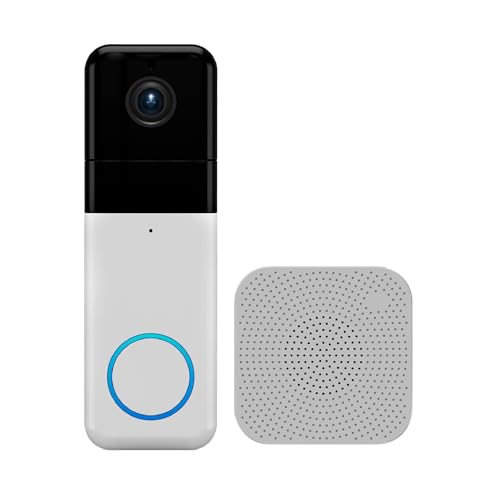 Best budget pickWyze Wireless Video Doorbell Pro with ChimeView on Amazon
Our Top Picks
Quick Comparison
| Product | Best for | Key feature |
|---|---|---|
| Ring Wired Doorbell 4K Pro | Homes with existing doorbell wiring | Retinal 4K video with wide-angle view |
| Ring Battery Doorbell 4K Pro | Homes without doorbell wiring | Quick Release Ultra Battery Pack |
| Ring Wired Doorbell Pro | Established hardwired installations | Hardwired power with motion detection |
| Wyze Wireless Video Doorbell Pro with Chime | Renters and budget-minded buyers | 1440p video with included wireless chime |
Ring Wired Doorbell 4K Pro
Ring Wired Doorbell 4K Pro (Newest Model), Retinal 4K with wide-angle video, 10x Enhanced Zoom, and Night Vision, Deep Silver
Best for: Homes with a working doorbell circuit that want the highest video resolution in this list.
This model suits homeowners who already have a doorbell transformer and want continuous power rather than recharging. The listing describes 4K video, a wide-angle field of view, up to 10x enhanced zoom and night vision.
Key specs
- Retinal 4K video with wide-angle view (per listing)
- Up to 10x Enhanced Zoom (per listing)
- Night vision (per listing)
- Hardwired installation
Pros
- Continuous power removes recharging chores
- High-resolution video helps identify faces and packages
- Wide field of view covers the full porch area
Cons
- Requires existing doorbell wiring and a compatible transformer
- Full features depend on a Ring subscription, which owners frequently mention
Bottom line: Best for hardwired homes that want top video quality and do not want to manage batteries.
View on AmazonRing Battery Doorbell 4K Pro
Ring Battery Doorbell 4K Pro (newest model), Retinal 4K with wide-angle video, up to 10x Enhanced Zoom, Night Vision, and Quick Release Ultra Battery Pack, Deep Silver
Best for: Homes without doorbell wiring that still want 4K-class video.
This version is designed for doors without a chime or transformer. It uses a removable battery pack, so you can swap it without taking the whole unit off the wall.
Key specs
- Retinal 4K video with wide-angle view (per listing)
- Up to 10x Enhanced Zoom (per listing)
- Night vision (per listing)
- Quick Release Ultra Battery Pack (per listing)
Pros
- No wiring required, so installation fits rentals and older doors
- Quick-release battery makes recharging simple
- Same 4K-class video as the wired version
Cons
- Battery needs periodic charging, especially with frequent motion alerts
- Cold weather can shorten battery life, a common owner observation
Bottom line: The right choice for renters or homes with no doorbell wiring who accept occasional recharging.
View on AmazonRing Wired Doorbell Pro
Ring Wired Doorbell Pro – Best-in-class hardwired doorbell camera with cutting-edge features (existing doorbell wiring required) (2021 release)
Best for: Owners of established hardwired Ring setups who want a proven, older-generation hardwired model.
This is an earlier hardwired release that many people still use. It is a reasonable option if you need a hardwired device and prefer a model with a long track record.
Key specs
- Hardwired installation (existing doorbell wiring required, per listing)
- 2021 release (per listing)
Pros
- Well-documented installation process
- Continuous power with no battery upkeep
- Broad compatibility with Ring accessories
Cons
- Lower video resolution than the newer 4K models
- Newer generations offer more advanced features
Bottom line: A sensible pick for hardwired homes that want a dependable device and do not need 4K.
View on AmazonWyze Wireless Video Doorbell Pro with Chime
Wyze Wireless Video Doorbell Pro with Chime | 1440 Hd Video Quality; 1:1 Head To Toe View; Wireless Chime Included; Two-Way Audio
Best for: Budget-minded buyers and renters who want a wireless doorbell with a chime included.
This model is marketed as a wireless video doorbell with a wireless chime, so it does not require running new low-voltage wiring. Two-way audio and a 1:1 head-to-toe view are highlighted in the listing.
Key specs
- 1440 HD video quality (per listing)
- 1:1 head-to-toe view (per listing)
- Wireless chime included (per listing)
- Two-way audio (per listing)
Pros
- Wireless chime included, so no wiring is needed inside the house
- Head-to-toe framing is useful for checking packages on the ground
- Two-way audio supports quick conversations with visitors
Cons
- Video resolution is below the 4K models
- Battery or wireless performance can vary with Wi-Fi strength at the door
Bottom line: A practical choice for renters and anyone wanting a wireless setup without a subscription-heavy plan.
View on AmazonBuying Guide
Check your existing doorbell wiring
Turn off the breaker, remove the old doorbell button and read the voltage printed on the transformer, usually between 16 and 24 volts AC. Most hardwired video doorbells expect this low-voltage supply. If there are no wires or the transformer is missing, choose a battery or wireless model instead. Consult a licensed electrician if you are unsure about working with wiring.
Good picks for this: Ring Battery Doorbell 4K Pro, Wyze Wireless Video Doorbell Pro with Chime
Video resolution and field of view
Higher resolution helps identify faces and license plates, while a head-to-toe or wide-angle view covers packages placed near the door. Compare the stated resolution and field of view on the listing, and note that zoom features are digital, not optical.
Good picks for this: Ring Wired Doorbell 4K Pro, Wyze Wireless Video Doorbell Pro with Chime
Power source and battery life
Hardwired units run continuously, while battery units need recharging. Battery life depends on cold weather, motion sensitivity and how many video clips you record. Plan a recharge schedule or a spare battery if you choose a battery model.
Good picks for this: Ring Battery Doorbell 4K Pro, Ring Wired Doorbell 4K Pro
Mounting surface and fit
Measure the door frame or wall and confirm the mounting plate fits flush. Brick, stucco and siding each need different anchors. A wedge or angle mount may be needed if the door is recessed or the camera points too far down.
Good picks for this: Ring Wired Doorbell Pro, Ring Battery Doorbell 4K Pro
Wi-Fi coverage at the door
Stand at the door with your phone and run a speed test. Most manufacturers recommend a solid connection, and owners often report dropped video when signal is weak. A mesh node or extender near the entry can help.
Good picks for this: Wyze Wireless Video Doorbell Pro with Chime, Ring Wired Doorbell 4K Pro
Chime and in-home alerts
Decide whether you want a mechanical chime, a wireless chime or only phone alerts. Some models include a chime, while others pair with a separate indoor unit. Check compatibility before buying.
Good picks for this: Wyze Wireless Video Doorbell Pro with Chime, Ring Wired Doorbell Pro
Subscription and storage
Many video doorbells offer cloud video history through a subscription, and some features require one. Review what is free, how long clips are kept and whether local storage is supported before committing.
Good picks for this: Ring Wired Doorbell 4K Pro, Ring Battery Doorbell 4K Pro
FAQ
Can I install a video doorbell pro without existing wiring?
Yes. Battery and wireless models do not need a doorbell transformer or chime wiring. They mount with included brackets and screws, then connect to your Wi-Fi network through the app.
What tools do I need to install video doorbell pro hardware?
Most installations need a drill with masonry and wood bits, a screwdriver, a level, a pencil, anchors and a voltage tester for hardwired models. Check the box contents and your manufacturer’s instructions for exact requirements.
How high should a video doorbell be mounted?
Manufacturers commonly suggest mounting around 48 to 60 inches from the ground, so the camera captures faces and not just the top of a head. Confirm the recommended height in your model’s manual.
Do I need Wi-Fi to use a video doorbell pro?
Yes, for live view, alerts and recorded video. Some features work only with a stable connection, so test signal strength at the door before mounting.
How do I know if my doorbell wiring can support a hardwired model?
Check that the transformer provides low-voltage AC, typically 16 to 24 volts, and that the wiring is intact. If you are unsure, have a licensed electrician verify the setup before installation.
Is a subscription required for video doorbell pro models?
Many models offer core live view without a subscription, but cloud recording and advanced alerts often require a paid plan. Review the feature list for the specific model before buying.
Can I install a video doorbell on a rental?
Often yes, especially with battery or wireless models that avoid rewiring. Check your lease first, and keep the original hardware if you need to restore the door later.
Conclusion
For homes with working doorbell wiring that want the best video, the Ring Wired Doorbell 4K Pro is the strongest match on paper. Renters or homes without wiring should consider the Ring Battery Doorbell 4K Pro or the Wyze Wireless Video Doorbell Pro with Chime. The Ring Wired Doorbell Pro suits owners of established hardwired setups. Match your choice to your wiring, Wi-Fi coverage and tolerance for recharging, and follow the manufacturer’s steps to install video doorbell pro hardware safely.
For step-by-step setup, see How to Install a Video Doorbell: Wired and Battery Models and Ring Video Doorbell Installation: A Step-by-Step Guide for Beginners. To compare power options, read Wired vs Battery Video Doorbells (and Cameras).
Sources
- Consumer product safety guidance on electrical installations and home hazards (cpsc.gov)
- Information on home electrical systems and low-voltage wiring basics (energy.gov)
Related reading
About Claire Whitaker
Claire Whitaker is part of our editorial team and reviews and edits our smart home guides, checking product details against manufacturer specifications and owner feedback.









