
 By Claire Whitaker
Updated November 2026
Installing a home security camera is easier than most people expect, but the right choice depends on where you want to mount it, how you plan to power it, and whether you want local storage or cloud recording. This guide compares six well-regarded options so you can match the camera to your install location. We weighed setup difficulty, power source, storage options, weather rating, and ecosystem compatibility, with an eye on owner feedback patterns and what manufacturers specify. Nothing here is based on our own testing, so treat specs as manufacturer-stated and confirm details on each listing before you buy.
Our Top Picks
Quick Comparison
| Product | Best for | Key feature |
|---|---|---|
| SEHMUA 2K Solar Security Cameras Wireless Outdoor | Outdoor spots without wiring | Solar-assisted battery with pan/tilt view |
| Blink Mini 2K+ | Indoor plug-in monitoring | 2K video with motion detection |
| 2026 Upgraded 2K Security Cameras Wireless Outdoor | Low-maintenance battery installs | Long battery life with AI motion detection |
| aosu D1 Classic 4-Cam Kit | Multi-camera kits with local storage | 32GB built-in storage and auto tracking |
| GMK 4 Pack Cameras System | Whole-property coverage | Four cameras with IP65 weatherproofing |
| 2 Pack 4MP Security Cameras Wireless Outdoor | Alexa households | Works with Alexa plus siren alarm |
SEHMUA 2K Solar Security Cameras Wireless Outdoor, 2 Pack

SEHMUA 2K Solar Security Cameras Wireless Outdoor, 2 Pack 360° View Pan/Tilt WiFi Security Camera Outside with Color Night Vision,Easy to Install, PIR Alarm, 2-Way Audio
Best for: Outdoor spots without wiring We also found Setting Up a Smart Home: Network and Security First useful on this point.
This two-pack suits homeowners who want exterior coverage at a door, garage side, or back fence without running power cable. It fits renters and anyone who would rather not drill for a hardwired system.
Key specs
- Sold as a 2-camera pack with 360° pan/tilt view
- Wireless outdoor design with solar charging
- Built-in PIR motion detection and two-way audio
Pros
- Mounting requires only a bracket and a few screws
- Solar charging reduces how often you recharge batteries
- Pan/tilt lets you cover two angles from one spot
Cons
- Solar charging depends on sun exposure, so shaded mounts may need manual charging
- Pan/tilt range is limited compared with wired PTZ systems
Bottom line: A strong pick for homeowners who want two outdoor cameras with minimal wiring and can mount them in direct sun.
View on AmazonBlink Mini 2K+ Indoor Security Camera
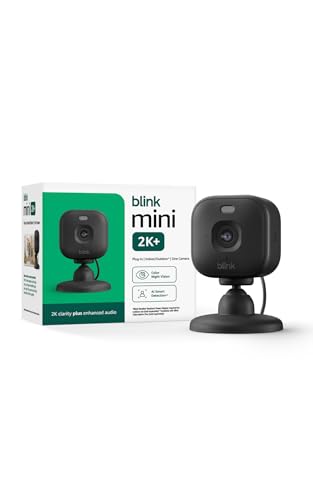
Blink Mini 2K+ (newest model) – Plug-in Home & Pet Indoor Security Camera with 2K video resolution, night vision, enhanced audio, motion detection – 1 camera (Black)
Best for: Indoor plug-in monitoring
This plug-in camera suits people who want to watch a living room, entryway, or pet area. Setup is largely a matter of choosing an outlet, placing the camera, and completing the app pairing.
Key specs
- 2K video resolution with night vision
- Plug-in power, single camera per listing
- Motion detection with enhanced audio
Pros
- No battery changes because it stays plugged in
- Simple placement on a shelf or wall outlet
- Good fit for indoor pet checks
Cons
- Not designed for outdoor weather exposure
- Needs an outlet within reach of the mount point
Bottom line: Best for indoor installs where a nearby outlet is available and you want an easy, no-battery setup.
View on Amazon2026 Upgraded 2K Security Cameras Wireless Outdoor

2026 Upgraded 2K Security Cameras Wireless Outdoor, Free Cloud Storage, 1-6 Months Battery Life, Waterproof, 2-Way Talk, AI Motion Detection Spotlight Siren Alarm Cameras for Home Security
Best for: Low-maintenance battery installs
This camera targets people who want long stretches between battery swaps and do not want to run cable. It works well on a front porch or side yard where access for maintenance is occasional.
Key specs
- 2K wireless outdoor camera
- Battery-powered with a listed battery life range of one to six months
- AI motion detection with spotlight and siren
Pros
- Battery design allows placement without an outlet
- Spotlight and siren add a visible deterrent
- Two-way talk supports quick verbal responses
Cons
- Battery life varies widely with motion frequency and cold weather
- Cloud storage features may involve plan choices
Bottom line: A good match for homeowners who want a battery camera with a deterrent light and siren and accept periodic recharging.
View on Amazonaosu D1 Classic 4-Cam Kit
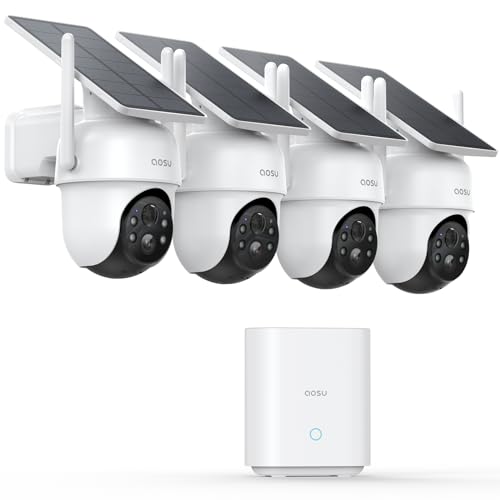
aosu D1 Classic 4-Cam Kit, Security Cameras Wireless Outdoor, Solar Powered | No Subscription Required, 32GB Built-in Storage, 360° Auto Tracking, 2K (3MP) Full-Color Night Vision, Easy Install
Best for: Multi-camera kits with local storage
This four-camera kit suits families covering several sides of a house who prefer local recording over a monthly subscription.
Key specs
- Four-camera kit with 2K color night vision
- Solar-powered design with built-in storage
- 360° auto tracking
Pros
- Multi-camera kit covers several entry points at once
- Local storage reduces reliance on subscriptions
- Auto tracking follows movement within the frame
Cons
- Solar charging needs adequate sun exposure
- Four cameras mean more mounts and more placement planning
Bottom line: Suited to whole-house coverage for homeowners who want local storage and do not mind planning four mount points.
View on AmazonGMK 4 Pack Cameras System

GMK 4 Pack Cameras System, Security Cameras Wireless Outdoor, 2K Video | VicoHome Cam, Motion Detect, Color Night Vision, 2-Way Talk, IP65 Waterproof, Indoor&Outdoor, 2.4GHz WiFi, SD/Cloud Storage
Best for: Whole-property coverage
This four-pack suits larger properties where you want consistent coverage of driveways, backyards, and entries under one app.
Key specs
- Four-camera system with 2K video
- IP65 waterproof rating for indoor and outdoor use
- Motion detection, two-way talk, and color night vision
Pros
- Four units cover multiple zones in one system
- IP65 rating suits typical outdoor exposure
- Supports both SD and cloud storage options
Cons
- Setup of four cameras takes longer than a single unit
- Wi-Fi range may need a mesh extender at distant mounts
Bottom line: A practical choice for larger lots where whole-property coverage matters more than a simple single-camera install.
View on Amazon2 Pack 4MP Security Cameras Wireless Outdoor

2 Pack 4MP Security Cameras Wireless Outdoor, Color Night Vision Camera | Cameras for Home Security with PIR Motion Detection, SD/Cloud Storage, 2-Way Audio, Siren Alarm, FHD, IP65, Works with Alexa
Best for: Alexa households
This two-pack suits homes already running Alexa devices and owners who want a siren alarm and PIR motion detection in an outdoor unit.
Key specs
- Two-camera pack with 4MP listed resolution
- IP65 weatherproof rating
- PIR motion detection, two-way audio, siren alarm
Pros
- Listed compatibility with Alexa simplifies voice checks
- Siren alarm provides an audible deterrent
- Supports SD and cloud storage
Cons
- Alexa features depend on your existing skill and device setup
- Wireless designs still require charging or power planning
Bottom line: Good for Alexa users who want two weatherproof outdoor cameras with a siren and voice integration.
View on AmazonAt a glance
- Best overall: SEHMUA 2K Solar Security Cameras – View on Amazon
- Best for indoor plug-in: Blink Mini 2K+ – View on Amazon
- Best for low maintenance: 2026 Upgraded 2K Security Cameras – View on Amazon
- Best for local storage: aosu D1 Classic 4-Cam Kit – View on Amazon
- Best for whole property: GMK 4 Pack Cameras System – View on Amazon
- Best for Alexa homes: 2 Pack 4MP Security Cameras – View on Amazon
Buying Guide
Power source: wired, battery, solar or plug-in
Your power source decides where you can mount a camera. Plug-in units need an outlet within reach of the mount point and a short cord. Battery units give you the most placement freedom but need periodic recharging. Solar-assisted units reduce recharging only if the panel gets several hours of direct sun daily. Check the mount location before you buy.
Good picks for this: Blink Mini 2K+, SEHMUA 2K Solar Security Cameras
Weather rating and outdoor durability
Look for an IP rating in the listing. IP65 is commonly described as dust-tight and resistant to water jets, which suits typical outdoor exposure. Indoor-only cameras should not be mounted where rain or direct hose spray reaches them. Cold-weather performance also affects battery life, so check the operating temperature range in the manufacturer specs.
Good picks for this: GMK 4 Pack Cameras System, 2 Pack 4MP Security Cameras
Mounting height, angle and field of view
Most installers mount outdoor cameras about 8 to 10 feet high to keep them out of easy reach while still capturing faces. Aim the lens slightly downward, and avoid pointing it straight at a bright light source. Field of view varies by model, so measure the area you want covered before choosing a mount point.
Good picks for this: aosu D1 Classic 4-Cam Kit, 2026 Upgraded 2K Security Cameras
Storage: local, SD card or cloud
Local storage on an SD card or built-in memory keeps footage without a monthly plan, while cloud storage offers off-site copies that survive a theft. Compare the storage method against how long you want to keep clips. Some systems offer both, which gives you a backup path.
Good picks for this: aosu D1 Classic 4-Cam Kit, GMK 4 Pack Cameras System
Resolution and night vision
Higher resolution helps you identify faces and license plates at distance, though it uses more storage. Night vision matters for entries and driveways. Listings may state 2K or 4MP; these are manufacturer-stated figures, so compare clip samples in reviews before assuming sharpness. For more on this, see Security Camera High Resolution: How to Choose the Right Sharpness for Your Home.
Good picks for this: 2 Pack 4MP Security Cameras, Blink Mini 2K+
Smart home compatibility
If you run Alexa or Google Home, confirm the camera supports your assistant before you buy. Compatibility often depends on the specific skill or integration. For a deeper look, read Smart Camera Smart Security Camera Compatible with Google Home: A Practical Guide (2026) and DIY Home Security: Choosing Cameras, Doorbells and Locks That Work Together.
Good picks for this: 2 Pack 4MP Security Cameras, Blink Mini 2K+
Wi-Fi coverage and placement
Wireless cameras need a stable signal at the mount point. Walls, metal siding and distance all reduce signal strength. Test signal at the planned location with your phone before drilling holes. If signal is weak, a mesh node or extender can help, and wired options may suit distant spots better. Related reading: 7 Best Security Camera Wireless Options for Home Monitoring (2026).
Good picks for this: GMK 4 Pack Cameras System, 2026 Upgraded 2K Security Cameras
FAQ
How long does it take to install a home security camera?
A single plug-in indoor camera can often be set up in under 30 minutes, including app pairing. Outdoor battery or wireless kits usually take longer because you need to test Wi-Fi signal, drill mounts, and adjust the angle. Multi-camera kits take more time, and budgeting an afternoon is realistic.
Do I need to drill holes to install security camera at home?
Not always. Some plug-in and magnetic-mount designs avoid drilling, but outdoor cameras usually need screws for a secure mount. Use anchors suited to your wall material, such as brick or stucco, and check the mount base before drilling.
Where is the best place to install security camera in home?
Common spots include the front door, back door, garage entry and any ground-floor window. Mount outdoor cameras high enough to avoid tampering, and aim them to capture faces at entry points. Indoors, a corner of the room often gives the widest view.
Can I install a security camera at home without Wi-Fi?
Some systems offer local recording to an SD card or built-in memory, but live viewing typically requires a network connection. Confirm the local storage and offline options in the manufacturer specs before buying.
How do I keep solar security cameras charged in winter?
Position the solar panel where it gets direct sun for several hours, clean dust off the panel regularly, and expect lower output in winter. Some owners add a manual charging routine during dark months. Check the manufacturer’s cold-weather guidance.
Is professional installation necessary?
Most DIY-friendly cameras do not require a professional. If you plan to run low-voltage wire through walls, tie into existing electrical circuits, or mount high on a roofline, consider hiring a licensed electrician or security installer. Consult a professional for any electrical work.
What should I check before buying a camera for my home?
Confirm the power source, weather rating, storage method, Wi-Fi coverage at the mount point, and smart home compatibility. Measure the area you want to cover and check the field of view in the specs.
Conclusion
When you install home security camera systems, start with the mount location and work backward. Plug-in indoor units suit simple setups near an outlet. Battery and solar cameras give outdoor placement flexibility. Multi-camera kits and whole-property systems fit larger homes, while Alexa-compatible options suit voice-controlled households. Match the pick to your power access, Wi-Fi coverage and storage preference, and confirm specs on each listing before purchasing.
Sources
- Consumer product safety guidance, including safe installation and electrical cautions for home devices (cpsc.gov)
- Background on solar power and battery basics that affect outdoor camera charging (energy.gov)
- Information on safety certification standards relevant to electrical home devices (ul.com)
Related reading
About Claire Whitaker
Claire Whitaker is part of our editorial team and reviews and edits our smart home guides, checking product details against manufacturer specifications and owner feedback.









