By Claire Whitaker
Updated November 2026
The best smart plug Alexa can control is one that pairs quickly, responds reliably to voice commands, and fits the way you use your outlets. In this guide you will learn which features matter most, how to match a plug to your Echo or Alexa app setup, how to avoid the setup problems owners most often report, and which models are worth considering. Use this as a checklist before you buy, and as a reference once your plugs are installed.
What Makes a Smart Plug Work Well with Alexa
Alexa supports smart plugs through Wi-Fi, Zigbee, and Matter connections, but the level of support depends on the plug and the Echo hub you use. Wi-Fi plugs are the simplest choice for most homes because they connect directly to your router and do not require a separate hub. Zigbee plugs need an Echo device with a built-in Zigbee hub, such as certain newer Echo models, or a separate bridge. Matter plugs are newer and can work across Alexa, Google Home, and Apple Home, though support varies by device and firmware.
Before comparing models, confirm three things:
- Protocol: Wi-Fi, Zigbee, or Matter, and whether your Echo or hub supports it.
- Alexa skill or native support: Most major brands list Alexa compatibility on their product pages. Look for “Works with Alexa” on the box or listing.
- 2.4 GHz Wi-Fi: Many smart plugs only connect to 2.4 GHz networks. If your router broadcasts a combined 2.4/5 GHz name, the plug may fail to pair.
Step-by-Step: Choosing the Right Smart Plug for Your Home
Step 1: Count your outlets and check the load
Write down what you plan to plug in. A standard smart plug is typically rated for about 15 amps (roughly 1,800 watts on a 120-volt circuit). Space heaters, window air conditioners, and some power tools can exceed that. Check the label on each device and the rating printed on the plug. For high-draw appliances, consider a plug rated for heavier loads or avoid smart switching altogether. For a deeper look, Best Smart Plugs for Home Automation: Seven Smart Plugs Compared covers this in detail.
Step 2: Decide between indoor and outdoor models
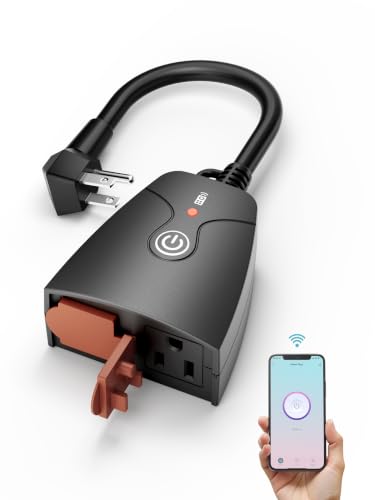
Indoor plugs are designed for dry locations. Outdoor models typically carry a weather-resistant rating, often IP44 or higher, and include a cover for the outlet. If you want to control holiday lights or a garden fountain, a weatherproof plug is the safer choice. Check the manufacturer’s specification for the rated temperature range and moisture protection.
Step 3: Confirm the Echo device you already own
Your existing Echo may affect which plugs will work well. A Wi-Fi plug will work with nearly any Echo. A Zigbee plug generally needs an Echo with a built-in hub or a separate bridge. Check the Alexa app under Devices to see what your hardware supports.
Step 4: Look for extra features only if you need them
Scheduling, energy monitoring, and separate control of two outlets on one plug are useful but not essential. If you want to know how much power a fridge or space heater draws, look for a model that includes energy monitoring. For a deeper comparison, see Best Energy Monitoring Smart Plugs.
Step-by-Step: Pairing a Smart Plug with Alexa
Most plugs follow a similar process. The exact menu names change between apps, so check the instructions included with your device.
- Plug the smart plug into a wall outlet near your router and wait for the indicator light to blink.
- Open the Alexa app and tap the plus icon, then choose Add Device.
- Select the device category (usually Plug or Smart Plug) and then the brand.
- Follow the prompts to connect the plug to your Wi-Fi. Use your 2.4 GHz network.
- Once connected, name the plug something specific, such as “Living Room Lamp,” so voice commands are clear.
- Assign the plug to a room in the app so you can say “Alexa, turn off the living room lamp” or “Alexa, turn off the living room.”
For a full walkthrough with screenshots and troubleshooting, see How to Set Up Smart Plug with Alexa: A Step-by-Step Guide (2026). If you own a Kasa model specifically, How to Connect Kasa Smart Plug to Alexa: Step-by-Step Setup (2026) covers that brand.
Comparing Smart Plug Options for Alexa
The table below summarizes the characteristics that matter most when shopping. It does not rank the models; instead it helps you match features to your needs.
| Plug Type | Connection | Hub Needed? | Best For |
|---|---|---|---|
| Standard Wi-Fi plug | 2.4 GHz Wi-Fi | No | Lamps, fans, coffee makers, most indoor use |
| Wi-Fi plug with energy monitoring | 2.4 GHz Wi-Fi | No | Tracking power use of appliances |
| Outdoor Wi-Fi plug | 2.4 GHz Wi-Fi | No | Porch lights, garden decor, holiday displays |
| Zigbee plug | Zigbee | Yes (compatible Echo or bridge) | Mesh networks, reduced Wi-Fi congestion |
| Matter plug | Matter over Wi-Fi or Thread | Depends on platform | Mixed ecosystems (Alexa plus Google or Apple) |
Smart Plug Picks for Alexa Users
Several brands have a long track record with Alexa and are often mentioned by owners. Compare current specs before buying, since firmware and models change.
- TP-Link Kasa Smart Plug: Widely supported by Alexa, with simple app setup and schedules. Owners often note reliable voice response for basic on/off control.
- Amazon Smart Plug: Designed for Alexa, with straightforward pairing through the Alexa app and no extra hub.
- Wemo Smart Plug: A long-established Wi-Fi option that works with Alexa, often recommended for basic scheduling.
- Govee Smart Plug: Offers Wi-Fi control and energy monitoring on some models, a budget-friendly choice for many rooms.
- Kasa outdoor and energy-monitoring models: Useful if you need weather resistance or power tracking in the same brand ecosystem.
For more options by use case, see Top 6 Smart Plugs for Alexa: Compared for Easy Voice Control and 5 Best Smart Plugs with WiFi for Alexa and Google Home (2026). If outdoor use is your priority, Best Outdoor Smart Plugs for Lights and Decor goes deeper.
Recommended gear
A few accessories make installation and daily use smoother.
- Kasa Smart Plug Mini: A compact Wi-Fi plug that fits tight outlet clusters without blocking adjacent sockets. View on Amazon
- Amazon Smart Plug: Designed for Alexa setup with minimal configuration, a good match if you want a single-brand ecosystem. View on Amazon
- Outdoor weatherproof outlet cover: A protective cover reduces moisture exposure for plugs used outside. View on Amazon
Common Mistakes to Avoid
- Connecting to the wrong Wi-Fi band. Most plugs need 2.4 GHz. Split the band or create a separate guest network if pairing fails.
- Plugging a space heater into a smart plug. Heaters draw high current and can overheat smart plugs. Check the rating first.
- Using vague device names. “Plug 1” and “Plug 2” confuse voice commands. Use room-and-device names.
- Forgetting to assign rooms. Room assignments make group commands like “turn off the bedroom” possible.
- Skipping firmware updates. Keep the plug app updated so Alexa integration stays current.
- Ignoring the Echo’s hub capability. Buying a Zigbee plug for an Echo without a hub leads to a device that will not pair.
Tips for Reliable Voice Control
- Place the plug where the Wi-Fi signal is strong. Weak signal causes delayed or failed commands.
- Use short, consistent names so Alexa recognizes them every time.
- Test each plug once after setup by saying its name and the command.
- Set schedules in the Alexa app or plug app, but avoid overlapping routines that conflict.
- For safety-sensitive equipment, such as medical devices or security systems, do not rely on a smart plug as the only control. Consult the equipment manufacturer or a qualified electrician.
FAQ
Do all smart plugs work with Alexa?
No. Many Wi-Fi plugs work with Alexa, but some require a specific hub or protocol. Check for “Works with Alexa” on the packaging or the manufacturer’s compatibility list before buying.
Do I need an Echo hub to use a smart plug with Alexa?
Wi-Fi plugs do not need a separate hub. Zigbee plugs need an Echo with a built-in Zigbee hub or a separate bridge.
Why won’t my smart plug connect to Alexa?
The most common cause is a 5 GHz-only network or a weak Wi-Fi signal. Confirm your plug is on 2.4 GHz, move the plug closer to the router, and try again. Resetting the plug and repeating setup often helps.
Can I use a smart plug with a space heater?
Generally, no. Space heaters draw a lot of current and can exceed a plug’s rating. Check the plug’s specifications and the heater’s wattage before connecting, and consult the manufacturer if you are unsure.
Can I control a smart plug when I am away from home?
Yes, if the plug uses Wi-Fi and is connected to your Alexa account. You can control it from the Alexa or plug manufacturer’s app on your phone while away.
Do smart plugs work during a power outage?
No. A smart plug has no battery backup, so it will not respond until power returns. After an outage, it may reconnect automatically, but check that schedules and states are correct.
Can Alexa control a smart plug that is also used with Google Home?
Some Matter-compatible plugs can be shared across platforms. Other plugs require separate setup for each assistant. Check whether your plug supports Matter if you use both ecosystems.
Conclusion
The best smart plug for Alexa depends on your Echo hardware, your Wi-Fi setup, and the appliances you plan to control. Start by confirming protocol and 2.4 GHz compatibility, check load ratings, and choose features like energy monitoring only if you need them. Once installed, name each plug clearly and test voice commands to make daily use simple.
Ready to choose one?
About Claire Whitaker
Claire Whitaker is part of our editorial team and reviews and edits our smart home guides, checking product details against manufacturer specifications and owner feedback.