By Claire Whitaker
Updated November 2026
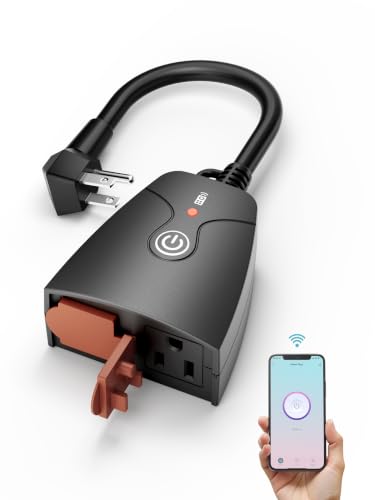
An alexa outdoor smart plug lets you switch porch lights, holiday displays, fountain pumps or garden lighting with your voice, a schedule or a routine. This guide walks you through choosing a weatherproof model, placing it for reliable Wi-Fi, pairing it with the Alexa app, and setting it up so it keeps working through rain, heat and cold. Expect a few practical checks along the way that save you from the most common outdoor setup headaches.
What to Look for in an Outdoor Smart Plug
Not every smart plug is built for weather. An indoor model can work for a few days under a covered porch, but moisture, temperature swings and direct sun will eventually damage it. When you compare options, start with the physical specifications rather than the feature list.
Shopping for one? See our guide: 4 Best Lutron Outdoor Smart Plugs for Patio Lights and Decor (2026).
Weather Rating and Enclosure
Look for an IP rating on the box or in the product manual. The first digit covers dust and solid objects, and the second covers water. An IP44 or IP65 rating is a common target for outdoor use, with IP65 offering stronger protection against water jets. Manufacturers specify the rating for a reason, so treat it as a minimum requirement rather than a suggestion. Also check whether the plug has a weather cover or gasket around the plug-in face.
Operating Temperature Range
Check the stated operating temperature range. Many outdoor-rated plugs are designed for roughly -20°F to 120°F or similar, but ranges vary by model. If you live somewhere with very hot summers or sub-zero winters, confirm the range covers your local extremes rather than average conditions.
Outlet Type and Load Rating
Check the maximum wattage or amperage the plug can handle. A typical US smart plug is rated for 15 amps at 120 volts, or about 1,800 watts. Add up the wattage of everything you plan to connect, and leave headroom. Do not use a plug rated for lighting loads to control a space heater or a large pump unless the manufacturer explicitly lists that load.
Alexa Compatibility
Confirm the plug works with Alexa before you buy. Most Wi-Fi smart plugs use the Alexa app and a cloud connection, while some use a hub or a different protocol. The product listing or manufacturer site should state Alexa compatibility clearly. If you are still choosing a model, the article Top 6 Smart Plugs for Alexa: Compared for Easy Voice Control compares several options side by side.
Step-by-Step: Setting Up an Alexa Outdoor Smart Plug
Step 1: Gather What You Need
- The outdoor smart plug and its manual
- A 2.4 GHz Wi-Fi network (many smart plugs cannot join 5 GHz-only networks)
- Your Wi-Fi password
- The Alexa app on a smartphone, with an Amazon account signed in
- The manufacturer’s companion app, if the plug requires one
- A weatherproof outdoor outlet or GFCI-protected receptacle
Step 2: Confirm the Outlet Is Safe
Outdoor outlets should be protected by a ground-fault circuit interrupter (GFCI). Press the test button and reset it to confirm it trips and restores. If the outlet has no GFCI protection and no GFCI breaker upstream, have a licensed electrician install one. If you are unsure about wiring, consult a professional before plugging anything in.
Step 3: Install the Plug
Plug the smart plug into the outdoor outlet first, then close the weather cover or lid over it. Plug your device, such as a string of lights, into the smart plug. Do not run extension cords through doorways or under rugs, and keep cords off the ground where water collects.
Step 4: Pair the Plug With the Manufacturer App
Most smart plugs need their own app for initial setup. Download the app, create an account if prompted, and follow the on-screen steps to add a device. The app typically asks you to put the plug into pairing mode, usually by holding its button for several seconds until a light flashes. Enter your 2.4 GHz Wi-Fi network name and password when asked.
Step 5: Link the Plug to Alexa
- Open the Alexa app and tap the Devices tab.
- Tap the plus icon, then choose Add Device.
- Select the brand of your smart plug. If it is not listed, search for it.
- Sign in to the manufacturer account when prompted and authorize the connection.
- Choose the plug from the discovered devices list and assign it to a room, such as Patio or Front Porch.
After linking, say “Alexa, turn on [device name]” to test it. If the name is hard to pronounce or easy to confuse with another device, rename it in the Alexa app.
Step 6: Create Routines and Schedules
Use the Alexa app’s Routines feature to turn lights on at sunset, or off at a set time. Routines can also be triggered by voice commands such as “Alexa, good night,” which switches off every outdoor plug at once. Test each routine once so you know it works as expected.
Placement and Wi-Fi Range
An outdoor plug is only as reliable as its Wi-Fi signal. Stucco walls, metal siding, brick and distance from the router all weaken the connection. Before you permanently mount anything, check the signal strength in the Wi-Fi app on your phone at the spot where the plug will live.
| Signal Check | What It Means | Suggested Action |
|---|---|---|
| Strong (full bars) | Reliable control expected | Proceed with installation |
| Moderate (two bars) | Occasional drops possible | Move the router closer or add a mesh node |
| Weak (one bar or less) | Frequent offline status likely | Add a Wi-Fi extender or choose a different spot |
If you run into connection issues after setup, the guide Wemo Smart Plug Not Connecting: 6 Fixes That Work covers the troubleshooting steps that apply to many brands.
Practical Use Cases
Outdoor plugs handle a wide range of jobs. Holiday lights are the most common, since they are seasonal and easy to schedule. Garden lighting, pond pumps, decorative fountains and porch fixtures are other frequent uses. For lighting-specific picks and ideas, see Best Outdoor Smart Plugs for Lights and Decor.
Check the load of each device before connecting it. A string of LED lights draws very little, while older incandescent strings and pumps draw considerably more. Add the wattage of everything on one plug, and keep the total well under the plug’s rated maximum.
Tips for Reliable Outdoor Control
- Mount the plug above ground level if standing water is common in your yard.
- Choose a spot shaded from direct afternoon sun to reduce heat stress.
- Keep the weather cover closed when no cord is plugged in.
- Use outdoor-rated extension cords and keep connections off the ground.
- Check firmware updates in the manufacturer app every few months.
- Label each plug in the Alexa app so commands do not conflict.
Common Mistakes
- Using an indoor plug outside. Without an IP rating, moisture can cause shorts or corrosion.
- Ignoring the 2.4 GHz requirement. Many plugs will not connect to a 5 GHz-only network.
- Overloading the plug. Connecting high-wattage devices can overheat the plug and cause failure.
- Skipping GFCI protection. Outdoor circuits need it, and a missing GFCI is a genuine safety hazard.
- Leaving the weather cover open. Rain and debris can get into the outlet face.
- Using similar device names. Alexa may act on the wrong plug if names overlap.
- Forgetting to test after a power outage. Some plugs reset to on or off, so check their state after an outage.
Recommended gear
- Weatherproof outdoor outlet cover: A bubble-style or in-use cover shields the smart plug from rain while still letting you plug in cords. View on Amazon
- Outdoor-rated extension cord: A cord rated for outdoor use with a lighted end can connect a plug to a distant fixture safely. View on Amazon
- Wi-Fi range extender: An extender can bring a weak outdoor signal up to usable levels when the router is far away. View on Amazon
FAQ
Can I use an alexa outdoor smart plug in the rain?
Only if it is rated for wet locations and protected by a weather cover. Check the IP rating and keep the outlet cover closed when nothing is plugged in. Confirm with the manufacturer before relying on it in heavy rain.
Why won’t my outdoor plug connect to Alexa?
The most common causes are a 5 GHz network, a weak Wi-Fi signal, or a plug not in pairing mode. Confirm the plug connects in its own app first, then try linking to Alexa again. Restarting the router can also help.
Do I need a hub for an outdoor smart plug?
Most Wi-Fi outdoor plugs connect directly to your router and do not need a hub. Some models use protocols such as Zigbee or Matter and may require a compatible hub. Check the product specifications before buying.
Can I control an outdoor plug when I am away from home?
Yes, as long as the plug is cloud-connected and your phone has internet access. Use the Alexa app or the manufacturer app to switch it on or off remotely.
How do I know how much power my devices draw?
Check the label on the device or its power adapter, which lists watts or amps. For devices without labels, a plug-in energy monitor can measure usage. Keep total load well under the plug’s rated maximum.
Can an outdoor smart plug run a space heater or pump?
Only if the plug is explicitly rated for that load. Space heaters draw high current and can overheat smart plugs, so confirm the rating and consult the manufacturer or an electrician before connecting one.
What should I do if the plug loses power or resets?
Check the plug’s power-on behavior setting in its app. Set it to restore its last state or to a preferred default. After any outage, verify the plug is online and in the expected state.
Are outdoor smart plugs safe to leave on all the time?
They are designed for continuous use within their rated load and temperature range. Inspect the plug and cords periodically for damage, discoloration or heat, and replace anything that shows wear.
Conclusion
A well-chosen alexa outdoor smart plug gives you voice control, scheduling and remote access for outdoor lights and devices. Start with the weather rating, confirm a strong 2.4 GHz Wi-Fi signal, and pair the plug through its own app before linking it to Alexa. Follow the safety basics around GFCI protection and load limits, and your outdoor setup should run reliably for years.
Ready to choose one?
About Claire Whitaker
Claire Whitaker is part of our editorial team and reviews and edits our smart home guides, checking product details against manufacturer specifications and owner feedback.