 By Colin Foster
Updated November 2026
Does a smart plug save energy? The short answer is that a smart plug does not reduce power use by itself, but it can cut waste when paired with the right habits, schedules and monitoring. The plugs below were selected on published specifications, brand reputation and common owner feedback patterns, with a focus on built-in energy monitoring, scheduling and voice assistant support. If your goal is to find out where your electricity goes, these models are a practical place to start.
Our top picks at a glance
- 1
 TOP CHOICEBest overallTapo Smart Plug Wi-Fi, Energy Monitoring, P115 (4-Pack)View on Amazon
- 2
 TOP CHOICEBest for multi-device householdsGovee Smart Plug with Energy Monitoring, WiFi Bluetooth Outlet, 4 PackView on Amazon
- 3
 TOP CHOICEBest for power factor claimsEnergy Saving Device 2026 Plug-In Power Factor Saver Us Smart PlugView on Amazon
- 4
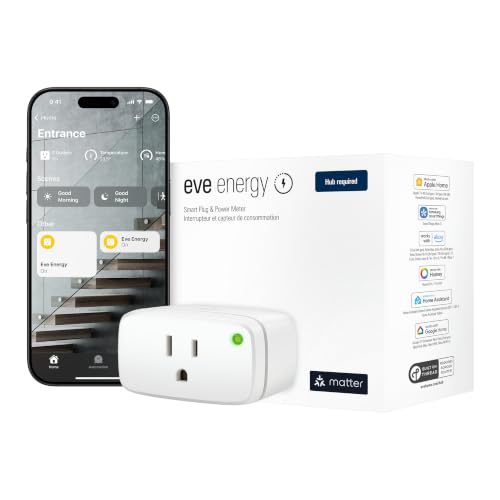 Best for Matter and privacyEve Energy (Matter) Smart PlugView on Amazon
- 5
 Best for whole-home trackingEmporia Energy Monitoring Smart Plug (4 Pack)View on Amazon
Our Top Picks
Before you read the individual reviews, it helps to understand what a smart plug can and cannot do. A plug switches power to whatever is connected to it. Any savings come from turning off devices that would otherwise sit idle, such as a coffee maker, a space heater left running or a gaming console on standby. Models with energy monitoring make this visible by reporting watts and kilowatt-hours in an app, which is often the most useful feature for saving energy. For background on this distinction, see What Smart Plugs Can (and Cannot) Do.
Tapo Smart Plug Wi-Fi, Energy Monitoring, P115 (4-Pack)
Tapo Smart Plug Wi-Fi, Energy Monitoring, P115(4-Pack), 15A | Works with Alexa & Google Home & Samsung SmartThings, Timer, 1800W Max, ETL Certified, 2.4G Wi-Fi Only
Best for: Best overall for tracking and scheduling
This pack suits households that want energy readings on several outlets at once, especially people starting with a single home office, entertainment center or bedroom setup.
Key specs
- 15A rating with 1800W maximum load
- Wi-Fi 2.4 GHz only
- Works with Alexa, Google Home and Samsung SmartThings
- Built-in timer and ETL certification
Pros
- Energy monitoring is included on each plug
- Four units make whole-room coverage practical
- Broad voice assistant and hub compatibility
Cons
- 2.4 GHz Wi-Fi only, which may matter on some routers
- The 1800W limit rules out heavy appliances like space heaters
Bottom line: A strong first choice for anyone who wants reliable monitoring and automation across several devices.
View on AmazonGovee Smart Plug with Energy Monitoring, WiFi Bluetooth Outlet, 4 Pack
Govee Smart Plug with Energy Monitoring, WiFi Bluetooth Outlet, 4 Pack | 15A Smart Outlets Work with Alexa and Google Assistant, Timer & Group Controller, No Hub Required, ETL & FCC Certified
Best for: Best for multi-device households
Good for families who want to control several outlets without buying a separate hub, including those who set up Bluetooth pairing before adding Wi-Fi.
Key specs
- 15A smart outlets
- Works with Alexa and Google Assistant
- Timer and group control features
- No hub required, ETL and FCC certified
Pros
- Group control simplifies scheduling several devices
- Bluetooth setup reduces early Wi-Fi troubleshooting
- Hub-free operation keeps the setup simple
Cons
- Energy data depth may be less detailed than dedicated monitoring plugs
- Owners often report that app stability varies between updates
Bottom line: Best suited to people who want group scheduling across several outlets more than detailed energy reporting.
View on AmazonEnergy Saving Device 2026 Plug-In Power Factor Saver Us Smart Plug
Energy Saving Device 2026 Plug-In Power Factor Saver Us Smart Plug | Electricity Saving Box for Home & Office 90v-250v 30kw Energy Saver Plug to Reduce Electricity Bill
Best for: Best for power factor claims
This plug is aimed at shoppers who have seen power factor correction advertised and want to test the claim for themselves. Read the claims carefully before buying.
Key specs
- Plug-in format for US 110V outlets
- Marketed for a 90V to 250V input range
- Sold as a plug-in power factor device
Pros
- Simple plug-in format needs no app setup
- Low-effort option for people who want to try a passive device
- Compact footprint for crowded outlets
Cons
- It lacks the scheduling and monitoring features most energy-saving plans rely on
- Independent verification of power factor savings is limited, so set expectations accordingly
Bottom line: Only consider this if you specifically want a passive power factor device and understand that it does not provide monitoring or automation.
View on AmazonEve Energy (Matter) Smart Plug
Eve Energy (Matter) – Smart Plug, App and Voice Control, 100% Privacy, Matter Over Thread, Works with Apple Home, Alexa, Google Home, SmartThings
Best for: Best for Matter and privacy
Well suited to households invested in Apple Home or other Matter-compatible ecosystems who want local control and minimal reliance on cloud services.
Key specs
- Matter over Thread connectivity
- Works with Apple Home, Alexa, Google Home and SmartThings
- App and voice control with energy monitoring
Pros
- Matter support improves cross-ecosystem compatibility
- Thread connectivity reduces Wi-Fi congestion
- Strong privacy focus for local control
Cons
- Thread requires a compatible border router, such as an Apple TV or HomePod mini, for the best experience
- Single-unit purchases can add up if you need many outlets
Bottom line: A good match for people who already use Apple Home or want a future-proof, Matter-based setup.
View on AmazonEmporia Energy Monitoring Smart Plug (4 Pack)
Emporia Energy Monitoring Smart Plug, WiFi Smart Outlet Plug Works with Alexa and Google Home – 15a WiFi Outlet with Timer, Mobile App, Home Energy Monitor, Scheduling – 2.4ghz WiFi Only (4 Pack)
Best for: Best for whole-home tracking
Designed for homeowners who want detailed usage history and scheduling across multiple appliances, including people tracking refrigerators, freezers or window units.
Key specs
- 15A WiFi outlets with timer and scheduling
- Energy monitoring with mobile app reporting
- Works with Alexa and Google Home
- 2.4 GHz Wi-Fi only
Pros
- Monitoring data helps identify standby and runtime waste
- Four-pack covers several rooms
- Voice assistant support for quick control
Cons
- 2.4 GHz Wi-Fi only, which may need a dedicated network on some routers
- Owners often mention app setup takes patience on first use
Bottom line: A practical pick for anyone who wants usage history across several appliances and is willing to set up the app carefully.
View on AmazonBuying Guide
Energy Monitoring Accuracy
Look for a plug that reports real-time watts and cumulative kilowatt-hours. Readings are typically accurate within a few percent for resistive loads, but accuracy drops at very low wattages, such as standby draws under 5 watts. Understanding these limits helps you interpret readings correctly. See Energy-Monitoring Smart Plugs: Watts, kWh and Accuracy Limits for details.
Good picks for this: Tapo Smart Plug P115 (4-Pack), Emporia Energy Monitoring Smart Plug (4 Pack)
Maximum Load Rating
Check the amperage and wattage rating against what you plan to plug in. A 15A plug is rated for about 1800 watts at 120V. Space heaters and some window air conditioners can exceed this, so use a plug rated for the load or choose a different device for those appliances.
Good picks for this: Govee Smart Plug with Energy Monitoring, Eve Energy (Matter) Smart Plug
Ecosystem Compatibility
Confirm that the plug works with the voice assistant and app platform you already use. Alexa, Google Home and Apple Home each have their own requirements. Matter-based devices offer broader compatibility, but they may need a border router. The comparison in Smart Plug Setup and Compatibility with Voice Assistants and Apps covers this in more depth.
Good picks for this: Eve Energy (Matter) Smart Plug, Govee Smart Plug with Energy Monitoring
Wi-Fi Band Support
Most smart plugs in this roundup use 2.4 GHz Wi-Fi only. If your router combines 2.4 and 5 GHz under one network name, the plug may fail to connect. Setting up a separate 2.4 GHz network for smart devices is a common fix.
Good picks for this: Tapo Smart Plug P115 (4-Pack), Emporia Energy Monitoring Smart Plug (4 Pack)
Scheduling and Automation
Timers and schedules are where most energy savings happen. Set a plug to cut power to a coffee maker overnight or to a desk lamp after work hours. Check whether the app supports recurring schedules, countdown timers and automation triggers from other devices.
Good picks for this: Govee Smart Plug with Energy Monitoring, Tapo Smart Plug P115 (4-Pack)
Durability and Certification
Look for certification marks such as ETL or UL on the packaging or listing. These indicate the plug has been evaluated against recognized safety standards. Avoid unlabeled or unbranded units for anything you plan to leave on for long periods.
Good picks for this: Tapo Smart Plug P115 (4-Pack), Govee Smart Plug with Energy Monitoring
Use Case and Placement
Think about where you will install the plug. Units with a compact body suit crowded power strips, while pairs of outlets may be easier to place behind furniture. Indoor plugs are not designed for wet locations, so use an outdoor-rated model for patios or garages with exposure to weather.
Good picks for this: Eve Energy (Matter) Smart Plug, Emporia Energy Monitoring Smart Plug (4 Pack)
FAQ
Does a smart plug save energy on its own?
No. A smart plug only controls power to the device connected to it. Savings come from turning off devices that would otherwise draw power unnecessarily, such as idle electronics or appliances left on overnight.
How do I know if a smart plug is saving energy?
Use a plug with energy monitoring to record usage before and after you set schedules. Compare the kilowatt-hour totals over a few weeks to see whether the device is drawing less power than before.
What devices benefit most from smart plugs?
Devices with standby power draw, such as game consoles, TVs, chargers and coffee makers, often benefit most. Space heaters and fans also suit scheduling, though heavy loads may exceed plug ratings. You may also like Eve Energy Matter Smart Plug: 6 Best Picks Compared for 2026.
Are smart plugs safe to leave on all the time?
Plugs rated for continuous use and certified by a recognized body such as ETL or UL are designed for this. Do not exceed the rated load, and avoid using them with high-draw appliances beyond their limit. If you have concerns about electrical safety, consult a licensed electrician.
Do smart plugs need a hub?
Many models connect directly to Wi-Fi, while Matter-based plugs such as the Eve Energy may need a compatible border router for Thread connectivity. Check the requirements before buying.
Will a smart plug lower my electric bill?
It can, if you use the plug to cut unnecessary consumption. The size of any reduction depends on your habits and the devices you control. Your utility company may also offer efficiency programs worth checking.
Conclusion
A smart plug can help you save energy, but only when used to cut waste. For most households, the Tapo P115 4-Pack offers a well-rounded mix of monitoring and automation. The Govee pack suits group scheduling across several outlets, while the Eve Energy works best for Matter and Apple Home users. The Emporia four-pack is a practical choice for detailed usage history. The power factor saver is best left to shoppers who understand its limits and specifically want a passive device.
Sources
- Guidance on home energy use, standby power and appliance efficiency (energy.gov)
- Electrical product safety recalls, reporting and general home safety tips (cpsc.gov)
- Information on product safety certification and what UL marks indicate (ul.com)
Related reading
About Colin Foster
Colin Foster is part of our editorial team and reviews and edits our smart home guides, checking product details against manufacturer specifications and owner feedback.