 By Colin Foster
Updated November 2026
If you want to know which Alexa devices have motion detection, the short answer is that several camera types and standalone sensors can send motion alerts to Alexa or work alongside it. The real question is which one fits your layout, your Wi-Fi setup and the kind of alerts you want. This guide compares five products based on their listed specifications, the detection method each uses, how they connect to Alexa, and patterns that owners commonly report. We weighed detection technology, placement flexibility, power source, indoor versus outdoor use and how well each one plays with the Alexa app.
Our top picks at a glance
- 1
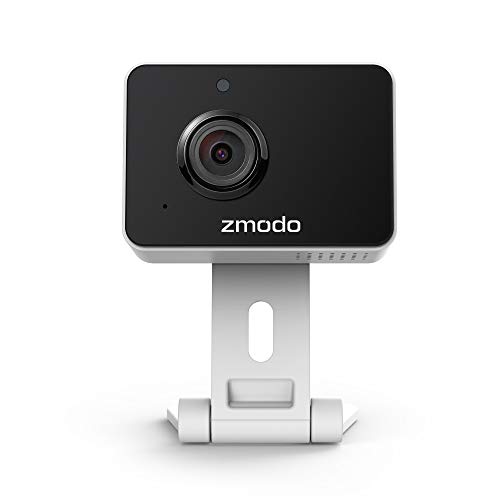 TOP CHOICEBest overallZmodo Mini Pro Indoor CameraView on Amazon
- 2
 TOP CHOICEBest for elder and caregiver monitoringSmart Caregiver Economy Wireless Monitor and Motion SensorView on Amazon
- 3
 TOP CHOICEBest for outdoor areas without wiringCOOAU Solar Security CameraView on Amazon
- 4
 Best for multi-room indoor coverageINFIYA 360° PTZ Indoor Cameras (4-Pack)View on Amazon
- 5
 Best for outdoor PTZ coverageRebluum 2K Solar Security CameraView on Amazon
Our Top Picks
The table below summarizes how the five products compare at a high level. Each product section that follows goes into more detail on specifications, pros, cons and who should consider it.
| Product | Best for | Key feature |
|---|---|---|
| Smart Caregiver Economy Wireless Monitor and Motion Sensor | Elder and caregiver monitoring | Wireless motion sensor for bed and door areas |
| Zmodo Mini Pro Indoor Camera | Single-room indoor monitoring | AI-powered motion detection with 2-way audio |
| COOAU Solar Security Camera | Outdoor areas without wiring | Solar charging with PIR motion detection |
| INFIYA 360° PTZ Indoor Cameras (4-pack) | Multi-room indoor coverage | 360° pan-tilt-zoom with one-tap call |
| Rebluum 2K Solar Security Camera | Outdoor PTZ coverage | 360° PTZ with PIR and AI motion detection |
Smart Caregiver Economy Wireless Monitor and Motion Sensor
Smart Caregiver Economy Wireless Monitor and Motion Sensor | Wireless motion detection system, fall prevention & wandering prevention, mountable sensor, use near bed or door
Best for: Elder and caregiver monitoring
This is a wireless motion sensor system aimed at households where someone needs to be watched without a camera in the room. It suits families caring for an older adult or a person with memory-related conditions who wanders, and it works well for placement near a bed or an exterior door.
Key specs
- Wireless motion detection system
- Designed for fall prevention and wandering prevention
- Mountable sensor for bed or door use
Pros
- No camera footage, which many families prefer for privacy
- Simple placement near high-risk areas
- Focused on the specific alert scenarios it is built for
Cons
- Not a video camera, so you cannot see what triggered an alert
- Alexa integration depends on the setup you choose, so check compatibility before buying
Bottom line: Pick this if your main goal is knowing when someone gets up or leaves a room, not watching live video.
View on AmazonZmodo Mini Pro Indoor Camera
Zmodo [2021 Upgrade] Mini Pro -WiFi Indoor Camera for Home Security, 1080p HD with Night Vision, 2-Way Audio, AI-Powered Motion Detection, Phone App, Pet Camera- Works with Alexa and Google
Best for: Single-room indoor monitoring
The Zmodo Mini Pro is a compact indoor camera for a single room, such as a living room, nursery or home office. It is a practical choice for people who want video, motion alerts and a pet-check camera in one device that works with Alexa and Google.
Key specs
- 1080p HD resolution with night vision
- AI-powered motion detection
- 2-way audio and works with Alexa and Google
Pros
- Clear motion alerts with AI-based person and activity filtering on many setups
- Two-way audio for talking to people or pets
- Compact footprint that is easy to place on a shelf
Cons
- Indoor use only, so it is not built for rain or outdoor mounting
- Coverage is limited to one fixed field of view
Bottom line: A strong choice if you want one dependable indoor camera with motion alerts that connects to Alexa.
View on AmazonCOOAU Solar Security Camera
COOAU Solar Security Cameras Wireless Outdoor, 2K 360° Home Surveillance | 30% Faster Solar Charging, Easy Setup, PIR Motion Detection, Color Night Vision, Alexa, 2.4GHz WiFi, Package Protection
Best for: Outdoor areas without wiring
This wireless outdoor camera uses a solar panel to keep its battery topped up, which suits driveways, side yards and back patios where running power is difficult. It is aimed at homeowners who want PIR-triggered alerts and package-area monitoring.
Key specs
- 2K resolution with 360° coverage
- PIR motion detection and color night vision
- 2.4GHz Wi-Fi and Alexa compatibility
Pros
- No trenching or wiring needed for installation
- Solar charging reduces how often you must recharge the battery
- Color night vision helps identify people after dark
Cons
- Solar charging depends on sun exposure, so shaded spots may need manual charging
- Requires a 2.4GHz network, which some newer routers do not prioritize
Bottom line: The right fit for outdoor placement where power and cabling are the main obstacles.
View on AmazonINFIYA 360° PTZ Indoor Cameras (4-Pack)
INFIYA 360° PTZ Wired One-Tap Call Indoor Cameras for Home Security, 4Pack | 360° PTZ, One-Tap Call, 24/7 recording, AI Motion Detection, Color Night Vision, Work with Alexa & Google Home, 2.4Ghz Only
Best for: Multi-room indoor coverage
A four-pack of pan-tilt-zoom indoor cameras is a sensible option for a larger home where you want to cover several rooms with consistent motion alerts. Households with children, pets or frequent guests often look at multi-camera setups like this.
Key specs
- 360° pan-tilt-zoom movement
- AI motion detection and color night vision
- One-tap call feature and 2.4GHz Wi-Fi only
Pros
- Four cameras give broad indoor coverage at once
- PTZ movement lets you adjust the view remotely
- Works with both Alexa and Google Home
Cons
- 2.4GHz only, which may require router adjustments
- Four units mean more setup time and more power outlets to plan around
Bottom line: Best for households that want indoor coverage across several rooms rather than a single camera.
View on AmazonRebluum 2K Solar Security Camera
Rebluum 2K Solar Security Cameras Wireless Outdoor, 360°PTZ Outdoor Camera | Battery Powered, Color Night Vision, 2-Way Audio, PIR+AI Motion Detection, IP66 Waterproof, Work with Alexa&Google Assistan
Best for: Outdoor PTZ coverage
This is a battery-powered outdoor pan-tilt camera with solar-friendly design. It suits front yards, driveways and back gardens where you want to sweep a wider area than a fixed camera can cover.
Key specs
- 2K resolution with 360° PTZ movement
- PIR and AI motion detection, 2-way audio
- IP66 waterproof rating and color night vision
Pros
- PTZ movement covers more ground than a fixed outdoor camera
- IP66 rating is a recognized standard for dust and water resistance
- Two-way audio supports talking to visitors or delivery drivers
Cons
- PTZ motors add more moving parts that owners may need to maintain over time
- Battery life varies with motion-alert frequency and sun exposure
Bottom line: A good match for outdoor spaces where you need to pan across a wide area rather than watch one fixed view.
View on AmazonBuying Guide
Before choosing a device, it helps to understand which features matter for motion alerts through Alexa. The factors below cover the most important considerations.
Detection Method: PIR, AI and Combined Systems
Passive infrared (PIR) sensors detect heat changes and are common in outdoor cameras and motion lights. AI-based detection analyzes video to tell people, vehicles and animals apart, which can reduce false alerts from swaying branches or passing shadows. Many modern cameras combine both methods.
Good picks for this: Rebluum 2K Solar Security Camera, COOAU Solar Security Camera
Indoor Versus Outdoor Rating
Check whether the device is rated for outdoor use. An IP66 rating, for example, indicates protection against dust and strong water jets under the standard’s test conditions. Indoor-only cameras should not be mounted where they will be exposed to rain or direct moisture.
Good picks for this: Zmodo Mini Pro Indoor Camera, INFIYA 360° PTZ Indoor Cameras
Power Source and Battery Life
Wired cameras need a nearby outlet and steady power. Battery cameras depend on capacity and charging method. Solar-assisted models reduce manual charging but need enough direct sunlight, often several hours a day, to keep up. Plan placement around sun exposure before you commit.
Good picks for this: COOAU Solar Security Camera, Rebluum 2K Solar Security Camera
Wi-Fi Band Compatibility
Several cameras in this category only support 2.4GHz Wi-Fi. Check your router settings before buying, and make sure the 2.4GHz band is enabled and not merged in a way that prevents the camera from connecting. Owners frequently report setup problems that trace back to band settings rather than the device itself.
Good picks for this: INFIYA 360° PTZ Indoor Cameras, COOAU Solar Security Camera
Coverage Area and Field of View
A fixed camera covers one field of view, while pan-tilt-zoom models can sweep a wider area. For a single room, a fixed unit is often enough. For a yard, driveway or open-plan floor, PTZ movement can reduce the number of devices you need.
Good picks for this: Rebluum 2K Solar Security Camera, INFIYA 360° PTZ Indoor Cameras
Purpose: Security Versus Care Monitoring
If your goal is security, video with motion clips and night vision usually matters most. If your goal is monitoring a person’s movements, such as an older adult getting out of bed or leaving a door, a dedicated motion sensor may be a better fit. Some households use both.
Good picks for this: Smart Caregiver Economy Wireless Monitor and Motion Sensor, Zmodo Mini Pro Indoor Camera
Privacy Settings and Local Controls
Indoor cameras often include privacy shutters, activity zones and the ability to turn off recording on a schedule. Review these settings during setup, especially if the camera covers shared spaces. Turning off alerts for areas you do not need to monitor reduces unnecessary notifications.
Good picks for this: Zmodo Mini Pro Indoor Camera, INFIYA 360° PTZ Indoor Cameras
FAQ
Which Alexa devices have motion detection built in?
Most Alexa-compatible motion detection comes from third-party cameras and sensors rather than Echo speakers or displays. Several security cameras in this category send motion alerts that you can view through the Alexa app or see on Echo Show screens when the camera is linked.
Do Echo speakers detect motion?
Standard Echo speakers do not act as motion sensors. Some Echo devices can respond to sound or presence in limited ways, but dedicated motion detection usually requires a camera or sensor that connects to Alexa.
Can I see motion alerts on an Echo Show?
Yes, for many compatible cameras. Once a camera is linked to Alexa, you can often view its live feed on an Echo Show with a voice command, and some setups display alerts on the screen. Confirm the specific camera’s Alexa compatibility before buying.
Why are my motion alerts not reaching Alexa?
Common causes include the camera being on a 5GHz-only network, the Alexa skill not being enabled, or the camera’s own app not being linked to your Amazon account. Check each step in order, and confirm the device appears in the Alexa app’s device list.
Do motion cameras work without a subscription?
Many motion cameras offer basic alerts and live view without a paid plan, but cloud video history and advanced AI features may require a subscription. Check what each manufacturer includes before you rely on stored clips.
Are solar security cameras reliable in winter?
Solar charging depends on daylight, so shorter winter days can reduce charging. Many owners report keeping a spare charge or using a weatherproof battery plan. Place the panel where it gets the most direct sun for the best results.
Is a motion sensor enough for home security?
A motion sensor alerts you to movement but does not show what caused it. For security, many people combine a sensor with a camera so they can verify alerts. For care monitoring, a sensor alone may cover the core need.
Conclusion
If you are looking for which Alexa devices have motion detection, the best choice depends on where the device goes and what you need it to do. The Zmodo Mini Pro suits a single indoor room with AI-based alerts. The INFIYA four-pack fits multi-room indoor coverage. The COOAU solar camera is a practical option for outdoor spots without wiring, while the Rebluum PTZ camera covers wider outdoor areas. For elder or caregiver monitoring where video is not required, the Smart Caregiver wireless motion sensor is the most focused option. Confirm Wi-Fi band requirements and Alexa compatibility before purchase, and check your router settings during setup.
Sources
- Consumer safety guidance on home security devices, product recalls and safe installation practices (cpsc.gov)
- Standards and cybersecurity guidance relevant to connected home devices and network security (nist.gov)
- Product safety certification information and how certification marks are applied to electronic devices (ul.com)
Related reading
- Which Echo Devices Are Compatible with Alexa Plus? Full List (2026)
- What Is the Difference Between All the Alexa Devices (2026): Which Should You Choose?
- Google Home Devices and Alexa (2026): Which Is Better for Your Home?
- Comparison of Alexa Devices (2026): Which Is Better for Your Home?
- Compare Alexa Echo Devices (2026): Which Is Better for Your Home?
About Colin Foster
Colin Foster is part of our editorial team and reviews and edits our smart home guides, checking product details against manufacturer specifications and owner feedback.