
 By Claire Whitaker
Updated November 2026
Finding a security camera for apartments takes more thought than buying one for a house. Renters usually cannot drill into walls, rewire doorbells or mount cameras on the exterior, and many leases limit what can be changed. The right choice depends on where you need coverage (front door, living room, a window), whether you want wireless or wired power, how the camera connects to your Wi-Fi, and whether it can be installed without tools. The four picks below were selected by reviewing manufacturer specifications, brand reputation and common owner feedback patterns. We did not run hands-on tests of these devices.
Our top picks at a glance
- 1
 TOP CHOICEBest overallOrbitell 1080p Wireless Wi-Fi Video Doorbell Camera with Two Way AudioView on Amazon
- 2
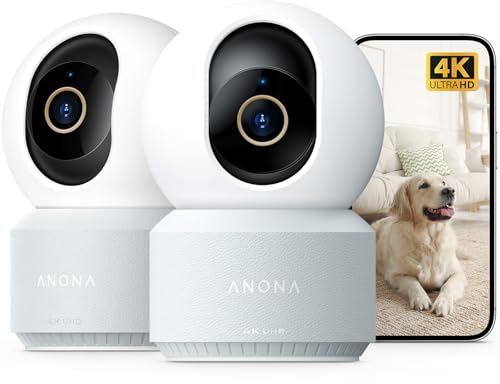 Best for whole-room coverageAnona 4K UHD Indoor Camera, Pet/Dog/Baby Security Camera with Phone ApView on Amazon
- 3
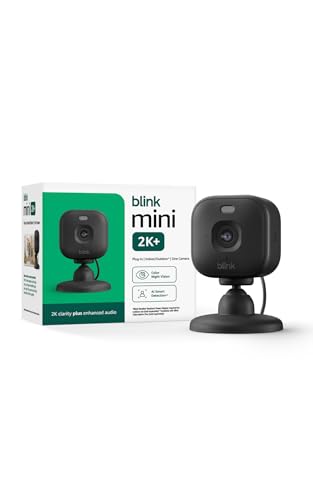 Best budget pickBlink Mini 2K+ (newest model) – Plug-in Home & Pet Indoor Security CamView on Amazon
- 4
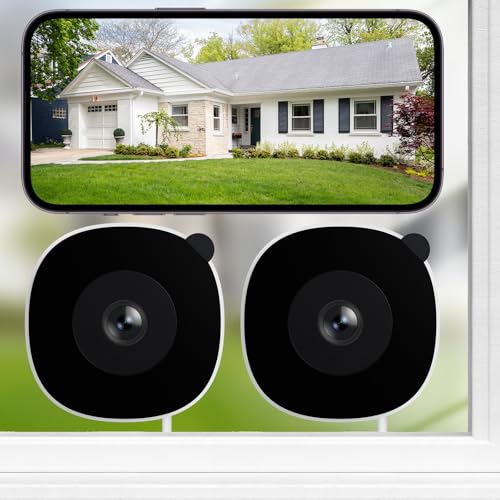 Best for window placementINFIYA 2.4/5GHz WiFi No-Drill Window Cameras for Home Security, 2K3MPView on Amazon
Our Top Picks
Quick Comparison
| Product | Best for | Key feature |
|---|---|---|
| Orbitell 1080p Wireless Wi-Fi Video Doorbell Camera | Watching your front door | Two-way audio and AI motion detection |
| Anona 4K UHD Indoor Camera, 2 Pack | Covering large rooms | 360° pan-tilt with auto-tracking |
| Blink Mini 2K+ Indoor Security Camera | Simple, low-effort setup | Plug-in design with 2K video |
| INFIYA No-Drill Window Cameras, 2 Pack | Renters who cannot drill | Mounts on glass without drilling |
Orbitell 1080p Wireless Wi-Fi Video Doorbell Camera with Two Way Audio, Night Vision, Cloud Storage, Smart AI Motion Detection, Support 2.4GHz Wi-Fi only
Orbitell 1080p Wireless Wi-Fi Video Doorbell Camera
Best for: Monitoring your apartment entry door without wiring into the doorbell circuit.
This suits renters who want to see visitors and packages at the door without modifying existing hardwiring. Because it is wireless, it can usually be mounted on the door frame or a nearby surface, which many leases allow more readily than permanent wiring. Check your building rules before mounting anything on the door.
Key specs
- 1080p wireless video doorbell camera
- Two-way audio
- Night vision
- Smart AI motion detection
- Cloud storage option
- 2.4GHz Wi-Fi only
Pros
- Wireless setup avoids hardwiring into existing doorbell wiring.
- Two-way audio lets you speak to visitors from your phone.
- Smart motion detection can reduce alerts from passing traffic.
Cons
- Works only on 2.4GHz Wi-Fi, so check your router settings first.
- Battery-powered devices need periodic recharging depending on use.
Bottom line: Best for renters who want a front-door camera that installs without tools and does not require electrical work.
View on Amazon
Anona 4K UHD Indoor Camera, Pet/Dog/Baby Security Camera with Phone App, 360°Pan-Tilt, 5G/2.4G Dual-Band Wi-Fi 6, Auto-Tracking, Person/Pet/Baby Crying Detection, Privacy Mode, Two-Way Audio, 2 Pack
Anona 4K UHD Indoor Camera, Pet/Dog/Baby Security Camera with Phone App, 2 Pack
Best for: Covering a full living room or studio apartment with a pan-tilt camera.
This is a good fit for renters with an open floor plan who want to watch a main room, a pet area or a nursery. The pan-tilt movement lets one camera cover more of the room than a fixed unit, and the two-pack option can cover two zones.
Key specs
- 4K UHD resolution
- 360° pan and tilt
- Dual-band 5GHz and 2.4GHz Wi-Fi 6
- Auto-tracking
- Person, pet and baby crying detection
- Privacy mode and two-way audio
Pros
- Pan-tilt coverage reduces the number of cameras needed for one room.
- Dual-band Wi-Fi supports stronger connections in many apartments.
- Privacy mode lets you pause recording when you are home.
Cons
- Requires a power outlet, so placement depends on where you have one.
- Higher resolution video uses more bandwidth on a shared network.
Bottom line: A strong choice for renters who want to monitor a large room or keep an eye on pets or children at home.
View on Amazon
Blink Mini 2K+ (newest model) – Plug-in Home & Pet Indoor Security Camera with 2K video resolution, night vision, enhanced audio, motion detection – 1 camera (Black)
Blink Mini 2K+ Plug-in Home and Pet Indoor Security Camera
Best for: A quick, low-effort indoor camera that plugs into any nearby outlet.
Blink’s plug-in design suits renters who want to set something up in minutes and move it when they change rooms. It is compact, so it fits on a shelf or counter without needing a mounting plate.
Key specs
- 2K video resolution
- Night vision
- Enhanced audio
- Motion detection
- Plug-in power
Pros
- Plug-in power means no batteries to charge.
- Compact size makes it easy to hide or reposition.
- Setup through a companion app is straightforward for most users.
Cons
- Needs a nearby outlet, which limits placement.
- Fewer advanced features than pan-tilt models.
Bottom line: Best for renters who want simple indoor monitoring and do not need outdoor or wide-angle coverage.
View on Amazon
INFIYA 2.4/5GHz WiFi No-Drill Window Cameras for Home Security, 2K3MP 2Pack | Full Color Night Vision, Anti-Glare, Human Detection, 24/7 Recording, Indoor/Outdoor Monitoring through Window
INFIYA 2.4/5GHz WiFi No-Drill Window Cameras for Home Security, 2K3MP 2 Pack
Best for: Monitoring through a window without drilling into walls or frames.
These cameras are designed to mount on glass, which can be useful when a lease prohibits holes in walls. They are often used to watch a balcony, patio door or street-facing window, though you should confirm that the view and any recording comply with building policies.
Key specs
- 2.4GHz and 5GHz Wi-Fi
- 2K resolution
- Full-color night vision
- Anti-glare design
- Human detection
- 24/7 recording option
- Two-camera pack
Pros
- No-drill mounting suits many rental restrictions.
- Anti-glare design helps reduce reflections from the window.
- Two cameras allow coverage of two openings.
Cons
- Suction or adhesive mounts can lose grip in extreme temperature swings.
- Window reflections and sunlight can still affect image quality.
Bottom line: The best fit for renters who need window coverage and cannot make any permanent changes to the unit.
View on AmazonBuying Guide
Mounting Method and Lease Rules
Most apartment leases restrict drilling, so check whether your building allows screws, adhesive or only temporary mounts. Wireless cameras with magnetic, adhesive or stand bases are usually the easiest to remove when you move out.
Good picks for this: Orbitell 1080p Wireless Wi-Fi Video Doorbell Camera, INFIYA No-Drill Window Cameras
Power Source
Battery cameras give you placement freedom but need periodic charging. Plug-in cameras run continuously but must sit near an outlet. Decide which trade-off suits your layout before buying.
Good picks for this: Blink Mini 2K+ Indoor Security Camera, Anona 4K UHD Indoor Camera
Wi-Fi Compatibility
Confirm whether a camera supports 2.4GHz only or dual-band. Many apartment routers broadcast both bands, but a camera limited to 2.4GHz may need its own network setting changed. Keep the camera within a few rooms of the router for a stable connection.
Good picks for this: Orbitell 1080p Wireless Wi-Fi Video Doorbell Camera, Anona 4K UHD Indoor Camera
Field of View and Coverage
A fixed lens covers a narrow zone, while pan-tilt cameras can rotate to cover more of a room. For a studio, one pan-tilt unit may be enough. For a long hallway or multi-room layout, plan for multiple units.
Good picks for this: Anona 4K UHD Indoor Camera, Blink Mini 2K+ Indoor Security Camera
Night Vision and Lighting
Night vision range is usually stated in feet by the manufacturer, and actual performance depends on room size and reflective surfaces. Full-color night vision can help identify details, while infrared-only modes produce black-and-white images.
Good picks for this: INFIYA No-Drill Window Cameras, Blink Mini 2K+ Indoor Security Camera
Storage and Privacy
Choose between local storage on a memory card, cloud subscriptions or a hybrid approach. Local storage keeps footage off external servers, while cloud plans add remote access to clips. Read the storage terms before you buy, and consider privacy features such as a privacy mode for times you are home.
Good picks for this: Anona 4K UHD Indoor Camera, Orbitell 1080p Wireless Wi-Fi Video Doorbell Camera
Maintenance and Care
Wipe lenses regularly, especially window-mounted units, since dust and fingerprints reduce image clarity. Check battery levels monthly and update firmware when the app prompts you, as updates can fix security issues and improve connectivity.
Good picks for this: INFIYA No-Drill Window Cameras, Blink Mini 2K+ Indoor Security Camera
FAQ
Can I install a security camera in an apartment without landlord permission?
It depends on your lease. Many renters use no-drill, adhesive or magnetic mounts that leave no permanent marks, but you should still ask your landlord or check your lease before installing anything, especially near shared doors or exterior walls.
Is a wireless camera good enough for an apartment?
For most apartments, yes. Wireless cameras avoid running cables through walls and work well if your Wi-Fi signal is strong where you plan to mount the unit. Test signal strength in the spot first.
Do apartment security cameras need a subscription?
Many models offer basic live viewing without a subscription, but cloud recording and extended history often require a paid plan. Local storage on a memory card is an alternative for many devices.
Where should I place an indoor security camera in my apartment?
Common spots include a corner of the main room, a shelf facing the entry door or a window overlooking the balcony. Avoid pointing the lens directly at bright windows, which can wash out images.
What Wi-Fi speed do I need for a security camera?
Manufacturers often list minimum upload speeds for their specific resolution. Higher-resolution cameras need more upload bandwidth, so check the specification sheet for your model and compare it with your internet plan.
Will a window camera work through glass?
Window-mounted cameras can see through glass, but reflections, dirt and sunlight can reduce clarity. Position the camera close to the glass, use the anti-glare features where available and clean the window regularly.
Can neighbors complain about a camera pointed outside my unit?
Possibly. Cameras that record shared hallways, neighboring doors or common areas can raise privacy concerns. Aim cameras at your own space and review your building’s rules before recording outside your unit.
Conclusion
For most renters, the best security camera for apartments depends on where you need coverage and what your lease allows. The Orbitell 1080p Wireless Wi-Fi Video Doorbell Camera suits entry-door monitoring without wiring. The Anona 4K UHD Indoor Camera works best for larger rooms and pets or children at home. The Blink Mini 2K+ fits simple, plug-in indoor use. The INFIYA No-Drill Window Cameras suit renters who need window coverage without drilling. Confirm your building’s rules before installing any unit, and check Wi-Fi band compatibility before you buy.
Sources
- Consumer product safety information, including guidance on electrical devices and product recalls (cpsc.gov)
- Consumer advice on online privacy, data collection and connected device security (ftc.gov)
- Practical information on home energy use, including device power consumption (energy.gov)
Related reading
- Where to Place Indoor Security Cameras (and Where Not To)
- Top 7 Security Cameras for Driveway Options for Every Need (2026)
- Top 7 Security Camera Pan Tilt Zoom Options for Home Monitoring
- Top 5 Weather Resistant Security Cameras for Outdoor Use (2026)
- Top 5 Solar Camera Security Outdoor Options for Home Monitoring (2026)
About Claire Whitaker
Claire Whitaker is part of our editorial team and reviews and edits our smart home guides, checking product details against manufacturer specifications and owner feedback.









