
 By Claire Whitaker
Updated November 2026
Choosing the best indoor camera security setup comes down to a handful of practical questions: how sharp the video needs to be, whether you want pan and tilt coverage, how much you care about privacy when you are home, and whether the camera has to work with Alexa, Google Home or Apple HomeKit. This guide compares six indoor cameras across those criteria. Our selection method is research-based, drawing on published specifications, brand reputation and common patterns in owner feedback. We have not tested these devices ourselves, so treat the specs below as manufacturer claims and check current listings before buying.
Our top picks at a glance
- 1
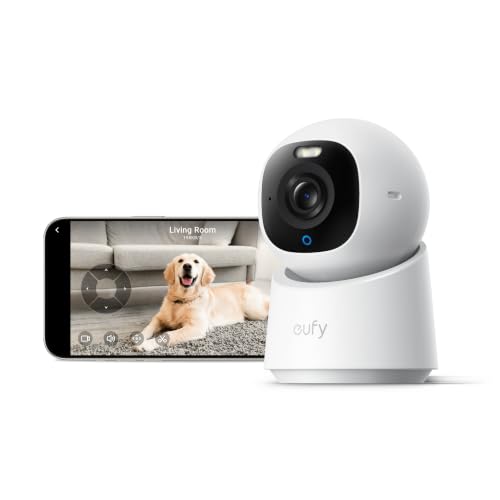 TOP CHOICEBest overalleufy Security 4K Indoor Camera E30View on Amazon
- 2
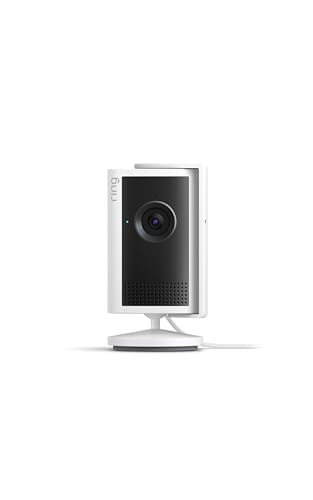 TOP CHOICEBest for small kitchensRing Indoor Cam 2KView on Amazon
- 3
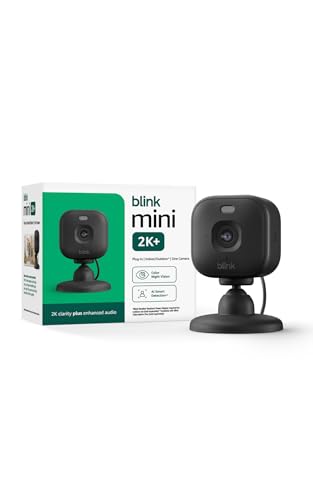 TOP CHOICEBest budget pickBlink Mini 2K+View on Amazon
- 4
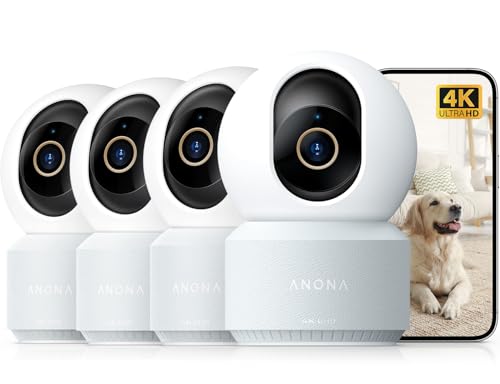 Best for pet monitoringAnona 4K UHD Indoor CameraView on Amazon
- 5
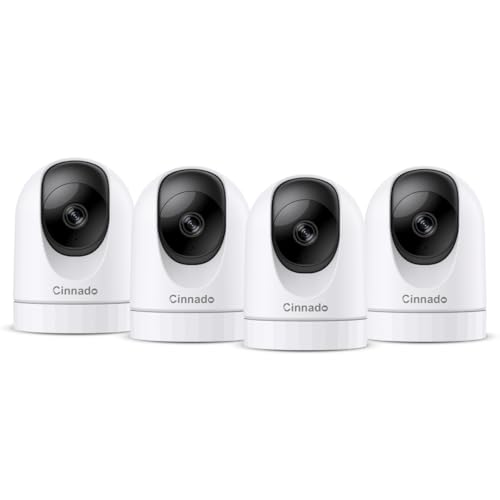 Best for multi-room coverageCinnado 2K Home Security Cameras Indoor 4 PackView on Amazon
- 6
 Best for voice assistant householdsTapo 2K Pan Tilt Security Camera C211 2-PackView on Amazon
Our Top Picks
| Product | Best for | Key feature |
|---|---|---|
| eufy Security 4K Indoor Camera E30 | Overall balance of resolution and privacy | 4K video with AI detection and local storage options |
| Ring Indoor Cam 2K | Small kitchens and entryways | Plug-in design with 6x enhanced zoom |
| Blink Mini 2K+ | Budget-conscious buyers | Compact plug-in body with 2K video |
| Anona 4K UHD Indoor Camera | Pet and baby monitoring | Auto-tracking with privacy mode |
| Cinnado 2K Home Security Cameras Indoor 4 Pack | Covering several rooms at once | Four-camera kit with 360° auto tracking |
| Tapo 2K Pan Tilt Security Camera C211 2-Pack | Voice assistant households | Works with Alexa and Google Home, two-way siren audio |
eufy Security 4K Indoor Camera E30
eufy Security 4K Indoor Camera E30, No Subscription, Work as Pet Camera | Nanny/Baby Camera, Pan&Tilt, AI Tracking, AI Detection, 24/7 Recording, Color Night Vision, Two-Way Audio,Works with HomeKit
Best for: Overall balance of resolution and privacy
This camera suits households that want the sharpest image in this group and are comfortable with local storage rather than a monthly plan. It also appeals to people who want HomeKit compatibility.
Key specs:
- 4K UHD video resolution
- Pan and tilt movement
- Color night vision
- Two-way audio
- AI person and pet detection
- Works with HomeKit
Pros:
- High resolution makes faces and details easier to identify
- No subscription is required for core recording, according to the listing
- HomeKit support fits Apple-centered homes
Cons:
- Higher resolution files take more storage space
- Advanced features depend on the app setup, which some owners find fiddly at first
Bottom line: A strong first choice for someone who wants image quality and HomeKit support without ongoing fees.
View on AmazonRing Indoor Cam 2K
Ring Indoor Cam 2K, Plug-In, Retinal 2K for crisp video, 6x Enhanced Zoom, Night Vision, Home and business security, White
Best for: Small kitchens and entryways
This plug-in camera fits spaces where you need a discreet view of a single room, such as a kitchen counter, a front hallway or a home office corner. Ring is a widely known brand in the home security category.
Key specs:
- 2K video resolution
- Plug-in power design
- 6x enhanced zoom
- Night vision
Pros:
- Plug-in power means no battery changes
- Zoom helps when the camera is mounted at a distance
- Compact footprint suits shelves and counters
Cons:
- Extended video history and advanced alerts typically require a Ring subscription
- Single-room coverage means more units are needed for larger homes
Bottom line: A good pick for a single important room if you already use the Ring app or plan to.
View on AmazonBlink Mini 2K+
Blink Mini 2K+ (newest model) – Plug-in Home & Pet Indoor Security Camera with 2K video resolution, night vision, enhanced audio, motion detection – 1 camera (Black)
Best for: Budget-conscious buyers
This is a simple plug-in camera for people who want basic indoor monitoring without a large upfront commitment. It is also a sensible add-on for a secondary room.
Key specs:
- 2K video resolution
- Plug-in power
- Night vision
- Motion detection
- Enhanced audio
Pros:
- Compact and easy to position
- Straightforward setup through the Blink app
- Works well as a low-commitment starting point
Cons:
- Cloud features and longer clip history generally need a Blink subscription
- Fewer advanced AI features than premium options
Bottom line: The most approachable choice for a basic indoor watch, especially for renters or a second room.
View on AmazonAnona 4K UHD Indoor Camera
Anona 4K UHD Indoor Camera, Pet/Dog/Baby Security Camera with Phone App, 360°Pan-Tilt, 2.4G/5G Dual-Band Wi-Fi 6, Auto-Tracking, Person/Pet/Baby Crying Detection, Privacy Mode, Two-Way Audio, 4 Pack
Best for: Pet and baby monitoring
This camera is aimed at households that want to check on pets or infants while away, with tracking that follows movement across a room. Its privacy mode is useful when you do not want the lens active.
Key specs:
- 4K UHD resolution
- 360° pan and tilt
- Auto-tracking
- Person, pet and baby crying detection
- Privacy mode
- Two-way audio
- Dual-band 2.4G/5G Wi-Fi 6
Pros:
- Auto-tracking keeps moving subjects in frame
- Privacy mode gives a clear on/off option
- Dual-band Wi-Fi can help in homes with crowded networks
Cons:
- Feature-rich setup has a learning curve
- Owners should confirm cloud and storage terms before relying on long history
Bottom line: Well suited to pet owners and parents who want tracking and detection features in one unit.
View on AmazonCinnado 2K Home Security Cameras Indoor 4 Pack
Cinnado 2K Home Security Cameras Indoor with 2.4GHz Wi-Fi & Siren, D1 4Pack | 360° Auto Tracking for Pets/Nanny/Baby/Dog, 2-Way Audio, 24/7 SD Card Storage, Cloud Storage, Works with Alexa & Google Ho
Best for: Covering several rooms at once
A four-camera kit makes sense for larger homes or for anyone who wants consistent coverage of multiple rooms without buying each unit separately.
Key specs:
- 2K video resolution
- 2.4GHz Wi-Fi
- 360° auto tracking
- Two-way audio
- Built-in siren
- SD card and cloud storage options
- Works with Alexa and Google Home
Pros:
- Multi-camera pack covers several rooms efficiently
- Local SD card storage is an option
- Voice assistant compatibility
Cons:
- 2.4GHz only, so it is not a fit for 5GHz-only setups
- Four units mean four app configurations to manage
Bottom line: A practical value for multi-room coverage, provided your router supports 2.4GHz.
View on AmazonTapo 2K Pan Tilt Security Camera C211 2-Pack
Tapo 2K Pan Tilt Security Camera for Baby Monitor, Dog Camera,C211(2-Pack) | Motion Detection, 2-Way Audio Siren, Night Vision, Cloud &SD Card Storage, Works with Alexa & Google Home, Black
Best for: Voice assistant households
This two-pack suits homes already built around Alexa or Google Home, with pan and tilt control and a siren for deterrence.
Key specs:
- 2K resolution
- Pan and tilt
- Motion detection
- Two-way audio with siren
- Night vision
- Cloud and SD card storage
- Works with Alexa and Google Home
Pros:
- Two cameras in one purchase
- Siren adds an active deterrent
- Works with both major voice assistants
Cons:
- Voice control depends on linking accounts correctly during setup
- Not HomeKit compatible
Bottom line: The right fit for a voice-first household that wants two cameras with a siren.
View on AmazonBuying Guide
Video Resolution
Resolution determines how much detail you can recover from a recording. 2K is generally adequate for seeing faces across a typical room, while 4K gives more room to crop and zoom into footage. Higher resolution also increases storage use, so weigh it against your retention plan.
Good picks for this: eufy Security 4K Indoor Camera E30, Anona 4K UHD Indoor Camera
Privacy Controls
Indoor cameras watch personal spaces. Look for a physical lens cover, a software privacy mode, and clear settings for when recording is active. Confirm where footage is stored and who can access it.
Good picks for this: Anona 4K UHD Indoor Camera, eufy Security 4K Indoor Camera E30
Smart Home Compatibility
Check which ecosystem your home uses before buying. Alexa, Google Home and Apple HomeKit each have different integration rules. Confirm the camera supports your platform, not just the brand’s own app.
Good picks for this: eufy Security 4K Indoor Camera E30, Tapo 2K Pan Tilt Security Camera C211 2-Pack
Power and Placement
Plug-in cameras avoid battery changes but need an outlet within cable reach. Battery models give placement freedom but require recharging. Measure outlet locations and cable lengths before choosing a mounting spot. For positioning advice, see Where to Place Indoor Security Cameras (and Where Not To).
Good picks for this: Ring Indoor Cam 2K, Blink Mini 2K+
Storage and Subscription Costs
Some cameras record locally to an SD card, while others depend on cloud plans for event history. Check what is free, what requires a subscription, and how many days of footage each option keeps. Local storage avoids recurring fees but needs a card and occasional maintenance.
Good picks for this: Cinnado 2K Home Security Cameras Indoor 4 Pack, eufy Security 4K Indoor Camera E30
Field of View and Coverage
Pan and tilt cameras can cover a wide area from one mount point, while fixed-lens cameras need careful aim. For a single room, one pan-tilt unit may be enough. For a larger layout, plan how many cameras you need to cover entrances and main walkways.
Good picks for this: Tapo 2K Pan Tilt Security Camera C211 2-Pack, Anona 4K UHD Indoor Camera
Network Requirements
Most indoor cameras need reliable Wi-Fi. Check whether the device supports 2.4GHz, 5GHz or both. Dual-band support can reduce congestion, but 2.4GHz is widely compatible with older routers. Test signal strength in the intended room before mounting.
Good picks for this: Anona 4K UHD Indoor Camera, Cinnado 2K Home Security Cameras Indoor 4 Pack
FAQ
Do indoor cameras need a subscription?
Not always. Some models store footage on an SD card or support local recording without a fee. Others offer cloud history or advanced alerts only with a paid plan. Read the storage terms before buying.
Is 2K or 4K better for indoor security?
4K provides more detail for identifying people and objects, especially when you zoom into recordings. 2K is often enough for seeing activity in a room and uses less storage. Your choice depends on how far the camera sits from the area you want to see.
Can indoor cameras work with Alexa or Google Home?
Many do, but support varies by model. Check the manufacturer’s compatibility list and confirm you can link the camera to your voice assistant account before purchase.
Are indoor cameras private?
Privacy depends on the device and your settings. Use a privacy mode or lens cover when you are home, review who has access to the app, and enable two-factor authentication where available.
Where should I place an indoor camera?
Mount cameras where they cover entry points or main activity areas without pointing at bathrooms or bedrooms. Avoid direct sunlight on the lens, which can wash out footage. Our placement guide covers this in more detail.
Do I need a hub for indoor cameras?
Most Wi-Fi indoor cameras connect directly to your router and do not need a hub. Check the product details to confirm.
Conclusion
For the best indoor camera security overall, the eufy Security 4K Indoor Camera E30 offers strong resolution and HomeKit support. Households on a tighter budget may prefer the Blink Mini 2K+, while the Ring Indoor Cam 2K suits a single important room. Pet and baby monitoring leans toward the Anona 4K UHD Indoor Camera, multi-room coverage toward the Cinnado four-pack, and voice-assistant homes toward the Tapo C211 two-pack. Match the camera to your ecosystem, storage preference and the rooms you need to watch.
Sources
- Consumer product safety guidance on electrical and connected home devices (cpsc.gov)
- Consumer advice on protecting home network and smart device privacy (ftc.gov)
- Cybersecurity guidance for connected consumer devices and Wi-Fi security (nist.gov)
Related reading
- Best Indoor Security Cameras for Pets and Privacy
- 4 Best Nest Cam Indoor Security Cameras for Home Monitoring (2026)
- Top 5 Solar Camera Security Outdoor Options for Home Monitoring (2026)
- Security Camera with Screen: 5 Best Systems Compared (2026)
About Claire Whitaker
Claire Whitaker is part of our editorial team and reviews and edits our smart home guides, checking product details against manufacturer specifications and owner feedback.









