
 By Claire Whitaker
Updated November 2026
When a honeywell smart thermostat not turning on is the problem, the first question is whether the unit can be fixed or whether it is time to replace it. This guide compares four Honeywell thermostats that work as replacements or upgrades, so you can match a model to your wiring, your heating and cooling system and the features you actually need. We selected these models using manufacturer specifications, brand reputation and common owner feedback patterns, focusing on power requirements, compatibility with single-stage systems, smart home support and ease of installation.
Our top picks at a glance
- 1
 TOP CHOICEBest overallHoneywell Home X7B Smart Wi-Fi Programmable ThermostatView on Amazon
- 2
 Best budget pickHoneywell Home X2P Programmable ThermostatView on Amazon
- 3
 Best for color touchscreen fansHoneywell Wireless WiFi Thermostat TH9320WF5003View on Amazon
- 4
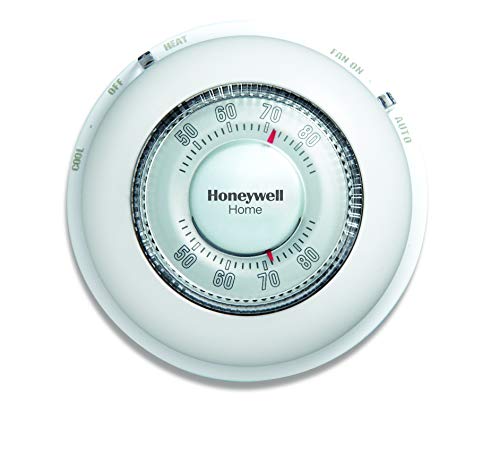 Best for simple mechanical replacementHoneywell Home The Round Manual Thermostat CT87N1001View on Amazon
Our Top Picks
Before choosing a replacement, it helps to know why a Honeywell smart thermostat stops powering on. Common causes include a tripped furnace or air handler breaker, a blown fuse on the control board, low or dead batteries in battery-powered models, and loose or miswired connections at the thermostat base. If the display is dark after checking the breaker and the wiring, a replacement may be the practical next step. The Ecobee Smart Thermostat Not Turning On: 6 Fixes That Work article covers similar power problems on another brand, and the Smart Thermostat Compatibility: C-Wires and HVAC Systems guide explains why the C-wire question matters before you buy.
Quick Comparison
| Product | Best for | Key feature |
|---|---|---|
| Honeywell Home X7B Smart Wi-Fi Programmable Thermostat | Smart home users who want app and voice control | 4.3″ customizable touchscreen and humidity monitoring |
| Honeywell Home X2P Programmable Thermostat | Basic single-stage heating and cooling systems | Simple 5-2 day programmable schedule |
| Honeywell Wireless WiFi Thermostat TH9320WF5003 | Owners who want a color display and Wi-Fi control | Color Wi-Fi interface and 7-day programming |
| Honeywell Home The Round Manual Thermostat | Users who want a non-smart, no-frills replacement | Classic round manual design with no Wi-Fi required |
Honeywell Home X7B Smart Wi-Fi Programmable Thermostat
Honeywell Home X7B Smart Wi-Fi Programmable Thermostat | Humidity Monitoring, 4.3" Customizable Touchscreen Display, Energy Star Certified, Works w/Alexa, Matter, Apple Home, Google
Best for: Smart home users who want app and voice control
This is the most feature-complete option in the group. It suits homes already running Alexa, Google Home or Apple Home, since the listing states compatibility with those ecosystems along with Matter support. It is a good fit if you want to monitor humidity and manage the schedule from a phone.
Key specs
- 4.3-inch customizable touchscreen display
- Humidity monitoring
- Wi-Fi connectivity
- Works with Alexa, Matter, Apple Home and Google
- Energy Star certified
Pros
- Broad smart home compatibility, including Matter
- Large, easy-to-read touchscreen
- Humidity monitoring adds useful context for comfort
Cons
- Requires a stable Wi-Fi connection for remote features
- Costs more to set up if your system lacks a C-wire
Bottom line: Choose this if you want a smart thermostat that fits into an existing voice assistant or app-based setup.
View on AmazonHoneywell Home X2P Programmable Thermostat
Honeywell Home X2P Programmable Thermostat, White | RTH20B Single-Stage, 1 Heat/1 Cool Compatibility, 5-2 Day Schedule
Best for: Basic single-stage heating and cooling systems
This model is a straightforward programmable thermostat for homes with a conventional single-stage system. It suits anyone who wants to replace a failed unit with something reliable and schedule-based without adding smart features.
Key specs
- Model RTH20B
- 1 heat / 1 cool compatibility
- 5-2 day programmable schedule
Pros
- Simple setup with a standard schedule
- Works with common single-stage systems
- No Wi-Fi setup needed
Cons
- No remote or voice control
- Limited to basic scheduling
Bottom line: A sensible choice if you want a dependable, non-smart replacement for a basic system.
View on AmazonHoneywell Wireless WiFi Thermostat TH9320WF5003
Honeywell Wireless WiFi Thermostat,7 Programmable | TH9320WF5003 WiFi Color Thermostat. Needs C Wire. Energy Star. 3.5”x4.5”
Best for: Owners who want a color display and Wi-Fi control
This color Wi-Fi model is aimed at households that want a visual interface and remote access. It requires a C-wire, so check your wiring before buying. It is a good middle ground between the basic programmable models and the fully featured smart options.
Key specs
- Model TH9320WF5003
- 7-day programming
- Wi-Fi connectivity
- Energy Star certified
- Requires a C-wire
Pros
- Color display is easy to read
- Remote control through Wi-Fi
- Energy Star certified
Cons
- Requires a C-wire, which many older homes lack
- Fewer smart ecosystem integrations than the X7B
Bottom line: Pick this if you have a C-wire and want a color Wi-Fi thermostat without the extra features of a top-tier model.
View on AmazonHoneywell Home The Round Manual Thermostat CT87N1001
Honeywell Home The Round Manual Thermostat, White | CT87N1001
Best for: Simple mechanical replacement
The Round is a manual, non-programmable thermostat that works without power-hungry electronics or Wi-Fi. It suits households that want a basic, low-maintenance replacement or a backup unit.
Key specs
- Model CT87N1001
- Manual, non-programmable operation
- Classic round design
Pros
- No batteries or Wi-Fi to manage
- Straightforward, familiar operation
- Good as a backup for smart units
Cons
- No scheduling or remote control
- Not suited to households that want energy-saving automation
Bottom line: A practical choice if you want something simple and do not need programming.
View on AmazonBuying Guide
Check your wiring and C-wire
Many smart and programmable Honeywell models need a common (C) wire to stay powered. Remove the cover and look for a wire labeled C or a spare terminal. If your system lacks one, look for a model that works without it or plan for an adapter. The C-wire question is one of the most common reasons a replacement fails to power up.
Good picks for this: Honeywell Home X2P Programmable Thermostat, Honeywell Home The Round Manual Thermostat
Confirm system compatibility
Check whether your furnace and air conditioner are single-stage or multi-stage, and whether you have a heat pump. The thermostat must match your equipment. A mismatch can prevent heating or cooling from working properly even if the display powers on.
Good picks for this: Honeywell Home X2P Programmable Thermostat, Honeywell Home X7B Smart Wi-Fi Programmable Thermostat
Decide between smart and non-smart features
Smart models offer app control, voice assistant integration and scheduling from anywhere. Non-smart models are simpler and need no Wi-Fi. Consider how often you change settings remotely before paying for connectivity you may not use.
Good picks for this: Honeywell Home X7B Smart Wi-Fi Programmable Thermostat, Honeywell Wireless WiFi Thermostat TH9320WF5003
Check your smart home ecosystem
If you use Alexa, Google Home or Apple Home, confirm the thermostat supports your platform before buying. Matter support can make future integrations easier. The Works with Google Home Smart Thermostat: 6 Things to Check Before You Buy (2026) article walks through compatibility checks in more detail.
Good picks for this: Honeywell Home X7B Smart Wi-Fi Programmable Thermostat
Consider display and usability
A color or large touchscreen display is easier to read and program, especially for older adults. Manual dials are simple but offer no scheduling. Choose an interface that matches how often you plan to adjust settings.
Good picks for this: Honeywell Wireless WiFi Thermostat TH9320WF5003, Honeywell Home X7B Smart Wi-Fi Programmable Thermostat
Think about scheduling needs
A 5-2 day schedule suits households with consistent weekday and weekend routines. A 7-day schedule gives more flexibility for irregular routines. A manual thermostat offers no scheduling at all, which may be fine for some homes.
Good picks for this: Honeywell Home X2P Programmable Thermostat, Honeywell Wireless WiFi Thermostat TH9320WF5003
Plan for installation and care
Turn off power at the breaker before removing the old thermostat. Label wires before disconnecting them, and take a photo for reference. Replace batteries on any battery-powered model once a year, and keep the thermostat away from direct sunlight and drafts for accurate readings. For wiring help, see the Honeywell Smart Thermostat Wiring: A Step-by-Step Guide for Beginners article. If you are unsure about electrical work, consult a licensed HVAC technician or electrician.
Good picks for this: Honeywell Home The Round Manual Thermostat, Honeywell Home X2P Programmable Thermostat
FAQ
Why won’t my Honeywell smart thermostat turn on?
The most common causes are a tripped breaker or furnace switch, a blown control board fuse, dead batteries in battery-powered models, or loose wiring at the base. Start by checking the breaker and the furnace power switch, then inspect the wires.
Can I fix a Honeywell thermostat that won’t power on myself?
Some issues, like a tripped breaker or dead batteries, are simple to fix. If the problem involves the control board, wiring or high-voltage components, consult a licensed HVAC technician or electrician.
Do I need a C-wire for a Honeywell smart thermostat?
Many smart and Wi-Fi models require a C-wire to supply continuous power. Some models are designed to work without one. Check the product specifications and your existing wiring before buying.
How do I know if my HVAC system is compatible with a new Honeywell thermostat?
Check whether your system is single-stage or multi-stage, whether it uses a heat pump, and how many wires are connected to your current thermostat. Compare these details against the product specifications.
Will a replacement thermostat fix a dead display?
Sometimes. If the old unit has failed internally, a replacement will restore power. If the display is dark because of a breaker or wiring issue, a replacement will not solve the underlying problem.
Should I choose a smart or non-smart Honeywell thermostat?
Choose a smart model if you want remote control and voice assistant integration. Choose a non-smart model if you prefer simplicity and do not need Wi-Fi features.
Conclusion
If your Honeywell smart thermostat is not turning on, start with the breaker, furnace switch and wiring before buying a replacement. If you do need a new unit, the Honeywell Home X7B suits households that want app and voice control, the X2P fits basic single-stage systems, the TH9320WF5003 suits owners with a C-wire who want a color Wi-Fi display, and The Round works as a simple manual replacement. Match the model to your wiring, equipment and daily needs.
Sources
- Guidance on thermostat settings, programmable thermostats and home heating and cooling efficiency (energy.gov)
- Energy Star certification criteria for smart and programmable thermostats (energystar.gov)
- Standards and technical resources on HVAC system design and controls (ashrae.org)
Before you buy: helpful guides
Related reading
About Claire Whitaker
Claire Whitaker is part of our editorial team and reviews and edits our smart home guides, checking product details against manufacturer specifications and owner feedback.





