
 By Owen Palmer
The right smart lock depends on your door and your living situation: a retrofit lock keeps your existing deadbolt and key, a full replacement deadbolt adds a keypad or fingerprint reader outside, and the connection type decides whether you can lock up from anywhere. Measure your door before you buy.
Types of Smart Locks
Smart locks fall into three main categories: retrofit locks that keep your existing deadbolt, full replacement deadbolts, and keypad-only or lever-handle models. Your choice depends on whether you rent or own, your door’s current hardware, and how much you want to change the look of your entryway.
Retrofit Locks
Retrofit locks attach to your existing deadbolt from the inside. You remove the interior thumb turn and install a motorized adapter that turns the deadbolt when you use your smartphone, a keypad, or a voice command. Your exterior key and keyhole remain unchanged. This is the most renter-friendly option because you can restore the original lock when you move out. Retrofit locks typically work with single-cylinder deadbolts and require a compatible tailpiece. Check the manufacturer’s list of compatible deadbolts before buying.
Full Replacement Deadbolts
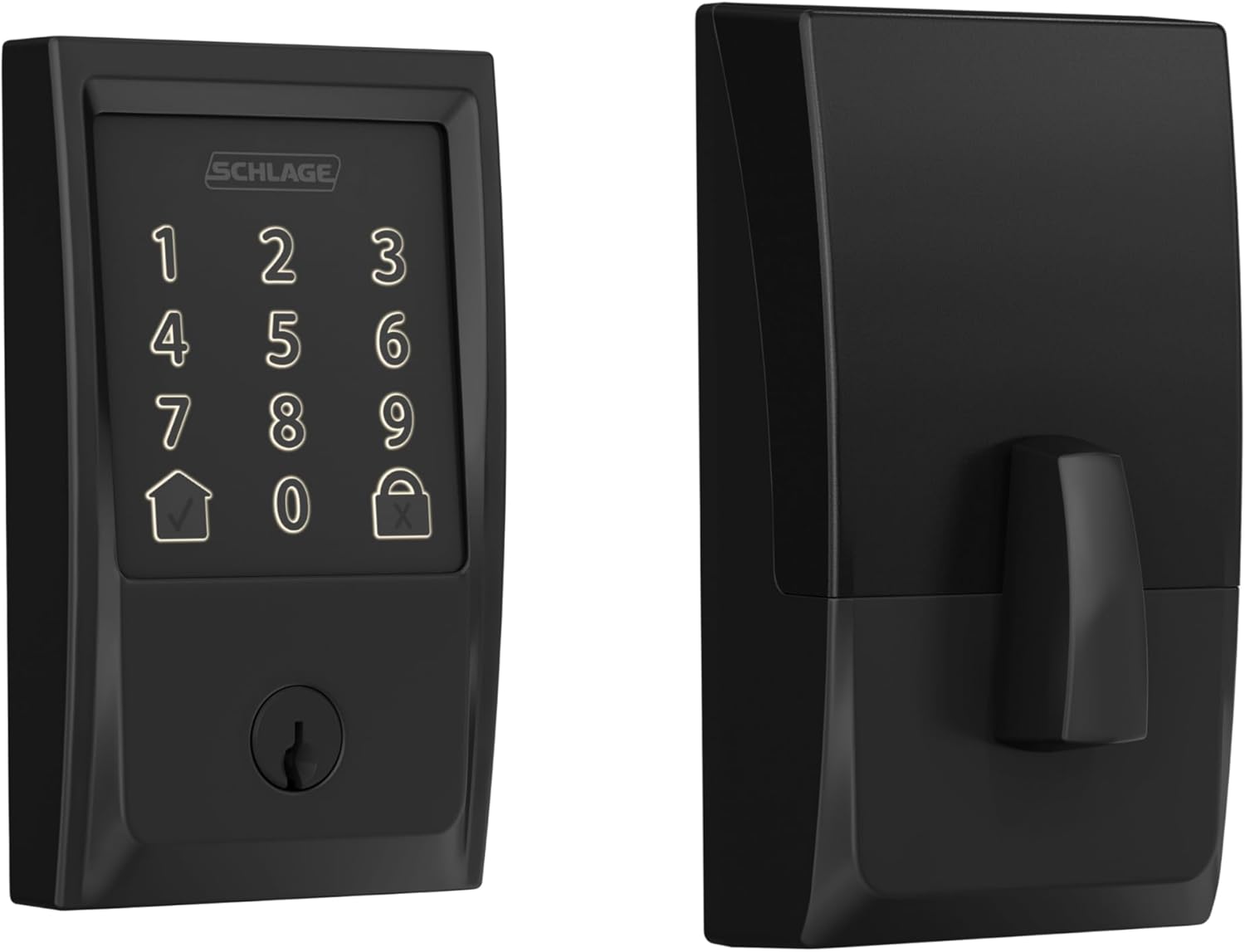
Full replacement deadbolts replace the entire lock assembly, including the exterior keyhole and interior thumb turn. They often include a built-in keypad or fingerprint reader on the outside. You get a fresh lock with modern security features, but installation requires removing the old deadbolt and possibly modifying the door. Many full replacement models support smart home standards like Matter, Thread, Z-Wave, or Wi-Fi. They are a permanent upgrade and may not be suitable for renters unless you have permission.
Keypad-Only and Lever Handles
Some smart locks are designed for doors that use a lever handle instead of a deadbolt, or for secondary doors like a side entry or garage. These locks integrate a keypad into the handle and often include a backup key or a mechanical override. They are less common for main front doors but can be convenient for family members who prefer a simple code entry.
Keypads, Fingerprints and Keys
How you unlock your door is a major consideration. Most smart locks offer multiple methods: a physical key, a numeric keypad, a fingerprint reader, or your smartphone via Bluetooth or Wi-Fi. Some models also support voice assistants through your smart home app.
Keypad Locks
Keypad locks let you enter a code to unlock the door. They are the most common smart lock type and work well for households with multiple people. You can create temporary codes for guests, service workers, or deliveries. Look for a lock with a backlit keypad for nighttime use. Some keypads are touch-sensitive rather than mechanical buttons, which can be easier to clean but may be less reliable in cold or wet weather.
Fingerprint Locks
Fingerprint readers add biometric convenience: you simply touch the sensor to unlock. They are faster than typing a code and work well if you have your hands full. However, fingerprint sensors can struggle with wet, dirty, or worn fingers. Some models combine fingerprint and keypad for redundancy. Check the manufacturer’s guidance on enrolling multiple fingerprints and whether the sensor works in cold climates.
Physical Key Backup
Many smart locks include a physical key override, either a traditional keyhole or a hidden key slot. This is essential if the battery dies or the electronics fail. For retrofit locks, your existing key remains the same. For full replacement locks, you receive new keys. Keep a spare key in a secure location outside the home (like a lockbox) or with a trusted neighbor. Some locks also have a mechanical keypad that works without power; these are rare but very reliable.
Connectivity
Smart locks connect to your home network using different wireless standards. The choice affects battery life, remote access, and compatibility with your smart home app and voice assistant.
| Standard | Typical Use | Pros | Cons |
|---|---|---|---|
| Bluetooth | Direct phone-to-lock | Low power, simple setup | Requires being near the lock; no remote access without a hub |
| Wi-Fi | Direct to router | Remote access without extra hub | Shorter battery life; may require a separate bridge |
| Z-Wave or Zigbee | Requires a hub | Reliable, long range, low power | Needs a compatible hub; less common in newer models |
| Thread / Matter | Mesh network via border router | Low power, interoperable, future-proof | Requires a Matter-compatible hub or border router |
If you want remote access without buying a separate hub, choose a lock with built-in Wi-Fi. Some locks reach Wi-Fi through a small bridge that plugs into an outlet near the door. For a lower-power option that works with your existing smart home system, look for Z-Wave, Zigbee, or Thread. Matter support is growing; check the device box or manufacturer page to confirm compatibility with your smart home app. For more on Matter, see our guide to Matter.
Auto-Lock and Auto-Unlock
Auto-lock and auto-unlock features add convenience but come with caveats. Auto-lock automatically locks the door after you leave, based on a timer or a sensor. Auto-unlock detects when you arrive and unlocks the door for you.
Auto-Lock
Auto-lock uses a timer that starts when the door is closed. You set the delay, typically between 30 seconds and several minutes. This ensures you never forget to lock the door. However, if the door is not fully closed, the lock may not engage. Some locks include a door position sensor that prevents auto-lock if the door is ajar. Check whether the sensor is built-in or requires a separate accessory. Auto-lock can be annoying if you step out briefly to grab something from the car; you can usually disable it temporarily from the app.
Auto-Unlock (Geofencing)
Auto-unlock uses your phone’s location to detect when you approach your home. When you cross a virtual boundary, the lock unlocks. This works well if you carry your phone, but it can be unreliable if your phone’s GPS drifts or if multiple people use the lock. Some locks require you to confirm on your phone before unlocking, adding a step for security. Location tracking can also add to your phone’s battery use. Many users disable auto-unlock and instead use a keypad or voice command.
Batteries and Backups
Smart locks run on batteries, typically four AA or two CR123A cells. Battery life varies from a few months to over a year depending on connectivity, usage, and temperature. Wi-Fi locks drain faster than Bluetooth or Thread locks. You should receive low-battery alerts from the app. When the battery is low, the lock may still work for a limited number of operations, but you should replace batteries promptly.
Low-Battery Backup Options
If the battery dies completely, you need a way to unlock the door. Most locks include a physical key override. Some have a 9-volt battery contact on the exterior that lets you temporarily power the lock to enter a code. Others have an emergency USB-C port on the outside that accepts power from a portable power bank. Check which backup method your lock offers. Always keep a spare key outside the home in a secure lockbox or with a neighbor.
Will It Fit Your Door
Before buying a smart lock, measure your door to ensure compatibility. The two critical measurements are backset and door thickness.
Backset
Backset is the distance from the edge of the door to the center of the deadbolt hole. Standard backsets are 2-3/8 inches (60 mm) or 2-3/4 inches (70 mm). Most smart locks adjust to both, but some are fixed. Measure your existing deadbolt to confirm. If you have a non-standard backset, you may need a special adapter or a different lock.
Door Thickness
Standard residential doors are 1-3/8 inches (35 mm) or 1-3/4 inches (45 mm) thick. Smart locks usually accommodate a range, but check the specifications. If your door is thinner or thicker, the lock may not fit properly. For retrofit locks, the interior adapter must clear the door thickness and any existing decorative trim. For full replacement locks, the exterior keypad or fingerprint reader must sit flush against the door surface.
Bore Hole Size
The hole drilled for the deadbolt is typically 2-1/8 inches (54 mm) in diameter. Most smart locks fit this standard. If your door has an older or non-standard hole, you may need to drill a new one or use a trim plate. Renters should avoid drilling; retrofit locks are a better choice.
For a detailed walkthrough of measuring your door, see our smart locks overview.
Renters
Renters face unique constraints when installing a smart lock. Your lease may prohibit changing the lock, or you may need permission from your landlord. Some leases require you to provide a key to the landlord for emergency access. Retrofit locks are the best option because they leave the exterior key unchanged and can be removed without altering the door. Full replacement locks require swapping the deadbolt, which may violate your lease. Always check your lease and talk to your landlord before installing any lock. If you install a smart lock without permission, you risk losing your security deposit or being charged for repairs.
Even with a retrofit lock, ensure the lock does not interfere with the landlord’s ability to enter. Some retrofit locks allow you to create temporary codes for maintenance visits, which can be more convenient than leaving a physical key. You can also set the lock to auto-lock after a certain time, preventing accidental unsecured doors.
Security Tips
A smart lock is only as secure as its installation and configuration. Follow these tips to keep your home safe.
- Use a strong, unique code for the keypad. Avoid obvious codes like 1234 or your birth year.
- Enable two-factor authentication on your smart home app if available.
- Keep the lock’s firmware updated. Most apps notify you of updates.
- Do not rely solely on auto-unlock; it can be spoofed or fail. Use a keypad or key as primary.
- Install the lock properly. A loose strike plate or misaligned deadbolt can be pried open. Follow the manufacturer’s instructions and use the provided screws.
- Consider a lock with a built-in alarm that sounds if someone tries to force the door.
- If you use a Wi-Fi lock, secure your home network with a strong password and consider a separate IoT network.
- For maximum security, combine your smart lock with a video doorbell. See our guide to choosing a video doorbell for tips on integrating both.
Top Picks to Compare
If you would rather start from a short list, these are popular options on Amazon for this search. Check each listing’s details, size and current price before you buy.




FAQ
Can I install a smart lock myself?
Yes, most smart locks are designed for DIY installation. Retrofit locks are especially easy because they only attach to the interior side. Full replacement locks require removing the old deadbolt and may involve drilling if your door has non-standard holes. Follow the manual step by step. If you are unsure, hire a licensed locksmith.
Do smart locks work with all doors?
Smart locks work with most standard residential doors that have a deadbolt. They may not fit doors with unusual thickness, metal doors with no deadbolt hole, or doors with a mortise lock. Measure your door’s backset, thickness, and bore hole before purchasing. For sliding glass doors or French doors, look for specialized smart locks designed for those types.
What happens if the Wi-Fi goes out?
If your Wi-Fi goes out, a Bluetooth or Thread lock that does not rely on a hub may still work with your phone when you are nearby. A Wi-Fi lock that requires cloud connectivity may lose remote access, but you can still use the keypad, fingerprint reader, or physical key. The lock’s local functions (keypad, key) always work regardless of internet status.
Are smart locks safe from hacking?
Smart locks use encryption to protect communication. The risk of a remote hack is low for well-known brands, but no device is completely invulnerable. Use strong passwords, keep firmware updated, and disable any unnecessary features like remote unlock if you do not need them. Physical security (the lock’s construction and installation) is more important than digital security for most burglars.
Choosing the right smart lock depends on your door, your living situation, and how you want to interact with it. Retrofit locks are ideal for renters, while full replacement locks offer a complete upgrade. Consider connectivity, battery backup, and auto-lock features carefully. Measure your door before buying, and always keep a physical key backup. With the right lock, you can enjoy the convenience of keyless entry without sacrificing security.
About Owen Palmer
Owen Palmer is part of our editorial team and reviews and edits our smart home guides, checking product details against manufacturer specifications and owner feedback.







