By Claire Whitaker
Updated November 2026
Choosing a smart plug with app control comes down to a few practical questions: does it work with the voice assistant you already use, can you schedule it from your phone, and does the app setup go smoothly? This guide compares seven widely sold Wi-Fi plugs on those points. Each pick is judged on voice assistant support, scheduling tools, ease of pairing, and how well it suits a particular need, such as a lamp, a fan, or a whole room of devices. Specs are taken from manufacturer listings, and owner feedback patterns are noted where they are consistent.
Our top picks at a glance
- 1
 TOP CHOICEBest overallGHome Smart Plug, WiFi Smart Plugs that Work with Alexa and Google HomeView on Amazon
- 2
 TOP CHOICEBest for multi-room setupsEIGHTREE Smart Plug WiFi Outlet Works with Alexa & Google Home, 15A, 4-PackView on Amazon
- 3
 TOP CHOICEBest for Matter compatibilityLinkind Matter Smart Plug, Work with Apple Home, Alexa, Siri, Google HView on Amazon
- 4
 Best for reliable schedulingKasa Smart Plug HS103P4, Smart Wi-Fi Outlet, Touch Actuator, Works witView on Amazon
- 5
 Best budget pickGovee Smart Plug, WiFi Outlet Compatible with Alexa & Google Assts, 4View on Amazon
- 6
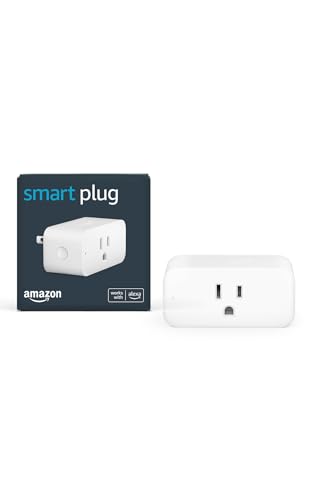 Best for Amazon householdsAmazon Smart Plug, Works with Alexa, Simple Setup, Endless PossibilitiesView on Amazon
- 7
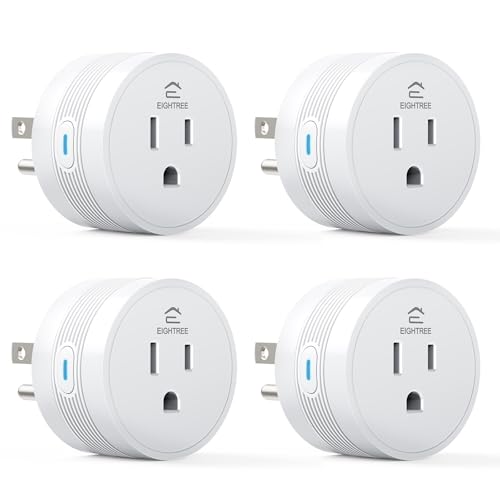 Best for high-load appliancesEIGHTREE 15A Smart Plug Works with Alexa & Google Home, Smart Outlet 4View on Amazon
Our Top Picks
Quick Comparison
| Product | Best for | Key feature |
|---|---|---|
| GHome Smart Plug | General use | Alexa and Google Home support with timer |
| EIGHTREE Smart Plug 4-Pack | Multi-room setups | Four plugs with remote control |
| Kasa Smart Plug HS103P4 | Scheduling | Touch control and no hub required |
| Linkind Matter Smart Plug | Mixed ecosystems | Matter support with Apple Home and Siri |
| EIGHTREE 15A Smart Plug 4-Pack | High-load devices | 15A rating for heavier appliances |
| Govee Smart Plug 4-Pack | Budget setups | Four plugs with 15A Wi-Fi control |
| Amazon Smart Plug | Alexa households | Simple setup within the Alexa app |
GHome Smart Plug, WiFi Smart Plugs that Work with Alexa and Google Home
GHome Smart Plug, WiFi Smart Plugs that Work with Alexa and Google Home | WiFi Smart Outlet Timer Indoor Light Timers with APP Remote Control, 2.4GHz WiFi Only, No Hub Required, ETL FCC Listed, White
Best for: General use with Alexa or Google Home.
This plug suits anyone who wants a straightforward smart plug with app scheduling for a lamp, fan, or small appliance.
Key specs:
- Wi-Fi connectivity
- Works with Alexa and Google Home
- Built-in timer
Pros:
- Simple app pairing
- Clear scheduling options
- Works with two assistants
Cons:
- Single-plug purchase only
- Needs a 2.4 GHz network
Bottom line: A solid default choice for most people who want one reliable plug.
View on AmazonEIGHTREE Smart Plug WiFi Outlet Works with Alexa & Google Home, 15A, 4-Pack
EIGHTREE Smart Plug WiFi Outlet Works with Alexa & Google Home, 15A, 4-Pack | Smart Home Socket with Remote Control & Timer Function, WiFi Plug for household appliances, No Hub Required, 2.4GHz WiFi O
Best for: Multi-room setups that need several plugs.
Households controlling lamps, fans, and holiday lights across several rooms will find the four-pack practical.
Key specs:
- 15A rating
- Works with Alexa and Google Home
- Includes remote control
Pros:
- Four plugs in one purchase
- Remote works without the app
- Consistent voice assistant support
Cons:
- Naming plugs takes extra effort
- App layout can feel basic
Bottom line: Best for buyers outfitting several rooms at once.
View on AmazonKasa Smart Plug HS103P4, Smart Wi-Fi Outlet, Touch Actuator, Works with Alexa, Echo, Google Home, No Hub
Kasa Smart Plug HS103P4, Smart Wi-Fi Outlet, Touch Actuator, Works with Alexa, Echo, Google Home, No Hub Required, 15 Amp, UL Certified, 4-Pack, White
Best for: Users who rely on detailed scheduling.
This plug suits people who want routines and schedules managed through a mature app, without buying a separate hub.
Key specs:
- Wi-Fi with no hub required
- Works with Alexa, Echo, and Google Home
- Touch actuator on the plug
Pros:
- Flexible scheduling
- No hub needed
- Touch control on the unit
Cons:
- Pricier than basic options
- Some users report occasional reconnects
Bottom line: A strong pick for scheduling-focused households.
View on AmazonLinkind Matter Smart Plug, Work with Apple Home, Alexa, Siri, Google Home | Smart Outlet Timer & Schedule
Linkind Matter Smart Plug, Work with Apple Home, Alexa, Siri, Google Home | Smart Outlet Timer & Schedule, Smart Home Automation, 15A/1800W, APP Remote Control, ETL Certified, 2.4G Wi-Fi Only, 4 Pack
Best for: Mixed ecosystems that include Apple Home.
Buyers who use Apple Home, Alexa, and Google together benefit from Matter support, which is designed to work across platforms.
Key specs:
- Matter compatibility
- Works with Apple Home, Alexa, Siri, and Google Home
- Built-in timer and schedule
Pros:
- Cross-platform Matter support
- Works with Siri
- Scheduling built in
Cons:
- Matter setup needs a compatible hub in some homes
- Fewer owner reviews than older models
Bottom line: Ideal if you want one plug that works across Apple, Amazon, and Google platforms.
View on AmazonEIGHTREE 15A Smart Plug Works with Alexa & Google Home, Smart Outlet 4 pack | WiFi Plugs for Smart Home
EIGHTREE 15A Smart Plug Works with Alexa & Google Home, Smart Outlet 4 pack | WiFi Plugs for Smart Home, Voice & App Remote Control, Smart Outlet Timer, No Hub Required, FCC & ETL Certified, 2.4GHz On
Best for: Higher-load appliances.
The 15A rating makes this four-pack a sensible choice for heavier devices such as space heaters or window fans, within the rated limit.
Key specs:
- 15A rating
- Four-pack
- Works with Alexa and Google Home
Pros:
- Higher amperage rating
- Four plugs included
- Voice assistant support
Cons:
- Bulkier than slim plugs
- Blocks a second outlet on some strips
Bottom line: Pick this for heavier loads when you need several units.
View on AmazonGovee Smart Plug, WiFi Outlet Compatible with Alexa & Google Assts, 4 pcs | Smart Home Plugs, 15A WiFi
Govee Smart Plug, WiFi Outlet Compatible with Alexa & Google Assts, 4 pcs | Smart Home Plugs, 15A WiFi Outlet, Timer Function and Group Controller, No Hub Required, ETL & FCC Certified, 2.4G Only
Best for: Budget-conscious buyers who need several plugs.
This four-pack suits renters and first-time smart home users who want to start small without a large commitment.
Key specs:
- 15A Wi-Fi rating
- Four plugs per pack
- Compatible with Alexa and Google Assistant
Pros:
- Budget-friendly multi-pack
- Straightforward app setup
- Works with two assistants
Cons:
- Fewer advanced scheduling features
- Build feel is lighter
Bottom line: A practical starter pick for basic app control.
View on AmazonAmazon Smart Plug, Works with Alexa, Simple Setup, Endless Possibilities
Amazon Smart Plug, Works with Alexa, Simple Setup, Endless Possibilities
Best for: Households already using Alexa.
Users who manage their home mainly through Alexa will find setup and routines tightly integrated.
Key specs:
- Works with Alexa
- Wi-Fi connected
- Simple app-based setup
Pros:
- Easy Alexa integration
- Quick setup
- Routines work well
Cons:
- Limited support outside Alexa
- Fewer advanced features
Bottom line: Best if your whole smart home runs on Alexa.
View on AmazonBuying Guide
Voice Assistant Compatibility
Confirm which assistant you use before buying. Alexa-only plugs will not respond to Google Assistant, while Matter-certified models are designed to work across more platforms. Check the listing for the exact assistants named.
Good picks for this: Linkind Matter Smart Plug, GHome Smart Plug
Scheduling and Routines
Look for an app that supports both recurring timers and sunrise or sunset triggers. Scheduling matters most for lamps, fans, and holiday lights that should turn on and off without manual input.
Good picks for this: Kasa Smart Plug HS103P4, Amazon Smart Plug
Load Rating
Check the amperage rating against the device. Many standard plugs are rated at 15A, which suits most lamps and small appliances. Avoid using any smart plug with devices that draw more than its rated limit.
Good picks for this: EIGHTREE 15A Smart Plug 4-Pack, Govee Smart Plug 4-Pack
Setup and Network Requirements
Most Wi-Fi plugs need a 2.4 GHz network rather than 5 GHz. Confirm your router broadcasts 2.4 GHz before buying, and keep the plug within a reasonable range of your router for stable control.
Good picks for this: GHome Smart Plug, EIGHTREE Smart Plug 4-Pack
Multi-Room Coverage
If you need several plugs, a multi-pack saves setup time and usually lowers the per-unit cost. Plan which devices go in which room and name each plug in the app before you start the routines.
Good picks for this: EIGHTREE Smart Plug 4-Pack, Govee Smart Plug 4-Pack
FAQ
Do smart plugs with an app need a hub?
Most Wi-Fi smart plugs connect directly to your router and do not need a hub. Matter-based plugs may use a hub or border router in some homes, depending on your existing ecosystem. Check the listing for hub requirements.
Can I control a smart plug away from home?
Yes. Once the plug is paired in its app and connected to Wi-Fi, you can switch it on or off from a phone on cellular data. Remote access depends on your router and the app working in the background.
Will a smart plug work with a fan or space heater?
It can, as long as the device draws less than the plug’s rated amperage. Space heaters draw a lot of power, so confirm the wattage on the heater label. Consult an electrician if you are unsure about safe loads.
What happens if the Wi-Fi goes down?
Most plugs keep their last state and can still be switched manually. Scheduled routines may pause until the connection returns. Some models also offer local control through a physical button or remote.
Conclusion
For most people, the GHome Smart Plug offers a balanced mix of assistant support and scheduling. Households with several rooms should look at the EIGHTREE four-pack, while Apple and Google users may prefer the Linkind Matter model. Heavier appliances point toward the 15A EIGHTREE pack, and budget buyers can start with the Govee four-pack. Match the plug to your assistant and your load, and the setup will go smoothly.
Sources
- Guidance on how smart plugs and standby power affect home energy use (energy.gov)
- Electrical safety recalls and product safety guidance for plugs and outlets (cpsc.gov)
Before you buy: helpful guides
- iSelector Smart Plug App: Setup, Pairing and Troubleshooting Steps
- Etekcity Smart Plug App: Setup, Pairing and Fixes Step by Step
- Wi-Fi Smart Plug App Setup: A Step-by-Step Guide for Beginners
- GE Smart Plug App: Setup, Pairing and Troubleshooting Steps for Beginners
- Tan Tan Smart Plug App: Setup, Pairing and Troubleshooting Steps
Related reading
About Claire Whitaker
Claire Whitaker is part of our editorial team and reviews and edits our smart home guides, checking product details against manufacturer specifications and owner feedback.