By Claire Whitaker
Updated November 2026
If you already run a Z-Wave hub and want a smart thermostat z wave models can plug into without a cloud workaround, the choice narrows quickly. This list focuses on thermostats that use Z-Wave as their native radio, so they pair with a hub you may already own. We weighed four factors: how directly the thermostat supports Z-Wave, whether it works with common security and home automation panels, the depth of its scheduling and humidity features, and the consistency of owner feedback on setup and reliability. We did not test these units ourselves; the comparison draws on published specifications, brand track record and patterns in owner reports.
Our top picks at a glance
- 1
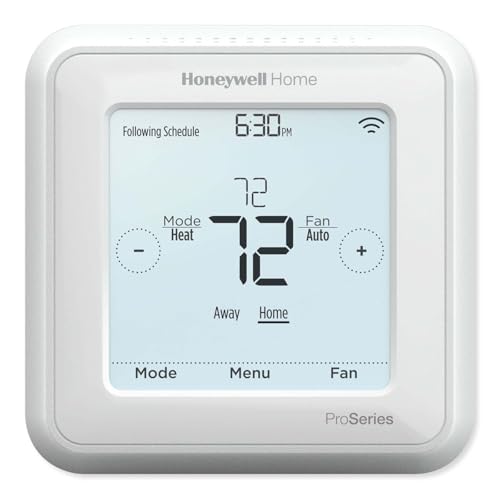 TOP CHOICEBest overallHoneywell Home TH6320ZW2007/U Z-Wave T6 Pro Programmable Touchscreen ThermostatView on Amazon
- 2
 Best for security panel owners2GIG STZ1-345 Z-Wave 700 Thermostat for Security PanelsView on Amazon
- 3
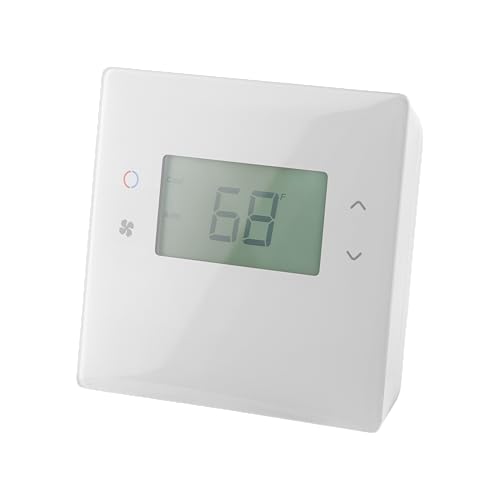 Best for simple Z-Wave controlZ-Wave TBZ500 Smart ThermostatView on Amazon
- 4
 Best for humidity-aware comfort2GIG Smart Z-Wave Plus Model 2GIG-STZ-1 Programmable ThermostatView on Amazon
Our Top Picks
Quick Comparison
| Product | Best for | Key feature |
|---|---|---|
| Honeywell Home TH6320ZW2007/U Z-Wave T6 Pro | Overall Z-Wave thermostat use | Touchscreen with SmartStart setup |
| 2GIG STZ1-345 Z-Wave 700 Thermostat | Security panel owners | Z-Wave 700 Series compatibility |
| Z-Wave TBZ500 Smart Thermostat | Simple Z-Wave control | Straightforward Z-Wave integration |
| 2GIG Smart Z-Wave Plus Model 2GIG-STZ-1 | Humidity-aware comfort | Humidity sensing and control |
Honeywell Home TH6320ZW2007/U Z-Wave T6 Pro Programmable Touchscreen Thermostat
Honeywell Home TH6320ZW2007/U Z-Wave T6 Pro Programmable Touchscreen Thermostat with SmartStart, Low Voltage, UWP Mounting System, Cover Plate, Color – White
Best for: Overall Z-Wave thermostat use
This model suits homeowners who want a full-color touchscreen thermostat that speaks Z-Wave natively and can be set up with a low-voltage wiring plan. It fits well in households that want a familiar Honeywell interface alongside hub-based automation.
Key specs
- Z-Wave native radio for hub integration
- Low-voltage wiring configuration
- Touchscreen interface with SmartStart support
- Includes UWP mounting system and cover plate
Pros
- Touchscreen is easy to read and navigate at a glance
- SmartStart simplifies first-time network inclusion
- Mounting system helps with uneven wall surfaces
Cons
- Owners often report that programming depth takes time to learn
- Requires a compatible Z-Wave controller for full automation
Bottom line: A strong default pick for Z-Wave households that want a polished touchscreen and dependable hub pairing.
View on Amazon2GIG STZ1-345 Z-Wave 700 Thermostat for Security Panels
2GIG STZ1-345 Z-Wave 700 Thermostat for Security Panels GC2, GC3, GC2e | Z-Wave 700 Series | 345 MHz Compatibility | Programmable Thermostat | Heat & Cool Control | LCD Display | Fan Control
Best for: Security panel owners
Built for the 2GIG security ecosystem, this thermostat is aimed at people who already run a 2GIG panel and want heating and cooling control inside the same system. Owners who value one app and one platform tend to find it a natural fit.
Key specs
- Z-Wave 700 Series platform
- 345 MHz compatibility per the listing
- Heat and cool control with fan control
- LCD display
Pros
- Designed to work within the 2GIG panel environment
- Covers heat, cool and fan control in one unit
- Z-Wave 700 Series platform supports newer device protocols
Cons
- Limited appeal outside the 2GIG ecosystem
- Owners sometimes report that advanced scheduling options are more basic than touchscreen models
Bottom line: The most logical choice for anyone who already owns a compatible 2GIG security panel.
View on AmazonZ-Wave TBZ500 Smart Thermostat
Z-Wave TBZ500 Smart Thermostat
Best for: Simple Z-Wave control
This is a good match for users who want a direct Z-Wave thermostat without extra layers of features. It suits smaller homes or secondary zones where a focused set of heating and cooling controls is enough.
Key specs
- Z-Wave connectivity for hub-based control
- Designed for standard residential heating and cooling
Pros
- Straightforward feature set is easier to learn
- Works directly with Z-Wave controllers
- Suits secondary zones or simpler installs
Cons
- Fewer advanced features than touchscreen options
- Owners should confirm wiring and system compatibility before purchase
Bottom line: Best for buyers who want reliable Z-Wave control without a lot of extra functions.
View on Amazon2GIG Smart Z-Wave Plus Model 2GIG-STZ-1 Programmable Thermostat
2GIG Smart Z-Wave Plus Model 2GIG-STZ-1 Programmable Thermostat, Humidity Sensing and Control, SmartStart Support, S2 Authentication Security, Fixed Format Display, Auto/On Fan Mode
Best for: Humidity-aware comfort
This thermostat suits homes where humidity control matters as much as temperature, such as older houses or climates with muggy summers. Its SmartStart support and secure inclusion make it a practical choice for Z-Wave Plus networks.
Key specs
- Z-Wave Plus platform
- Humidity sensing and control
- SmartStart support
- S2 Authentication security
- Fixed format display with Auto/On fan mode
Pros
- Humidity sensing adds comfort beyond temperature alone
- S2 Authentication supports secure device inclusion
- Auto and On fan modes cover common preferences
Cons
- Fixed format display is less flexible than a touchscreen
- Owners may need to check hub compatibility for full feature use
Bottom line: A solid pick when humidity control and secure Z-Wave Plus pairing are priorities.
View on AmazonBuying Guide
Confirm Z-Wave Compatibility With Your Hub
Not every Z-Wave device works with every controller equally well. Check whether your hub supports the thermostat’s Z-Wave generation (Z-Wave Plus and Z-Wave 700 Series are the current common standards) and confirm the device class it reports as. A mismatch often shows up as missing functions rather than a total failure, so verify before buying.
Good picks for this: Honeywell Home TH6320ZW2007/U Z-Wave T6 Pro, 2GIG STZ1-345 Z-Wave 700 Thermostat
Check Your Wiring and C-Wire Situation
Many smart thermostats need a common wire (C-wire) to power the display and radio continuously. Look at the wires behind your current thermostat; if you see only four or five conductors without a blue or black wire labeled C, you may need a workaround or an adapter kit. Confirm your system type (heat pump, gas furnace, baseboard) before ordering.
Good picks for this: Z-Wave TBZ500 Smart Thermostat, 2GIG Smart Z-Wave Plus Model 2GIG-STZ-1 Programmable Thermostat
Decide Between Touchscreen and Fixed Display
Touchscreen models are easier for scheduling and status checks, especially for households with several users. Fixed displays are simpler and often more readable in bright light, but they limit how much you can see at once. Think about who will adjust the thermostat most often.
Good picks for this: Honeywell Home TH6320ZW2007/U Z-Wave T6 Pro, 2GIG Smart Z-Wave Plus Model 2GIG-STZ-1 Programmable Thermostat
Look for Humidity Sensing If You Need It
Humidity sensing lets some thermostats coordinate with dehumidification or humidification equipment. If your home runs damp in summer or dry in winter, this feature can matter more than extra scheduling options. Check whether the model senses humidity on its own or needs an external sensor.
Good picks for this: 2GIG Smart Z-Wave Plus Model 2GIG-STZ-1 Programmable Thermostat
Match the Ecosystem You Already Use
If you run a security panel, choosing a thermostat from the same ecosystem reduces setup friction and keeps alerts in one app. If your hub is a general home automation controller, a standalone Z-Wave thermostat may integrate more flexibly. Consider how you expect your system to grow over the next few years.
Good picks for this: 2GIG STZ1-345 Z-Wave 700 Thermostat, Z-Wave TBZ500 Smart Thermostat
Consider Setup and Inclusion Method
Look for support for SmartStart or similar inclusion methods, which let the hub add the device by scanning a code rather than pressing multiple buttons in sequence. Secure inclusion using S2 Authentication also helps protect the device during pairing. Owners often report that these features save time during initial setup.
Good picks for this: Honeywell Home TH6320ZW2007/U Z-Wave T6 Pro, 2GIG Smart Z-Wave Plus Model 2GIG-STZ-1 Programmable Thermostat
Plan for Mounting and Cover Plates
Measure your existing wall plate and check whether the new thermostat needs a mounting bracket or cover plate to fit cleanly. Some kits include adapter plates for older or uneven walls. Keep the original wall anchors in mind if you are replacing a unit with a different footprint. For another angle, check out 5 Best Smart Thermostats for Google Home Options Compared (2026).
Good picks for this: Honeywell Home TH6320ZW2007/U Z-Wave T6 Pro, Z-Wave TBZ500 Smart Thermostat
FAQ
What does Z-Wave mean for a thermostat?
Z-Wave is a low-power wireless protocol that lets devices talk to a central hub. A Z-Wave thermostat can be controlled, scheduled and monitored through that hub rather than through a separate cloud account, which can simplify integration with other devices in the house.
Do I need a Z-Wave hub to use a Z-Wave thermostat?
Yes, in most cases. A Z-Wave thermostat needs a compatible Z-Wave controller or hub to join the network and be managed. Without one, you may still be able to use basic local controls on the unit itself.
Do Z-Wave thermostats need a C-wire?
Many do, because the display and radio draw continuous power. Some models run on battery or harvest power differently, but most manufacturers specify C-wire requirements in their installation documents. Check the specifications before you buy.
Can Z-Wave thermostats work with Alexa or Google Home?
Often yes, but the connection usually runs through a hub that bridges Z-Wave to voice assistants. Confirm that your hub supports the assistant you use and that the thermostat’s device class is recognized.
Is Z-Wave more reliable than Wi-Fi for thermostats?
Z-Wave runs on a separate radio band, so it does not compete with Wi-Fi traffic, and owners often report stable local control. Reliability still depends on mesh coverage, hub quality and installation, so results vary by home.
Should I hire a professional to install a smart thermostat?
For simple swaps with a compatible wiring setup, many homeowners install these units themselves. If your system is a heat pump, has high-voltage baseboard heat, or you are unsure about wiring, consult a licensed HVAC technician or electrician before proceeding.
Conclusion
For most Z-Wave households, the Honeywell Home TH6320ZW2007/U Z-Wave T6 Pro is a sensible default thanks to its touchscreen and straightforward hub pairing. If you already own a 2GIG security panel, the 2GIG STZ1-345 keeps everything in one ecosystem. The Z-Wave TBZ500 suits buyers who want focused, no-frills control, and the 2GIG Smart Z-Wave Plus Model 2GIG-STZ-1 is the better match when humidity sensing matters. Verify hub compatibility and wiring first, and the right pick usually becomes clear.
Sources
- Guidance on programmable and smart thermostats and how scheduling affects home energy use (energy.gov)
- Safety certification standards and what listing marks indicate for residential electrical devices (ul.com)
- Background on wireless communication standards relevant to low-power home device networks
Related reading
- Best Smart Products for Home Z Wave Devices (2026): Which Should You Choose?
- Works with Google Home Smart Thermostat: 6 Things to Check Before You Buy (2026)
- Wiring a Smart Thermostat: A Step-by-Step Guide for Beginners
- Vivint Smart Thermostat Manual: Setup and Settings Guide (2026)
- Top 6 Benefits of a Smart Thermostats for Your Home in 2026
About Claire Whitaker
Claire Whitaker is part of our editorial team and reviews and edits our smart home guides, checking product details against manufacturer specifications and owner feedback.