 By Claire Whitaker
Updated November 2026
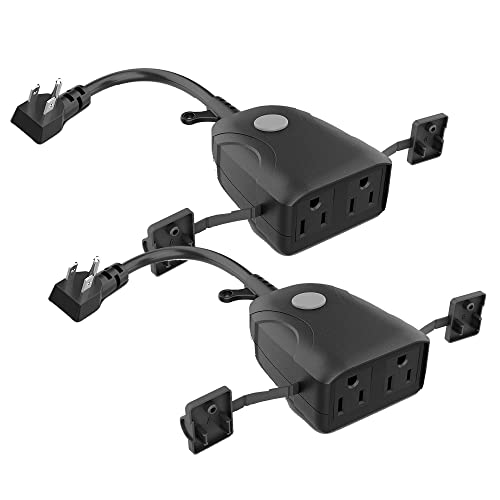
If you want to know how does smart plug works in practice, the short answer is that it switches power to whatever is plugged into it, controlled from your phone or a voice assistant. Wi-Fi smart plugs are the simpler pick for most households because they connect straight to your router with no extra hardware. Zigbee smart plugs suit larger setups with many devices, since they can act as range extenders and keep working when internet access drops, provided you have a compatible hub.
| Criteria | Wi-Fi Smart Plug | Zigbee Smart Plug |
|---|---|---|
| Hub required | No | Yes (Zigbee hub or compatible bridge) |
| Setup method | Manufacturer app, then pairing | Hub app, then device pairing |
| Local control without internet | Usually no | Yes, through the hub |
| Mesh coverage | Limited | Strong, each plug relays signals |
| Best for | Single rooms and quick installs | Whole-home automation |
How Each Type Connects to Your Network
A Wi-Fi smart plug contains a small radio and a relay. After you pair it through the manufacturer app, it joins your 2.4 GHz network and listens for commands from a cloud server, which passes them along when you tap a button or ask your assistant. Winner for simplicity: Wi-Fi, because it needs nothing beyond your router.
A Zigbee plug uses a lower-power mesh protocol and talks to a local hub instead of your router. Commands travel from the app to the hub, then to the plug, often without leaving your house. Winner for reliability on a big network: Zigbee.
Control Options and Voice Assistant Support
Both types work with Alexa and Google Home, and many also support Apple Home through a bridge or built-in certification. Wi-Fi plugs typically offer schedules, energy readings on select models and away-mode randomization directly in their own app. Zigbee plugs depend on the hub’s feature set. Winner for out-of-the-box features: Wi-Fi.
Most setup problems come from network settings rather than the plug itself. If you are working through a pairing failure, Kasa Smart Plug Not Connecting: 6 Fixes That Work (2026) covers the common causes, and How to Connect Smart Plug to Wi-Fi: A Step-by-Step Guide for Beginners walks through the basics.
Power Handling and Electrical Safety
Check the rated load printed on the plug, which is usually 15 amps for standard US models. Do not connect space heaters or high-draw appliances to any smart plug unless the manufacturer explicitly rates it for that load. Winner for safe use with lamps, fans and small electronics: both types perform equally when the rating is respected.
For a broader view of what makes a plug suitable for your setup, How to Evaluate Smart Plugs Before You Buy lists the specifications worth comparing. If you are unsure about wiring or load limits in your home, consult a licensed electrician.
Pros & Cons
Wi-Fi Smart Plug
- Pro: No hub needed, so setup takes minutes.
- Pro: Built-in scheduling and app features on most models.
- Con: Depends on your router and internet connection for remote commands.
Zigbee Smart Plug
- Pro: Local control keeps working during internet outages.
- Pro: Each plug strengthens the mesh across the home.
- Con: Requires a compatible hub before the plug does anything.
Which Should You Choose?
- Choose a Wi-Fi plug if you have a few lamps or fans to automate and want the fastest setup. Try the View on Amazon.
- Choose a Zigbee plug if you plan to automate many devices across several floors and already use or want a hub. Try the View on Amazon.
- Choose a Wi-Fi plug if your router covers the whole house and you do not want another device on the network.
- Choose a Zigbee plug if your Wi-Fi signal is weak in certain rooms and you need the mesh to fill gaps.
FAQ
Does a smart plug need the internet to work?
Wi-Fi plugs generally need internet access for remote control, though local schedules may keep running. Zigbee plugs can often be controlled locally through their hub when the internet is down.
Can a smart plug turn off automatically?
Yes. Most models support timers, countdowns and schedules set in the app, and many can be triggered by voice commands or routines in Alexa or Google Home.
Can I use a smart plug with a space heater?
This is not recommended unless the manufacturer rates the plug for that load. Space heaters draw significant current and can overheat ordinary plugs, so consult the product labeling and a licensed electrician before deciding.
Conclusion
For most single-room automation, a Wi-Fi smart plug answers how does smart plug works in the simplest way, with no extra hardware to buy. If you are building a whole-home system with many devices, a Zigbee plug and hub will give you more reliable local control and better coverage over time.
About Claire Whitaker
Claire Whitaker is part of our editorial team and reviews and edits our smart home guides, checking product details against manufacturer specifications and owner feedback.