By Colin Foster
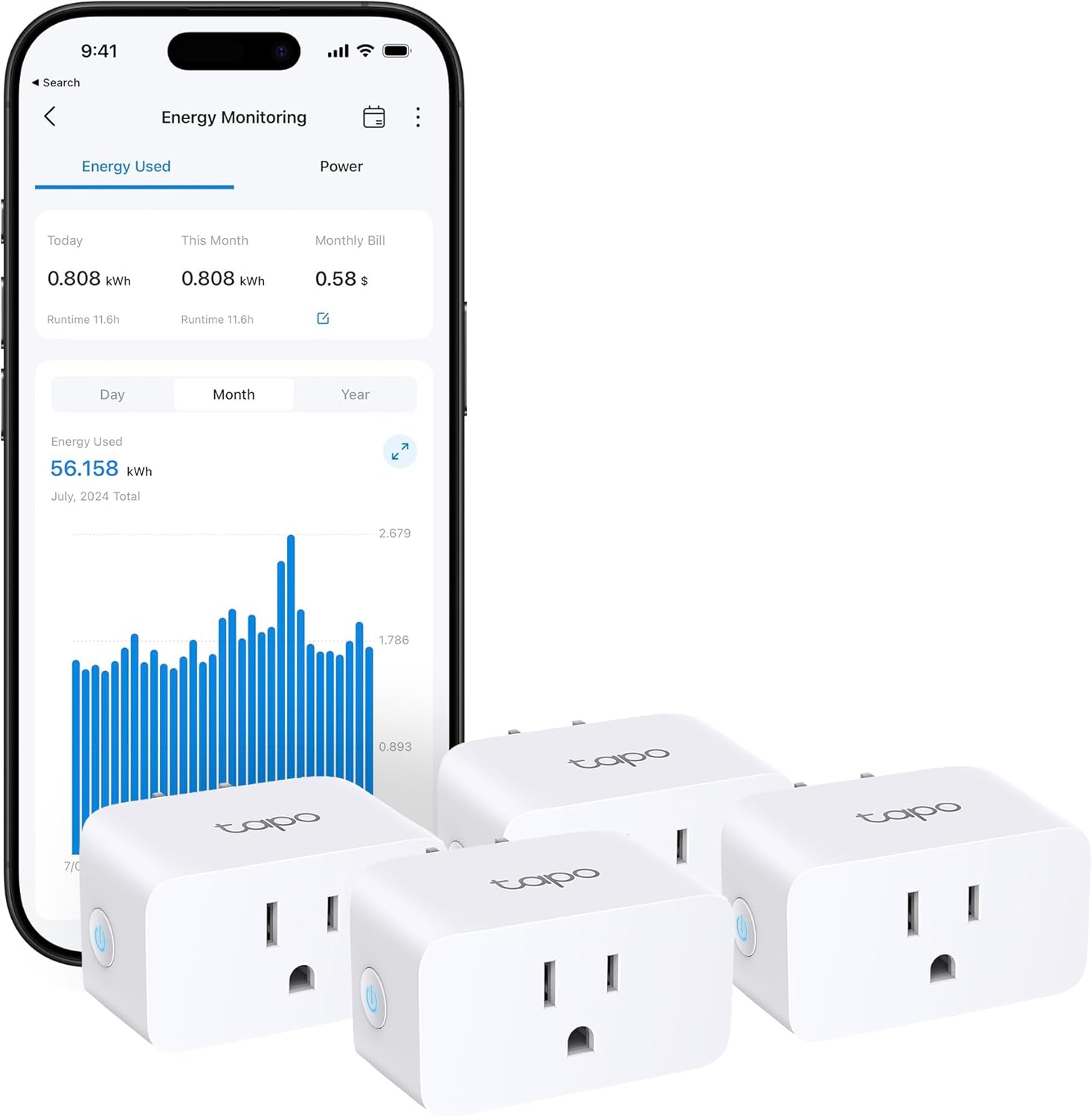
An energy-monitoring smart plug lets you see exactly how much electricity a single appliance or device uses. It measures power in watts, tracks energy use over time in kilowatt-hours (kWh), and often shows an estimated cost based on the electricity rate you enter into the app. These plugs are useful for finding devices that draw power even when turned off (standby power), identifying energy hogs, and setting alerts when a device’s power draw changes unexpectedly. However, they have accuracy limits and strict safety rules: they must never be used with space heaters or any appliance that exceeds the plug’s rating, and large motor loads such as air conditioners need extra caution. This guide explains what the numbers mean, how to estimate your own electricity cost, and how these smart plugs compare to whole-home energy monitors.
Understanding Watts and Kilowatt-Hours
Watts measure the instantaneous rate of electrical consumption. If a lamp is rated at 60 watts, it uses 60 watts of power every moment it is on. Kilowatt-hours (kWh) measure the total energy consumed over time. One kilowatt-hour equals using 1,000 watts for one hour. So a 60-watt lamp running for 10 hours uses 600 watt-hours, or 0.6 kWh. Your electric bill charges you per kWh, so understanding this relationship helps you calculate what a device costs to run.
The basic formula is:
- Power (watts) × Time (hours) ÷ 1,000 = Energy (kWh)
- Energy (kWh) × Your electricity rate (per kWh) = Estimated cost
An energy-monitoring smart plug does the first step for you: it reports real-time watts and cumulative kWh. You provide the electricity rate in the app’s settings, and it shows the running cost. Because rates vary by region and change over time, apply your own rate to the kWh reading.
What Energy-Monitoring Smart Plugs Can Do
These plugs fit between a standard outlet and the appliance you want to track. They connect to your home Wi‑Fi and report data to a smartphone app. Common features include:
- Real‑time wattage display – See how much power a device draws right now.
- Cumulative kWh tracking – View total energy used over a day, week, or month.
- Standby power detection – Many devices use power even when “off” (e.g., televisions, game consoles, chargers). The plug shows this “vampire” draw so you can decide to unplug or use a switched power strip.
- Alerts and schedules – Set notifications if power suddenly rises or falls. For example, an alert can tell you if a freezer’s compressor stops working. You can also turn the outlet on or off on a timer or based on energy thresholds.
- Cost estimation – After you enter your local electricity rate into the app, the plug displays an approximate running cost for each device.
Many plugs also work with voice assistants for on/off control, and newer models support Matter or Thread for local control without cloud dependence. Check the product packaging or manufacturer’s page for specific compatibility.
Accuracy Limits and Important Cautions
Energy-monitoring smart plugs use small internal sensors to measure current and voltage. Manufacturers often state an accuracy figure for ideal conditions. In real use, accuracy can be affected by several factors:
- Power factor – Devices with motors or switching power supplies (like refrigerators, computers, LED bulbs) have a power factor less than 1. Simple energy plugs may measure apparent power (volt-amps) instead of real power (watts), leading to errors. Higher‑quality plugs attempt to compensate, but you should not rely on a smart plug for utility‑grade billing accuracy.
- Very low loads – Very small standby loads may be below the plug’s measurement range. The plug may read zero or a fixed low value.
- High loads near the rating – Accuracy may degrade when a device draws power close to the plug’s maximum (typically 15 amps, or 1,800 watts in the US). Always leave a safety margin.
Safety warnings you must follow:
- Never plug a space heater, portable air conditioner, microwave, hair dryer, or any appliance rated above the plug’s current or wattage limit. The plug can overheat and cause a fire.
- Check the plug’s label for its amp and watt rating. Many US plugs are rated for 15A (1,800W maximum), but some are lower, and continuous loads should stay well below the maximum.
- Do not plug a smart plug into a power strip or extension cord unless the manufacturer explicitly allows it. The combined load can exceed the plug’s capacity.
- Use only indoors and in dry locations unless the product is rated for outdoor use.
When in doubt, consult the manufacturer’s instructions. If you need to monitor a large appliance like a water heater or electric dryer, consider a whole-home monitor instead (see comparison below).
Calculating Estimated Cost with Your Electricity Rate
To estimate how much a device costs to run, use the energy reading from the smart plug. Here is the process:
- Look at the plug’s report: the device used 1.5 kWh over a 24-hour period.
- Check your latest electricity bill for the rate you pay per kWh. Rates are often listed as “energy charge” and may include delivery fees. For a rough estimate, use the total bill amount divided by total kWh used.
- Multiply the kWh used by your rate. For instance, if the device used 1.5 kWh in a day, multiply 1.5 by your rate per kWh to get the daily cost.
- Extrapolate to a monthly or yearly cost by multiplying by the number of days.
Most smart plug apps automate this calculation once you enter your rate. You can then compare, for example, what a dehumidifier costs to run against a fan, or how much your home office equipment costs while you are away.
Whole-Home Monitors vs. Smart Plugs
Whole-home monitors (often installed inside the electrical panel) measure the total electricity consumption of the entire house, and sometimes circuit by circuit. Here is a comparison to help you decide which approach fits your needs.
| Feature | Smart Plug | Whole-Home Monitor |
|---|---|---|
| Installation | No wiring needed; just plug into outlet. | Professional installation usually required; sensors clamp around main wires or individual circuit breakers. |
| What it measures | Only the device plugged into it. | Total house usage, and often per-circuit data for selected breakers. |
| Cost tracking | Shows per-device cost after you enter rate. | Shows whole-house cost and can isolate circuit costs. |
| Accuracy | Good for individual devices, but may be affected by power factor. | Generally higher accuracy for total usage; circuit-level accuracy varies. |
| What it cannot monitor | Hardwired appliances (water heater, furnace, range) unless you use a special smart switch. | Individual outlets or lamp loads unless an inline sensor is used. |
| Safety | Must never be used with high-power appliances (space heaters, ACs). | Safe when installed correctly by a licensed electrician. No load limitations on the sensor. |
When a Smart Plug Is the Better Choice
- You want to check the energy use of a few specific items like a refrigerator, TV, gaming console, or home office setup.
- You are hunting for standby power drains and want to measure individual devices.
- You want to set simple on/off schedules or power alerts for a single appliance (e.g., turn off a coffee maker after hours of inactivity).
- You want a low‑cost, easy‑to‑install option that does not require opening your electrical panel.
Smart plugs are ideal for portable, plug‑in devices. Read more about energy-monitoring smart plugs for detailed setup tips.
When a Whole-Home Monitor Is the Better Choice
- You want to track your entire home’s energy usage over time and see trends on a single dashboard.
- You have solar panels and need to see net usage or production.
- You want to monitor hardwired appliances like the water heater, well pump, or HVAC system.
- You are comfortable hiring an electrician for installation, or you have experience working with electrical panels (and follow all safety precautions).
A whole-home monitor gives a broader view but cannot easily break down individual plug loads. For many people, a combination works best: a whole‑home monitor for overall picture and a few smart plugs for specific devices. Our whole-home energy monitor guide covers installation and features in detail.
Setting Up and Using Your Energy-Monitoring Plug
- Check the plug’s rating – Confirm it can handle the device you plan to monitor. Most standard plugs are rated for 15A (1,800W). Do not exceed.
- Plug it in – Insert the smart plug into an outlet. Some plugs are large and may block adjacent outlets; consider a spacing adapter.
- Connect to your app – Follow the manufacturer’s instructions to pair via Wi‑Fi, Thread, or Bluetooth. The app will guide you through naming the plug (e.g., “Living Room TV”).
- Enter your electricity rate – Find the rate on your utility bill. Enter it into the app’s settings so the plug can estimate cost.
- Set alerts if desired – For appliances like a freezer or refrigerator, set a power-range alert so you are notified if consumption drops (indicating a failure).
- Review data periodically – Check daily or weekly reports to spot unusual usage. If a device draws more than expected, it may be malfunctioning or nearing end of life.
Keep the plug connected to your home network; if the Wi‑Fi goes down, the plug usually retains on/off state but may stop reporting data until it reconnects.
FAQ
How accurate are energy-monitoring smart plugs?
Manufacturers often state an accuracy figure for ideal conditions. Real-world accuracy depends on the power factor of the device and whether the plug measures true power (watts) or apparent power (volt-amps). For ordinary household electronics (LED bulbs, chargers, computers), you can expect reasonable estimates. For motors or high-end audio equipment, errors may be larger. These plugs are not certified utility meters, so use them for relative comparisons and rough cost estimations.
Can I use an energy-monitoring smart plug with a space heater?
No. Space heaters often draw 1,500 watts or more, which is very close to the typical 1,800 watt limit of a 15-amp smart plug. Continuous high load can overheat the plug and cause a fire. Additionally, many space heaters require a direct wall outlet with no adapter or extension. Never use an energy-monitoring smart plug with a space heater, air conditioner, microwave, or other high-wattage appliance.
Will it work with window air conditioners?
Only if the plug’s label and manual allow that kind of load. Window air conditioners have compressor startup surges, so compare the AC nameplate with the plug’s maximum and any motor-load rating, and leave a margin; if in doubt, do not use one. In addition, many window units have a grounded plug that may not fit some smart plugs. Always check the plug’s maximum wattage and the appliance’s label. For monitoring large appliances, consider a whole-home monitor or a dedicated smart switch rated for higher loads.
Can I calculate energy cost without a smart plug?
Yes. You can use a plug-in power meter that shows watts and kWh on a small display. It works the same way but does not connect to your phone or offer alerts. A smart plug adds convenience through remote monitoring, history logs, and integration with other smart home automation. Both types use the same formula to estimate cost.
Do energy-monitoring smart plugs work with Matter or Thread?
Some newer models support the Matter standard and Thread protocol. This allows the plug to work locally with your smart home app without relying on the manufacturer’s cloud. Compatibility depends on the specific product and firmware. Look for “Works with Matter” or “Thread” on the packaging. Even without Matter, most energy-monitoring plugs use Wi‑Fi and work with major voice assistants.
Energy-monitoring smart plugs give you a simple, affordable way to understand your household’s electricity use one device at a time. By knowing the difference between watts and kWh, respecting the plug’s safety limits, and using the data to identify energy hogs or standby waste, you can make smarter decisions about which devices to run and when. For a more complete picture of your home’s energy, consider pairing a few smart plugs with a whole-home monitor. Always follow manufacturer instructions and never exceed the plug’s rated load. For more ideas on managing home energy, explore the smart home energy section.
About Colin Foster
Colin Foster is part of our editorial team and reviews and edits our smart home guides, checking product details against manufacturer specifications and owner feedback.