By Claire Whitaker
Updated November 2026
Shoppers searching for the honeywell thx321wfs2001w t10 pro smart thermostat with redlink usually want to know one thing: which model in the T10 family fits their wiring, their HVAC equipment, and their comfort goals. This list compares seven Honeywell smart thermostats that share the T10 and RedLINK lineage, so you can match the right model to your home. Selection criteria were wiring requirements, sensor options, compatibility with RedLINK-equipped systems, touchscreen and control features, and patterns that owners frequently mention in their feedback.
Our top picks at a glance
- 1
 TOP CHOICEBest overallTHX321WF3003W/U – T10+ Pro Smart with RedLINK 3.0 Thermostat No SensorView on Amazon
- 2
 TOP CHOICEBest for whole-home comfortHoneywell YTHM1004R3000 T10+ Thermostat Kit with SensorView on Amazon
- 3
 TOP CHOICEBest for premium featuresHoneywell Home X8S Premium Smart Wi-Fi Thermostat with Sensor, WhiteView on Amazon
- 4
 Best for heat pump systemsHoneywell TH6220WF2006/U Lyric T6 Pro Wi-Fi Programmable ThermostatView on Amazon
- 5
 Best for multistage systemsHoneywell TH8321WF1001 Touchscreen Thermostat Wifi Vision Pro 8000View on Amazon
- 6
 Best for large touchscreenHoneywell Home THX1200W5/U ElitePro S1200 Smart ThermostatView on Amazon
- 7
 Best budget pickHoneywell Home T5 Smart Wi-Fi Thermostat | RTH8800WF2022View on Amazon
Our Top Picks
Quick Comparison
| Product | Best for | Key feature |
|---|---|---|
| THX321WF3003W/U – T10+ Pro Smart with RedLINK 3.0 Thermostat No Sensor | Most homes with a compatible RedLINK system | RedLINK 3.0 connectivity without a remote sensor |
| Honeywell YTHM1004R3000 T10+ Thermostat Kit with Sensor | Homes with uneven temperatures between rooms | Included remote sensor for room-based control |
| Honeywell Home X8S Premium Smart Wi-Fi Thermostat with Sensor, White | Buyers who want more advanced controls | Premium Wi-Fi interface with sensor support |
| Honeywell TH6220WF2006/U Lyric T6 Pro Wi-Fi Programmable Thermostat | Heat pump and conventional systems | Stage support up to 2 heat and 1 or 2 cool |
| Honeywell TH8321WF1001 Touchscreen Thermostat Wifi Vision Pro 8000 | Multistage heating and cooling | Stages up to 3 heat and 2 cool |
| Honeywell Home THX1200W5/U ElitePro S1200 Smart Thermostat | Users who prefer a large display | 5-inch touchscreen |
| Honeywell Home T5 Smart Wi-Fi Thermostat | RTH8800WF2022 | Shoppers wanting a straightforward smart schedule | 7-day programmable touchscreen with geofencing |
THX321WF3003W/U – T10+ Pro Smart with RedLINK 3.0 Thermostat No Sensor
THX321WF3003W/U – T10+ Pro Smart with RedLINK邃「 3.0 Thermostat No Sensor
Best for: Most homes with a compatible RedLINK system
This is a good match for homeowners who want RedLINK connectivity and a clean, single-thermostat setup without buying a separate remote sensor. It suits households where one central reading is acceptable for comfort.
Key specs
- RedLINK 3.0 wireless communication
- Wi-Fi smart control through the Honeywell Home app
- Designed for compatible heating and cooling equipment
Pros
- Works without a remote sensor, keeping the setup simpler
- Strong fit for RedLINK-equipped systems
- Familiar Honeywell app and scheduling controls
Cons
- Temperature reading comes from one location, which may not suit larger homes
- Owners with non-RedLINK equipment will need a different model
Bottom line: A strong first choice for buyers who want RedLINK compatibility and a simple, sensor-free installation.
View on AmazonHoneywell YTHM1004R3000 T10+ Thermostat Kit with Sensor
Honeywell YTHM1004R3000 T10+ Thermostat Kit with Sensor
Best for: Homes with uneven temperatures between rooms
This kit adds a remote sensor to the T10+ platform, letting the thermostat weigh temperature readings from a second location. It fits homes where a bedroom or upstairs area runs warmer or cooler than the thermostat wall.
Key specs
- Includes a remote sensor for room-based temperature readings
- T10+ Pro series platform with RedLINK connectivity
Pros
- Sensor helps address hot and cold spots
- Kit format means sensor and thermostat are matched
- Useful for multi-room comfort control
Cons
- Sensor placement takes planning, and poor placement reduces benefit
- Needs a compatible system to deliver full RedLINK function
Bottom line: The better choice when one room consistently feels off, and you want the sensor included from the start.
View on AmazonHoneywell Home X8S Premium Smart Wi-Fi Thermostat with Sensor, White
Honeywell Home X8S Premium Smart Wi-Fi Thermostat with Sensor, White
Best for: Buyers who want more advanced controls
The X8S is aimed at users who want a feature-rich Wi-Fi thermostat with sensor support and a premium interface. It suits households that plan to use detailed scheduling and app-based monitoring.
Key specs
- Wi-Fi smart control with app access
- Remote sensor support
- White finish
Pros
- Premium control features for detailed comfort management
- Sensor support improves room-level readings
- Clean, modern look
Cons
- Feature set may be more than casual users need
- Confirm wiring and system compatibility before purchase
Bottom line: A good pick for tech-focused households that want premium controls and sensor-based comfort.
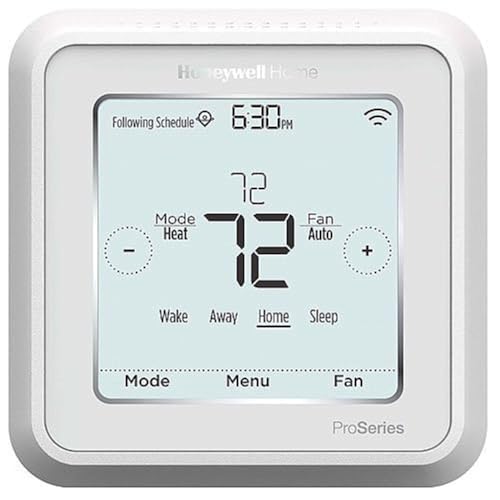
View on AmazonHoneywell TH6220WF2006/U Lyric T6 Pro Wi-Fi Programmable Thermostat
Honeywell TH6220WF2006/U Lyric T6 Pro Wi-Fi Programmable Thermostat with Stages Up to 2 Heat/1 Cool Heat Pump or 2 Heat/2 Cool Conventional
Best for: Heat pump and conventional systems
This Lyric T6 Pro model is a dependable option for homes with heat pumps or conventional equipment that uses multiple stages. It is a practical choice for owners who want programmable Wi-Fi control without extra complexity.
Key specs
- Supports up to 2 heat stages and 1 or 2 cool stages, per the listing
- Wi-Fi programmable operation
Pros
- Stage support covers many common setups
- Programmable schedules for routine temperature control
- Well-known Honeywell Lyric platform
Cons
- Not designed for the largest multistage systems
- Advanced sensor features are not the focus
Bottom line: A solid pick for heat pump homes that need dependable Wi-Fi scheduling at a moderate feature level.
View on AmazonHoneywell TH8321WF1001 Touchscreen Thermostat Wifi Vision Pro 8000
Honeywell TH8321WF1001 Touchscreen Thermostat Wifi Vision Pro 8000 with Stages upto 3 Heat / 2 Cool
Best for: Multistage heating and cooling
The Vision Pro 8000 is built for systems with more stages than a basic thermostat handles. It suits larger or more demanding HVAC setups where staged control matters.
Key specs
- Supports up to 3 heat stages and 2 cool stages, per the listing
- Touchscreen interface with Wi-Fi control
Pros
- Handles more stages than most residential thermostats
- Touchscreen makes manual adjustment straightforward
- Wi-Fi access for remote changes
Cons
- Overkill for simple two-stage systems
- Older model naming can make matching firmware and accessories confusing
Bottom line: The right choice when your equipment has three heat stages or two cool stages.
View on AmazonHoneywell Home THX1200W5/U ElitePro S1200 Smart Thermostat
Honeywell Home THX1200W5/U ElitePro S1200 Smart Thermostat, 5" Touchscreen, White
Best for: Users who prefer a large display
The ElitePro S1200 uses a 5-inch touchscreen, which many owners find easier to read than smaller displays, especially for older family members. It suits homes where the thermostat is a daily-use focal point.
Key specs
- 5-inch touchscreen display
- Smart Wi-Fi control
- White finish
Pros
- Large display improves readability
- Smart control from a phone or tablet
- Clean design for visible wall placement
Cons
- Larger footprint than compact thermostats
- Verify C-wire availability and HVAC compatibility before buying
Bottom line: Best for households that want an easy-to-read, prominent thermostat.
View on AmazonHoneywell Home T5 Smart Wi-Fi Thermostat | RTH8800WF2022
Honeywell Home T5 Smart Wi-Fi Thermostat | RTH8800WF2022, 7 Day-Programmable Touchscreen, Alexa Ready, Geofencing Technology, Energy Star, C-Wire Required
Best for: Shoppers wanting a straightforward smart schedule
The T5 is a streamlined option for buyers who want 7-day programmable scheduling, geofencing, and voice assistant readiness without extra features. It suits first-time smart thermostat owners.
Key specs
- 7-day programmable touchscreen
- Geofencing technology
- Alexa ready
- Energy Star certified, per the listing
- C-wire required
Pros
- Simple scheduling with geofencing for away-mode changes
- Voice assistant compatibility
- Straightforward setup for basic needs
Cons
- C-wire requirement can block installation in older homes
- Fewer advanced features than premium models
Bottom line: A sensible budget pick for buyers who want core smart features and a manageable setup.
View on AmazonBuying Guide
Wiring and C-wire requirements
Before choosing any model, confirm whether your system has a C-wire. Many smart thermostats need one for continuous power. Check your existing thermostat cable: a common wire labeled C, or a spare conductor, indicates one is present. If it is missing, look for a model with a built-in power solution or consider an adapter.
Good picks for this: Honeywell Home T5 Smart Wi-Fi Thermostat | RTH8800WF2022, THX321WF3003W/U – T10+ Pro Smart with RedLINK 3.0 Thermostat No Sensor
RedLINK compatibility
RedLINK is the wireless protocol that lets Honeywell thermostats communicate with compatible equipment and accessories. Confirm that your furnace, air handler, or heat pump supports it before buying. A RedLINK-equipped system generally gives you the most complete feature set.
Good picks for this: THX321WF3003W/U – T10+ Pro Smart with RedLINK 3.0 Thermostat No Sensor, Honeywell YTHM1004R3000 T10+ Thermostat Kit with Sensor
Number of heating and cooling stages
Stages determine how finely the system can adjust output. A single-stage system runs at full capacity or not at all, while multistage equipment can ramp up gradually. Look at your equipment label or manual for stage counts, and match the thermostat to that number.
Good picks for this: Honeywell TH8321WF1001 Touchscreen Thermostat Wifi Vision Pro 8000, Honeywell TH6220WF2006/U Lyric T6 Pro Wi-Fi Programmable Thermostat
Remote sensors and room coverage
A thermostat measures temperature at one spot. If that spot is not representative of the rest of the home, a remote sensor can help. Place sensors away from windows, exterior doors, supply vents, and direct sunlight for the most useful readings.
Good picks for this: Honeywell YTHM1004R3000 T10+ Thermostat Kit with Sensor, Honeywell Home X8S Premium Smart Wi-Fi Thermostat with Sensor, White
Display size and usability
Screen size affects readability from across a room. A 5-inch display is easier to read at a glance than a compact screen, which may matter for older users or households that adjust settings frequently. Consider where the thermostat will sit and how often it will be used by hand.
Good picks for this: Honeywell Home THX1200W5/U ElitePro S1200 Smart Thermostat
Voice assistant and app integration
If you plan to control the thermostat with a voice assistant, confirm the model lists compatibility with your platform. Owners commonly report that app-based control and geofencing work best when the thermostat is on a stable Wi-Fi connection and the Honeywell Home app has permission to use location services.
Good picks for this: Honeywell Home T5 Smart Wi-Fi Thermostat | RTH8800WF2022, Honeywell Home X8S Premium Smart Wi-Fi Thermostat with Sensor, White
Installation and care
Turn off power at the breaker before removing an old thermostat, and label wires before disconnecting them. Keep firmware updated through the app to maintain compatibility. Clean the display gently with a dry or lightly dampened cloth, and avoid harsh chemicals. If wiring feels unclear, consult a licensed HVAC technician.
Good picks for this: THX321WF3003W/U – T10+ Pro Smart with RedLINK 3.0 Thermostat No Sensor, Honeywell TH6220WF2006/U Lyric T6 Pro Wi-Fi Programmable Thermostat
FAQ
Is the honeywell thx321wfs2001w t10 pro smart thermostat with redlink the same as the models on this list?
The model number you searched may be closely related to the T10 Pro family, but listings can vary in naming and packaging. Compare the model number printed on the box and the product listing before purchasing, and confirm RedLINK compatibility with your equipment.
Do I need a C-wire for these thermostats?
Many smart models, including the T5 listed here, require a C-wire. Some other models may work without one. Check the product specifications and your existing wiring before buying.
What is RedLINK?
RedLINK is Honeywell’s wireless communication protocol used between thermostats, certain equipment, and accessories. It is designed to let compatible components share information without relying on additional wiring.
Do I need a remote sensor?
Not always. If your home has consistent temperatures across rooms, a single thermostat reading may be sufficient. Homes with noticeable hot or cold spots often benefit from a sensor placed in the affected area.
Can I control these thermostats with Alexa or Google Assistant?
Many Honeywell smart thermostats support voice assistant integration. Confirm the specific model lists compatibility with your platform, and link your account through the official app.
How many heating and cooling stages do I need?
Check your HVAC equipment label or manual. Match the thermostat’s stage support to your system, since a model with too few stages can limit performance and one with too many may add unnecessary features.
Can a homeowner install these thermostats?
Many homeowners complete installation with basic tools, but electrical work carries risk. If you are unsure about wiring, power, or system compatibility, consult a licensed HVAC professional.
Conclusion
For most readers searching for the honeywell thx321wfs2001w t10 pro smart thermostat with redlink, the THX321WF3003W/U with RedLINK 3.0 is the most direct starting point, especially in homes with compatible equipment. Households with room-to-room temperature differences should look at the YTHM1004R3000 kit with its included sensor. Owners of multistage systems will want the Vision Pro 8000 or the Lyric T6 Pro, depending on stage count. The T5 suits buyers seeking a simpler, budget-minded smart schedule. Verify wiring and equipment compatibility before buying, since that single check decides which model will work in your home.
Sources
- Guidance on programmable and smart thermostat settings and home heating and cooling efficiency (energy.gov)
- Standards and technical resources on HVAC system design and controls (ashrae.org)
- Information on measurement standards and smart device interoperability research (nist.gov)
Before you buy: helpful guides
- Honeywell Smart Thermostat Wiring Diagram: Step-by-Step Guide (2026)
- Honeywell Smart Thermostat Wiring: A Step-by-Step Guide for Beginners
- Honeywell WiFi Smart Thermostat Wiring Diagram: Step-by-Step Guide (2026)
- Honeywell Home Smart Thermostat Manual: A Practical Guide (2026)
- T6 Pro Smart Wi-fi Programmable Thermostat 2h/2c Th6220wf2006: A Practical Guide (2026)
About Claire Whitaker
Claire Whitaker is part of our editorial team and reviews and edits our smart home guides, checking product details against manufacturer specifications and owner feedback.