By Claire Whitaker
Updated November 2026
Choosing a smart plug for lamp use comes down to a few practical questions: will it work with the voice assistant you already own, does it handle the wattage of your lamp, and is it simple enough to set up without a hub? We compared three widely available models on compatibility, listed specifications, setup requirements, and patterns that owners frequently mention in their feedback. Every pick here is a plug that turns a plain floor or table lamp into something you can schedule and control from an app or voice command.
Our top picks at a glance
- 1
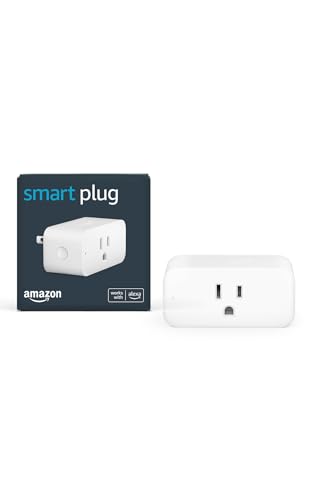 TOP CHOICEBest overallAmazon Smart Plug, Works with Alexa, Simple Setup, Endless PossibilitiesView on Amazon
- 2
 Best for multi-room setupsKasa Smart Plug Ultra Mini 15A, EP10P2, Smart Home Wi-Fi Outlet, 2-Pack, WhiteView on Amazon
- 3
 Best budget pickKasa Smart Plug HS103P4, Smart Wi-Fi Outlet, Touch Actuator, 4-Pack, WhiteView on Amazon
Our Top Picks
| Product | Best for | Key feature |
|---|---|---|
| Amazon Smart Plug | Alexa households wanting simple setup | Native Alexa integration with straightforward pairing |
| Kasa Smart Plug Ultra Mini 15A, EP10P2 | Compact placement and multi-plug use | Ultra-mini footprint that leaves neighboring outlets usable |
| Kasa Smart Plug HS103P4 | Buyers who want several plugs at once | Four-pack with a touch actuator for manual control |
Amazon Smart Plug, Works with Alexa, Simple Setup, Endless Possibilities
Amazon Smart Plug, Works with Alexa, Simple Setup, Endless Possibilities
Best for: Alexa households that want the fastest path from unboxing to voice control.
This plug suits anyone whose lamp sits in a living room or bedroom and who already relies on Alexa for routines. Because it is built around Alexa, enrollment is typically handled inside the Alexa app, which keeps the process short. It is a good first smart plug for someone who does not want to manage a separate ecosystem.
Key specs:
- Works with Alexa for voice and routine control
- Wi-Fi connected, no hub required
- Designed for standard household lamp loads
Pros:
- Simple setup inside the Alexa app
- Works well with Alexa routines such as sunset and bedtime schedules
- Low-profile design for most wall outlets
Cons:
- Limited appeal if your home is built around Google Home or Apple Home
- Fewer advanced scheduling options than some competitors
Bottom line: The right choice for an Alexa-first home that wants one plug working quickly with minimal configuration.
View on AmazonKasa Smart Plug Ultra Mini 15A, EP10P2, Smart Home Wi-Fi Outlet, 2-Pack, White
Kasa Smart Plug Ultra Mini 15A, EP10P2, Smart Home Wi-Fi Outlet | Works with Alexa & Google Home, No Hub Required, UP Certified, 2.4GHz Wi-Fi Only, 2-Pack, White
Best for: Compact placement and multi-room setups that work with both Alexa and Google Home.
This two-pack suits people who want lamps in several rooms on schedules and do not want a hub. The ultra-mini body is useful behind a bedside table or in a tight corner where a bulkier plug would block the adjacent outlet. Its 2.4 GHz Wi-Fi requirement is worth knowing before purchase, since 5 GHz-only networks will not connect.
Key specs:
- 15 amp rating
- Works with Alexa and Google Home
- No hub required; connects over 2.4 GHz Wi-Fi only
- Two-pack
Pros:
- Compact body leaves the neighboring outlet free
- Supports both Alexa and Google Home voice control
- Two units make multi-room lamp scheduling affordable to start
Cons:
- Requires 2.4 GHz Wi-Fi, which can complicate setup on dual-band routers
- Not suited to very high-wattage loads beyond the rated 15 amps
Bottom line: A strong pick for households with multiple lamps and mixed voice assistants, provided the router offers a 2.4 GHz network.
View on AmazonKasa Smart Plug HS103P4, Smart Wi-Fi Outlet, Touch Actuator, 4-Pack, White
Kasa Smart Plug HS103P4, Smart Wi-Fi Outlet, Touch Actuator, Works with Alexa, Echo, Google Home, No Hub Required, 15 Amp, UL Certified, 4-Pack, White
Best for: Budget-minded buyers who want to equip several lamps at once.
This four-pack fits homes where lamps are spread across bedrooms, living areas, and a home office. The touch actuator gives you a manual on/off option, so the plug remains useful for guests who will not use an app or voice command. It is a practical choice when you want consistent coverage across the house without buying individually.
Key specs:
- 15 amp rating
- Works with Alexa, Echo, and Google Home
- No hub required
- Touch actuator for manual control
- Four-pack
Pros:
- Four units cover most of a typical home
- Touch control works without any app
- Works with major voice assistants
Cons:
- Bulkier than ultra-mini designs, which can crowd adjacent outlets
- Also depends on 2.4 GHz Wi-Fi for setup
Bottom line: The best value for a whole-home rollout, especially if guests or family members will sometimes need a physical switch.
View on AmazonBuying Guide
Wattage and Load Rating
Check the amperage printed on the plug and the wattage of your bulb. Most smart plugs in this category are rated around 15 amps, which translates to roughly 1,800 watts on a standard 120-volt US circuit. A typical LED or incandescent lamp draws far less, so load rating matters mainly for space heaters or high-draw equipment. Never plug a space heater into a smart plug unless the manufacturer explicitly lists heater use as supported.
Good picks for this: Amazon Smart Plug, Kasa Smart Plug HS103P4
Voice Assistant Compatibility
Confirm that the plug supports your assistant before buying. Alexa and Google Home have different routine systems, and some plugs integrate more smoothly with one than the other. If your household uses both, look for explicit support for each platform in the listing and the manufacturer’s documentation.
Good picks for this: Kasa Smart Plug Ultra Mini 15A, Kasa Smart Plug HS103P4
Wi-Fi Band Requirements
Many smart plugs connect only over 2.4 GHz. If your router broadcasts a single combined network name for both bands, the plug may fail to pair. Consult the router’s settings to create a separate 2.4 GHz network, or check whether your setup guide recommends a temporary configuration during pairing. For background on why many devices use this band, see Why Smart Devices Need 2.4 GHz Wi-Fi (and How to Connect Them).
Good picks for this: Kasa Smart Plug Ultra Mini 15A, Amazon Smart Plug
Physical Size and Outlet Clearance
Measure the space around the outlet before buying. Bulky plugs can cover the adjacent socket, which is a problem behind furniture or in a tight corner. Ultra-mini designs are better for crowded placements, while standard-size plugs are fine for open walls.
Good picks for this: Kasa Smart Plug Ultra Mini 15A, EP10P2
Manual Controls and Fallback Use
A physical button is useful when Wi-Fi drops, when visitors need to switch a lamp, or when a child or roommate does not use the app. Touch actuators and buttons provide this fallback. For a broader comparison of smart plug and switch types, see Smart Plug vs Smart Outlet vs Smart Switch.
Good picks for this: Kasa Smart Plug HS103P4
Setup Process and App Quality
Setup typically involves installing the manufacturer’s app, creating an account, and pairing the plug to your Wi-Fi network. Owners often report that setup takes a few minutes when the router is properly configured and longer when band steering or network naming causes conflicts. Read the setup section of Smart Plug Setup and Compatibility with Voice Assistants and Apps before you start.
Good picks for this: Amazon Smart Plug, Kasa Smart Plug Ultra Mini 15A
Scheduling and Automation Features
Check whether the plug supports timers, countdowns, and sunrise or sunset schedules. These matter most for lamps that should turn on before you arrive home or switch off automatically at night. Be realistic about what a plug can do: it switches power on and off, and it cannot dim a lamp unless the bulb itself supports dimming. For a clear explanation of limits, see What Smart Plugs Can (and Cannot) Do.
Good picks for this: Kasa Smart Plug HS103P4, Amazon Smart Plug
FAQ
Can a smart plug turn a regular lamp into a smart lamp?
Yes. A smart plug controls power to whatever is plugged into it, so a regular lamp can be scheduled and controlled by voice or app. It cannot change brightness or color unless you use a dimmable or color-capable bulb with its own controls. For a step-by-step approach, see How to Make a Regular Lamp Smart.
Do I need a hub for these smart plugs?
The three models covered here connect directly to Wi-Fi and do not require a separate hub, according to their listings. Confirm this in the product documentation before purchase, since some other smart plugs use Zigbee or Thread and need a bridge.
Will a smart plug work with a dimmer lamp?
Generally no. Most smart plugs are simple on/off devices and may not be compatible with dimmer switches or dimming lamps. If you need dimming, a smart bulb or a lamp designed for smart control is a better fit. For comparisons, see Smart Lamps: Built-In Smart Lights vs Smart Bulbs in Regular Lamps.
Why won’t my smart plug connect to Wi-Fi?
The most common cause reported by owners is a 5 GHz-only network or a combined band name that prevents the plug from finding the 2.4 GHz signal. Temporarily enable a separate 2.4 GHz network during setup, move the router closer to the plug, and confirm your password is entered correctly.
Is it safe to leave a lamp plugged into a smart plug all day?
Smart plugs are designed for continuous use within their rated load, but you should follow the manufacturer’s guidance and avoid overloading them. Do not use a smart plug with a space heater or other high-draw appliance unless the maker specifies that use. If you have concerns about electrical safety in your home, consult a licensed electrician.
Can I control a smart plug when I am away from home?
Yes, as long as the plug is connected to Wi-Fi and you have the manufacturer’s app installed with a remote connection enabled. Remote control depends on your home internet staying online, so a power or internet outage will interrupt access.
Which voice assistant works best with smart plugs?
Both Alexa and Google Home support the plugs in this guide. Alexa tends to offer the most direct setup for the Amazon model, while the Kasa units support both platforms. Choose based on which assistant you already use daily.
Conclusion
For most households looking for a smart plug for lamp use, the Amazon Smart Plug is a sensible starting point if Alexa is your main assistant and you want quick setup. The Kasa Smart Plug Ultra Mini 15A, EP10P2 suits compact spaces and mixed Alexa and Google Home setups, as long as your router provides 2.4 GHz Wi-Fi. The Kasa Smart Plug HS103P4 four-pack makes the most sense if you are equipping several lamps across the house and want a physical button as backup.
Sources
- Guidance on home energy use and efficient electrical loads (energy.gov)
- Electrical product safety recalls and home appliance safety tips (cpsc.gov)
- Fire prevention guidance for electrical equipment and extension use (nfpa.org)
About Claire Whitaker
Claire Whitaker is part of our editorial team and reviews and edits our smart home guides, checking product details against manufacturer specifications and owner feedback.