By Claire Whitaker
Updated November 2026
Choosing a wifi video intercom doorbell comes down to where it will be mounted, who will answer it, and whether you want a monitor indoors or just an app on your phone. This list compares six systems in that light. Our criteria were published specifications, brand reputation for firmware updates and support, common owner feedback about connection stability and night video, and how each model handles unlocking, recording and subscription needs. We did not test these products ourselves, so treat the picks as a research-based shortlist and confirm details against the current listing.
Our top picks at a glance
- 1
 TOP CHOICEBest overallAMOCAM 1080P Wireless WiFi Video Intercom Doorbell System, 7 Inch MonitorView on Amazon
- 2
 TOP CHOICEBest for access controlSmart WiFi Video Intercom & Doorbell Tuya Access Control Camera KeypadView on Amazon
- 3
 TOP CHOICEBest for wired installsANJIELO SMART Video Doorbell Intercom System, WiFi 1080P WiredView on Amazon
- 4
 Best for no subscriptionTKMARS Doorbell Camera Wireless with Monitor ScreenView on Amazon
- 5
 Best for larger householdsWireless Doorbell Camera with 7" Touchscreen MonitorView on Amazon
- 6
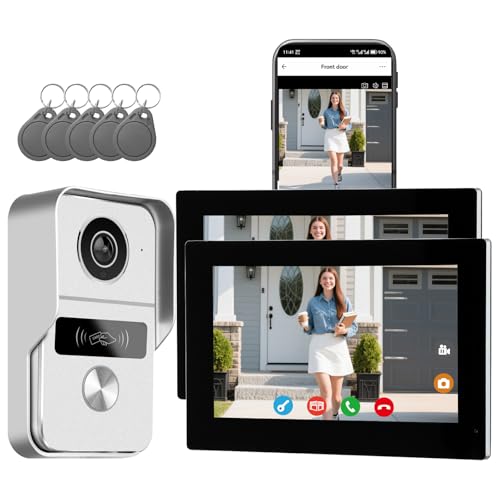 Best for apartments and officesWired Video Doorbell Apartment Intercom System, 1080P with Two MonitorsView on Amazon
Our Top Picks
Quick Comparison
| Product | Best for | Key feature |
|---|---|---|
| AMOCAM 1080P Wireless WiFi Video Intercom Doorbell System | Homes wanting an indoor monitor | 7-inch monitor with wireless link |
| Smart WiFi Video Intercom & Doorbell Tuya Access Control Camera Keypad | Access control and shared entries | Fingerprint, password, card and app unlock |
| ANJIELO SMART Video Doorbell Intercom System | Homes with existing doorbell wiring | Five unlock methods and motion detection |
| TKMARS Doorbell Camera Wireless with Monitor Screen | Users avoiding monthly fees | Local recording without subscription |
| Wireless Doorbell Camera with 7″ Touchscreen Monitor | Multi-level or larger households | Touchscreen monitor with 2-way audio |
| Wired Video Doorbell Apartment Intercom System | Apartments, villas and offices | Remote unlock with two monitors |
AMOCAM 1080P Wireless WiFi Video Intercom Doorbell System, 7 Inch Monitor
AMOCAM 1080P Wireless WiFi Video Intercom Doorbell System,7 Inch Monitor
Best for: Homes that want a dedicated indoor screen rather than relying only on a phone.
This system suits households where someone is often inside and wants to see and speak with visitors on a larger display. It is a good fit for single-family homes with a clear line of sight from the entry to the monitor location.
Key specs
- 1080P camera resolution, as stated in the listing
- 7-inch indoor monitor
- Wireless WiFi connection between camera and monitor
Pros
- Dedicated monitor means no phone is needed to answer the door
- Wireless setup avoids running new cable to the entry
- Clear 1080P picture for recognizing visitors
Cons
- Monitor placement depends on power outlet access
- Wireless range can vary with wall materials and distance
Bottom line: A strong choice for homeowners who want an indoor screen and a simple wireless install.
View on AmazonSmart WiFi Video Intercom & Doorbell Tuya Access Control Camera Keypad
Smart WiFi Video Intercom & Doorbell Tuya Access Control Camera Keypad | 1080P Night Vision Camera, Metal Access Contror System, Video Monitoring, Fingerprint/Password/Card/Tuya APP Remotely Unlock
Best for: Shared entries and properties where door access needs to be managed by more than one method.
This is aimed at users who want keypad, card, fingerprint and app-based entry combined with video. It fits small businesses, rental properties and homes with several regular users.
Key specs
- 1080P night vision camera, per the listing
- Fingerprint, password, card and Tuya app unlock, per the listing
- Video monitoring and remote unlock through the app
Pros
- Multiple unlock methods for different users
- Remote unlocking through a Tuya-compatible app
- Metal construction suits outdoor exposure
Cons
- Setup involves more steps than a basic doorbell
- Access control features require careful user management
Bottom line: Best for users who need access control and video in one unit, not just a doorbell view.
View on AmazonANJIELO SMART Video Doorbell Intercom System, WiFi 1080P Wired
ANJIELO SMART Video Doorbell Intercom System,WiFi 1080P Video Doorbell Camera Wired Video Doorbell,Video Intercom System,Motion Detection,5 in 1 Unlock
Best for: Homes with existing doorbell wiring that want a WiFi upgrade.
This model suits owners who already have low-voltage doorbell wiring and want video, motion detection and unlocking added. Confirm your existing transformer and wiring before purchase.
Key specs
- WiFi 1080P video, per the listing
- Motion detection
- Five-in-one unlock functions, per the listing
Pros
- Works with a wired installation for steady power
- Motion detection supports alerts
- Multiple unlock options
Cons
- Wired installs need basic electrical comfort or a pro
- Compatibility depends on your existing wiring and chime
Bottom line: A practical pick for owners upgrading from a traditional wired doorbell.
View on AmazonTKMARS Doorbell Camera Wireless with Monitor Screen
TKMARS Doorbell Camera Wireless No Subscription with Monitor Screen, Waterproof Video Intercom with Active Wake-Up, No WiFi Needed, 170° Angle, Local Recording for Home/Apartment/Seniors
Best for: Users who want to avoid monthly subscription fees and do not have a reliable WiFi signal at the door.
This is aimed at renters, seniors living alone and anyone wanting local recording. It is designed to work without a WiFi connection to the camera.
Key specs
- Wireless operation with indoor monitor, per the listing
- 170° viewing angle, per the listing
- Local recording, no subscription required per the listing
Pros
- No subscription needed for basic use
- Does not depend on WiFi at the door
- Wide viewing angle covers the approach
Cons
- Local recording means footage stays on the device
- Remote viewing features may be more limited than cloud systems
Bottom line: Best for buyers who prioritize no subscription and a monitor-based setup.
View on AmazonWireless Doorbell Camera with 7″ Touchscreen Monitor
Wireless Doorbell Camera with 7" Touchscreen Monitor, 1080P Video Door Phone Intercom System 2.4G/5G WiFi, PIR Motion Detection, Local Storage, No Monthly Fee, 2-Way Audio, Night Vision, App Control
Best for: Larger homes or multi-level households that need a touchscreen monitor and two-way talk.
This suits families who want to answer from a central screen and check motion events on a phone. It is a good match for homes where the entry is far from the main living area.
Key specs
- 7-inch touchscreen monitor, per the listing
- 1080P camera, per the listing
- PIR motion detection, 2.4G/5G WiFi, local storage, 2-way audio, per the listing
Pros
- Touchscreen monitor is easy to use
- Dual-band WiFi support per the listing
- Local storage with no monthly fee
Cons
- Monitor needs a power source
- App features depend on a stable home network
Bottom line: Suited to larger homes that want a central touchscreen and local storage.
View on AmazonWired Video Doorbell Apartment Intercom System, 1080P with Two Monitors
Wired Video Doorbell Apartment Intercom System, 1080P Doorbell Camera, 7-inch Touch Screen, Night Vision, Remote Unlock, Two-Way Intercom for Villa, Home, Office, with 1 Camera and 2 Monitors
Best for: Apartments, villas and offices where one entry serves several units or a reception point.
This is a multi-monitor intercom aimed at buildings where residents or staff need to answer from more than one location. It is built around a wired intercom layout rather than a single standalone doorbell.
Key specs
- 1080P doorbell camera, per the listing
- 7-inch touch screen monitors, per the listing
- Night vision, remote unlock and two-way intercom, per the listing
Pros
- Two monitors allow answering from separate rooms
- Suited to multi-unit and commercial settings
- Remote unlock per the listing
Cons
- Wired installation is more involved than battery models
- Overkill for a single-family front door
Bottom line: The right choice for multi-unit buildings or offices that need several answer points.
View on AmazonBuying Guide
Wired vs. wireless power
Wired systems draw steady power from your existing doorbell circuit and rarely need recharging. Wireless models run on batteries or a separate power supply and are easier to place where no wiring exists. Check whether your entry already has low-voltage wiring before deciding. Wired installs generally require basic electrical knowledge, and a licensed electrician is a sensible option if you are unsure.
Good picks for this: AMOCAM 1080P Wireless WiFi Video Intercom Doorbell System, Wired Video Doorbell Apartment Intercom System
Monitor type and placement
A dedicated indoor monitor lets you answer without a phone. Measure the distance from the entry to where the monitor will sit, and confirm an outlet is nearby. Consider sight lines, since a monitor placed in a hallway may be easier to check than one in a closed room.
Good picks for this: Wireless Doorbell Camera with 7″ Touchscreen Monitor, TKMARS Doorbell Camera Wireless with Monitor Screen
Subscription and local storage
Some systems rely on cloud subscriptions for recorded video, while others store footage locally. Read the listing carefully and confirm whether features like event history require a paid plan. Local storage keeps recordings on the device but means you need to manage the storage and access physically.
Good picks for this: TKMARS Doorbell Camera Wireless with Monitor Screen, Wireless Doorbell Camera with 7″ Touchscreen Monitor
WiFi strength and network requirements
Most WiFi video systems need a stable 2.4 GHz or dual-band connection at the door. Check your router’s signal at the entry using a phone’s signal bars. A weak signal can cause dropped video and missed alerts. Wireless range also depends on wall materials, so measure carefully.
Good picks for this: ANJIELO SMART Video Doorbell Intercom System, Smart WiFi Video Intercom & Doorbell Tuya Access Control Camera Keypad
Viewing angle and video resolution
A wider viewing angle covers more of the approach, which helps when packages or visitors stand to the side. Resolution such as 1080P improves facial recognition at close range. Check the specified field of view in the listing, and mount the camera at a height that avoids extreme overhead or ground-level angles.
Good picks for this: TKMARS Doorbell Camera Wireless with Monitor Screen, AMOCAM 1080P Wireless WiFi Video Intercom Doorbell System
Unlock and access control features
If you need to let people in remotely, look for systems that offer app-based or keypad unlocking. Keypad and card methods are useful for shared properties. Review how user codes are managed, and make sure the lock hardware is compatible with the unlock method the system uses.
Good picks for this: Smart WiFi Video Intercom & Doorbell Tuya Access Control Camera Keypad, Wired Video Doorbell Apartment Intercom System
Weather resistance and durability
Outdoor units face rain, dust and temperature swings. Look for a stated waterproof rating and a sturdy housing. Metal housings generally handle outdoor exposure better than thin plastic, though exact protection depends on the rating in the listing. Mount under a porch cover where possible to reduce direct weather exposure.
Good picks for this: Smart WiFi Video Intercom & Doorbell Tuya Access Control Camera Keypad, TKMARS Doorbell Camera Wireless with Monitor Screen
FAQ
What is a wifi video intercom doorbell?
It is a doorbell with a camera that streams video to a phone app, an indoor monitor, or both. Many models also offer two-way talk and some allow remote unlocking.
Do I need a subscription to use one?
Not always. Some systems offer local storage with no monthly fee, while others charge for cloud recording or extended event history. Check the listing before buying.
Can I use a wired system with my existing doorbell wiring?
Often yes, but it depends on your transformer voltage and chime compatibility. Confirm the wiring specifications and consult an electrician if you are unsure.
Does a wifi video intercom need a strong internet connection?
It needs a stable connection at the door location. Weak signals can cause dropped video and delayed alerts, so test your signal where the camera will be mounted.
Can I unlock the door remotely?
Some systems support remote unlocking through an app or keypad, but this depends on the lock hardware and the system’s features. Verify compatibility before relying on it for security.
Where should I mount the camera?
Mount it at a height that captures faces without excessive overhead or ground-level angles. Keep it out of direct sunlight where possible, since strong backlight can wash out video.
Is a monitor better than a phone app?
A monitor lets you answer without picking up your phone, which suits households with people inside most of the day. A phone app offers more flexibility when you are away.
Conclusion
For most homeowners, a monitor-based system such as the AMOCAM 1080P Wireless WiFi Video Intercom Doorbell System is a sensible starting point. Buyers who need access control should look at the Tuya-based keypad model, and those with existing wiring may prefer the ANJIELO system. If avoiding subscriptions matters most, the TKMARS model is worth comparing, and multi-unit buildings or offices should consider the wired apartment intercom. Confirm wiring, WiFi signal and unlock compatibility before you buy.
Sources
- Consumer safety guidance on home electrical products and recalls (cpsc.gov)
- Information on home electrical and energy-efficient device use (energy.gov)
- Safety certification standards for electrical and connected devices (ul.com)
Before you buy: helpful guides
Related reading
- Top 5 Ring Video Doorbell Change WiFi Options Compared (2026)
- Ring Battery Doorbell Plus Smart Wifi Video Doorbell (2026): Which Should You Choose?
- 5 Best Smart WiFi Video Doorbell Options for Every Home (2026)
About Claire Whitaker
Claire Whitaker is part of our editorial team and reviews and edits our smart home guides, checking product details against manufacturer specifications and owner feedback.