By Claire Whitaker
Updated November 2026
Shoppers searching for a wyze wireless video doorbell pro usually want one thing: a doorbell camera that installs without a complicated electrical job, records clear video of visitors and packages, and works with the phone and voice assistant already in the house. This guide narrows the Wyze lineup to five models that cover the main situations: a wireless setup with an included chime, a battery-powered camera for renters and doors without wiring, a dual-camera design for watching both people and porch packages, and a wired option for homes that already have doorbell wiring. Each pick was selected from manufacturer specifications, the brand’s reputation for app and firmware support, and recurring owner feedback about setup and video quality. We did not test these devices ourselves; the comparisons below are based on published specs and the patterns owners commonly report.
Our top picks at a glance
- 1
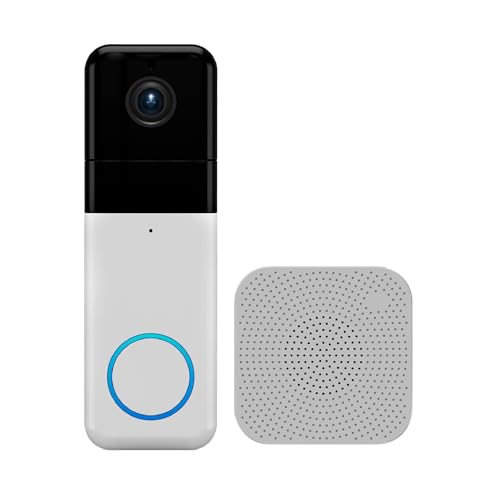 TOP CHOICEBest overallWyze Wireless Video Doorbell Pro with ChimeView on Amazon
- 2
 TOP CHOICEBest for battery installsWyze Battery Video Doorbell Wireless CameraView on Amazon
- 3
 TOP CHOICEBest for package monitoringWYZE Wireless Duo Cam Doorbell Camera (B0DCJB43TH)View on Amazon
- 4
 Best for existing wiringWYZE Wired Doorbell Camera v2View on Amazon
- 5
 Best for a second viewing angleWYZE Video Doorbell Wireless Duo Cam (B0FP2NV7PS)View on Amazon
Our Top Picks
| Product | Best for | Key feature |
|---|---|---|
| Wyze Wireless Video Doorbell Pro with Chime | Wireless installs with an indoor chime | 1440 HD video with 1:1 head-to-toe view |
| Wyze Battery Video Doorbell Wireless Camera | Renters and doors without wiring | Wire-free or wired option with color night vision |
| WYZE Wireless Duo Cam Doorbell Camera (B0DCJB43TH) | Watching people and packages separately | Dual cameras with 2K HD video |
| WYZE Wired Doorbell Camera v2 | Homes with existing doorbell wiring | 2K HD with works with Alexa and Google Assistant |
| WYZE Video Doorbell Wireless Duo Cam (B0FP2NV7PS) | Covering two angles on one battery doorbell | Dual cameras with color night vision |
Wyze Wireless Video Doorbell Pro with Chime
Wyze Wireless Video Doorbell Pro with Chime | 1440 Hd Video Quality; 1:1 Head To Toe View; Wireless Chime Included; Two-Way Audio
Best for: Wireless installs with an indoor chime
This is the most direct match for the wyze wireless video doorbell pro search. It suits people who want a doorbell that does not require running new wire to the door, and who would like a chime that plugs in indoors so guests are heard throughout the house.
Key specs
- 1440 HD video quality (per the listing)
- 1:1 head-to-toe view
- Wireless chime included
- Two-way audio
Pros
- Wireless chime means no electrician-level wiring at the chime location
- The 1:1 aspect ratio shows a visitor from head to toe, which helps with package drop-offs
- Two-way audio lets you answer visitors from your phone
Cons
- Owners often note that Wi-Fi signal at the door affects reliability, so check coverage first
- Cloud or local storage features may carry a subscription for full history
Bottom line: Pick this if you want the cleanest wireless setup with a chime included and do not want to touch existing doorbell wiring.
View on AmazonWyze Battery Video Doorbell Wireless Camera
Wyze Battery Video Doorbell Wireless Camera, 1536×1536 HD+ with Color Night Vision, 2-Way Audio, 1:1 Head-to-Toe View, Person/Vehicle/Package Monitor, Wire-Free/Wired Option, 1 Minute Easy Setup
Best for: Renters and doors without wiring
A good fit for renters, townhouses, or any entry where running cable is impractical. The listing describes both wire-free and wired options, so you can start on battery and switch later if the home is rewired.
Key specs
- 1536×1536 HD+ resolution (per the listing)
- Color night vision
- 2-way audio
- Person, vehicle and package monitoring
- Wire-free or wired option
Pros
- Installs without drilling into a wired circuit when run on battery
- Person, vehicle and package detection reduce notification noise
- Color night vision keeps faces visible after dark
Cons
- Battery models need periodic recharging, and cold weather shortens runtime
- Detection features and video history may require a paid plan
Bottom line: Choose this if you need a battery doorbell that still offers person and package alerts and a wired upgrade path.
View on AmazonWYZE Wireless Duo Cam Doorbell Camera (B0DCJB43TH)
WYZE Wireless Duo Cam Doorbell Camera Video Doorbell w Wi-Fi Chime, 2K HD | Battery Powered Smart Doorbell Camera With Dual Cameras For People & Package. Features 2-Way Audio And Color Night Vision
Best for: Watching people and packages separately
This model is aimed at households that want one camera on the visitor and another covering the porch floor or walkway. It works well for homes with packages left at a distance from the door.
Key specs
- 2K HD video
- Dual cameras for people and packages
- Wi-Fi chime
- 2-way audio and color night vision
Pros
- Two camera views reduce blind spots at the door
- Battery-powered, so wiring is optional
- Color night vision supports identification after dark
Cons
- Two lenses mean more positioning work during setup
- Battery life depends on how often motion and calls trigger recording
Bottom line: A strong choice for porches where packages sit away from the main door and you want both views in one app.
View on AmazonWYZE Wired Doorbell Camera v2
WYZE Wired Doorbell Camera v2(Existing Doorbell Wiring Required), 2K HD | Security Video Doorbell, Color Night Vision, 2-Way Audio, Package Monitor, Works with Alexa & Google Assistant
Best for: Homes with existing doorbell wiring
For homes that already have a mechanical or electronic doorbell wired to a transformer, this version offers continuous power and avoids recharging. It is the most practical pick if you want to keep the camera powered year-round.
Key specs
- 2K HD video
- Color night vision
- 2-way audio
- Package monitor
- Works with Alexa and Google Assistant
Pros
- Continuous wired power means no battery charging routine
- Voice assistant support fits existing Alexa or Google setups
- 2K resolution gives sharper detail than many battery models
Cons
- Requires existing doorbell wiring and a compatible transformer
- Installation is less forgiving for people who have never worked with low-voltage wiring
Bottom line: Pick this if your home is already wired for a doorbell and you want a permanent, always-on camera that works with your voice assistant.
View on AmazonWYZE Video Doorbell Wireless Duo Cam (B0FP2NV7PS)
WYZE Video Doorbell Wireless Duo Cam Doorbell Camera wWi-Fi Chime, 2K HD | Battery Powered Smart Doorbell Camera With Dual Cameras For People & Package. Features 2-Way Audio And Color Night Vision
Best for: Covering two angles on one battery doorbell
A dual-camera battery doorbell for people who want full porch coverage without running wire. It is a good match for corner entries or homes where the front step is hard to see from a single lens.
Key specs
- 2K HD video
- Dual cameras for people and packages
- Battery-powered
- 2-way audio and color night vision
Pros
- Two views cover corners and side walkways
- No wiring needed for basic installation
- Night vision in color helps with identification
Cons
- Battery charging adds upkeep compared with wired models
- Owners sometimes adjust both lenses several times to get the angles right
Bottom line: A good pick for a wire-free install that needs two views, especially at homes with a porch or side entry.
View on AmazonBuying Guide
Wired or battery power
Check the wiring at your door before you buy. If you have a working doorbell transformer, a wired model gives continuous power. If not, a battery model avoids electrical work. Battery units typically need a recharge every few weeks to months depending on how many events they record, and cold weather shortens runtime.
Good picks for this: WYZE Wired Doorbell Camera v2, Wyze Battery Video Doorbell Wireless Camera
Video resolution and field of view
Resolution matters less than the framing. A 1:1 or tall aspect ratio shows a visitor from head to toe and captures packages on the mat. Look for listings that state the resolution and the viewing angle, and confirm the camera covers the exact spot where visitors stand.
Good picks for this: Wyze Wireless Video Doorbell Pro with Chime, Wyze Battery Video Doorbell Wireless Camera
Single or dual cameras
A dual-camera design lets one lens watch the person at the door and another cover the porch or walkway. This helps if packages are left a few feet from the entry. Single-lens models are simpler to position and often cost less to maintain.
Good picks for this: WYZE Wireless Duo Cam Doorbell Camera (B0DCJB43TH), WYZE Video Doorbell Wireless Duo Cam (B0FP2NV7PS)
Chime compatibility
If you want an indoor chime, confirm whether the product includes one or requires an existing mechanical chime. A wireless chime avoids wiring inside the house. Existing chimes may not work with every wired model, so check the transformer voltage and chime type first.
Good picks for this: Wyze Wireless Video Doorbell Pro with Chime, WYZE Wired Doorbell Camera v2
Wi-Fi coverage at the door
A doorbell camera streams video over Wi-Fi, so signal strength at the front door matters. Stand at the door with your phone and check the Wi-Fi bars. If the signal is weak, consider a mesh node or extender before installing.
Good picks for this: Wyze Wireless Video Doorbell Pro with Chime, WYZE Wired Doorbell Camera v2
Smart assistant and app support
If your home runs on Alexa or Google Assistant, confirm that the doorbell supports the features you want, such as live view on a smart display. Check whether motion alerts and video history need a paid plan, since those costs add up over time.
Good picks for this: WYZE Wired Doorbell Camera v2, Wyze Battery Video Doorbell Wireless Camera
Weather and mounting
Look for an outdoor-rated housing and an included mount that fits your door frame or wall. Battery models should be mounted where they receive reasonable sun to support charging. Keep the camera out of direct rain runoff and away from heat sources that can affect night vision.
Good picks for this: Wyze Battery Video Doorbell Wireless Camera, WYZE Video Doorbell Wireless Duo Cam (B0FP2NV7PS)
FAQ
Do I need existing doorbell wiring to use a Wyze video doorbell?
No. Wireless and battery models run without any wiring at the door. Wired models such as the WYZE Wired Doorbell Camera v2 require an existing doorbell circuit and a compatible transformer. Check your wiring before buying a wired model.
How often do battery doorbell cameras need charging?
Charging frequency depends on how many motion events and calls the camera records. Owners often report recharging every few weeks in busy entries and far less often in quiet ones. Cold weather usually shortens runtime, so plan for more frequent charging in winter.
Can I use a wireless chime with a wired doorbell?
Some setups allow a wireless chime to pair with a wired camera, but compatibility varies by model. Check the product listing for chime support before buying, and confirm that your existing chime, if any, is compatible with the camera.
Does the doorbell work with Alexa or Google Assistant?
Several Wyze doorbell models list voice assistant support. The WYZE Wired Doorbell Camera v2 specifically states it works with Alexa and Google Assistant. Confirm the feature in the listing and in the Wyze app before you rely on it.
Is a dual-camera doorbell better than a single camera?
It depends on your entry. A dual setup helps when packages land away from the main door or when you want a wider view of the porch. A single camera is simpler to position and may be enough for a narrow entry.
Does a video doorbell need a subscription?
Basic live view and two-way audio are usually available without a plan, but advanced features such as extended video history may require a subscription. Read the product page and the app plan details before buying.
Conclusion
For most people looking at a wyze wireless video doorbell pro, the Wyze Wireless Video Doorbell Pro with Chime is the simplest starting point because it avoids wiring and includes an indoor chime. Renters and homes without doorbell wiring should look at the Wyze Battery Video Doorbell Wireless Camera. Households that want to watch packages and people from separate angles will find the dual-camera models useful, and homes with an existing doorbell circuit get the most reliable power from the WYZE Wired Doorbell Camera v2. Check your wiring, Wi-Fi coverage at the door, and whether you need voice assistant support before choosing.
Sources
- Guidance on home electrical systems and low-voltage wiring basics (energy.gov)
- Consumer safety information on electrical products and home devices (cpsc.gov)
- Standards and guidance on securing connected home devices (nist.gov)
Related reading
- Wyze Video Doorbell Wired: How to Wire It Up Step by Step (2026)
- Wyze Video Doorbell Installation: A Step-by-Step Guide for Beginners
- Swann Evo Wireless Video Doorbell (2026): Which Should You Choose?
- Ring Video Doorbell Pro Battery: Charging, Lifespan and Setup Tips (2026)
- Installing Video Doorbell Pro: A Step-by-Step Guide for Beginners
- 5 Best X Smart Home Wireless Video Doorbells for Home Security (2026)
- 4 Best Ways to Install Video Doorbell Pro Models (2026)
About Claire Whitaker
Claire Whitaker is part of our editorial team and reviews and edits our smart home guides, checking product details against manufacturer specifications and owner feedback.