
 By Claire Whitaker
Updated November 2026
Finding the best 5GHz smart plug starts with one question: will it actually connect to your network? Most smart plugs use 2.4GHz Wi-Fi, which is the band many home routers default to. Some newer models can also join 5GHz networks, which can help when your 2.4GHz band is crowded. The picks below are chosen by band support, voice assistant compatibility, energy monitoring and how easy each one is to set up with Alexa or Google Home.
Our top picks at a glance
- 1
 TOP CHOICEBest overallEIGHTREE 5GHz Smart Plug 15A WiFi Outlet Works with Alexa & Google, 4 PacksView on Amazon
- 2
 Best for energy trackingNOUS Wi-Fi Smart Plug 15A, Dual-Band 2.4GHz & 5GHz, Energy MonitoringView on Amazon
- 3
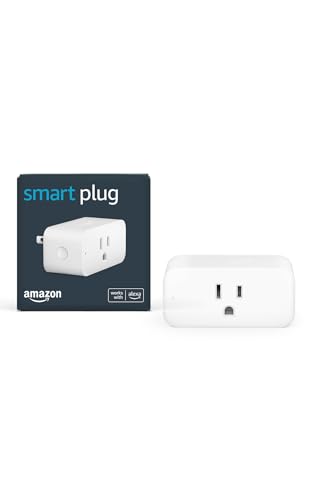 Best budget pickAmazon Smart PlugView on Amazon
Our Top Picks
Quick Comparison
| Product | Best for | Key feature |
|---|---|---|
| EIGHTREE 5GHz Smart Plug 15A | Multi-plug households | 5GHz Wi-Fi support in a multi-pack |
| NOUS Wi-Fi Smart Plug 15A | Monitoring appliance power use | Dual-band 2.4GHz and 5GHz with energy monitoring |
| Amazon Smart Plug | Simple Alexa setups | Straightforward voice control and setup |
EIGHTREE 5GHz Smart Plug 15A WiFi Outlet Works with Alexa & Google, 4 Packs
EIGHTREE 5GHz Smart Plug 15A WiFi Outlet Works with Alexa & Google, 4 Packs | Smart Home WiFi Plug with Remote Control & Group Control, Timer Outlet with Schedule, Dual-Band WiFi Outlet, No Hub Requir
Best for: Households that want several plugs at once.
This multi-pack suits homes with many lamps, fans or small appliances that need remote control. It is built around 5GHz Wi-Fi and works with both Alexa and Google Home.
Key specs
- 15A rated outlet
- 5GHz Wi-Fi connectivity
- Pack of 4 plugs
Pros
- Four plugs in one purchase
- Works with Alexa and Google
- Clear 5GHz support in the listing
Cons
- Requires a compatible 5GHz network
- Setup varies by router settings
Bottom line: A strong choice if you want to automate several outlets with one brand.
View on AmazonNOUS Wi-Fi Smart Plug 15A, Dual-Band 2.4GHz & 5GHz, Energy Monitoring
NOUS Wi-Fi Smart Plug 15A, Dual-Band 2.4GHz & 5GHz, Energy Monitoring, Compatible with Alexa, Google Home, Tuya App, Remote Control, Timer, Compact Design, Smart Outlet, 3 Pack
Best for: Tracking how much power a device uses.
This plug is aimed at people who want to see energy consumption alongside on/off control. Its dual-band support means it can connect on either frequency, which helps when one band is congested.
Key specs
- 15A rated outlet
- Dual-band 2.4GHz and 5GHz Wi-Fi
- Energy monitoring
Pros
- Dual-band connectivity
- Built-in energy monitoring
- Compatible with Alexa and Google Home
Cons
- Monitoring data depends on the app
- Single-plug purchase
Bottom line: Best for anyone who wants usage data along with remote switching.
View on AmazonAmazon Smart Plug
Amazon Smart Plug, Works with Alexa, Simple Setup, Endless Possibilities
Best for: Simple setups with Alexa.
This plug focuses on easy voice control and a quick setup process. It suits first-time smart home users who mainly want to switch lamps or fans with spoken commands.
Key specs
- Works with Alexa
- Simple app-free setup through Alexa
Pros
- Easy setup through Alexa
- Reliable voice control
- Low-commitment entry point
Cons
- Limited features compared with monitoring models
- Fewer advanced options
Bottom line: A practical pick if you mainly want voice-controlled on and off switching.
View on AmazonBuying Guide
Check Your Router’s Band Support
Many smart plugs only connect to 2.4GHz networks, so confirm which band your devices use before buying. Some routers combine both bands under one network name, which can cause setup confusion. Check your router’s settings or app to see whether 5GHz is enabled and whether you can separate the bands.
Good picks for this: EIGHTREE 5GHz Smart Plug 15A, NOUS Wi-Fi Smart Plug 15A
Voice Assistant Compatibility
Make sure the plug supports the assistant you already use, whether Alexa or Google Home. Compatibility is usually listed on the product page. Confirm it before purchase so you avoid a plug that works only through a separate app.
Good picks for this: Amazon Smart Plug, EIGHTREE 5GHz Smart Plug 15A
Energy Monitoring
If you want to track how much electricity an appliance uses, look for a plug with built-in monitoring. Basic plugs only switch power on and off. Monitoring models show usage in the app, which helps identify devices that run longer than expected.
Good picks for this: NOUS Wi-Fi Smart Plug 15A
Amperage Rating
Check the plug’s amperage rating against the appliance it will control. A 15A plug suits most lamps, fans and small appliances, but high-draw devices such as space heaters need more capacity or should not be plugged into a smart plug at all. Follow the manufacturer’s specifications.
Good picks for this: EIGHTREE 5GHz Smart Plug 15A, NOUS Wi-Fi Smart Plug 15A
Setup Simplicity
Plugs that pair through a voice assistant usually take less time than those that need a separate app. Consider how many plugs you plan to add, since setup effort multiplies across a larger network. Keeping everything within one ecosystem reduces friction.
Good picks for this: Amazon Smart Plug, EIGHTREE 5GHz Smart Plug 15A
FAQ
Do all smart plugs work on 5GHz Wi-Fi?
No. Many smart plugs only support 2.4GHz networks. Models that list dual-band or 5GHz support can connect on the newer band, but you should confirm compatibility in the product specifications before buying.
Can I use a smart plug without a hub?
Most Wi-Fi smart plugs connect directly to your router and do not need a separate hub. Check the listing to confirm, since some models rely on other protocols.
Why won’t my smart plug connect to my network?
Common causes include the plug trying to join a 5GHz-only network or a band it does not support. Try separating your router’s bands, then retry setup. Restarting the router and plug can also help.
Is a smart plug safe for high-power appliances?
Check the amperage rating and avoid plugging high-draw devices into smart plugs. For electrical safety questions, consult a licensed electrician.
Conclusion
For most homes, the EIGHTREE multi-pack offers the broadest coverage. If you want usage data, the NOUS plug is the better fit. For simple Alexa control, the Amazon Smart Plug keeps things easy. Match the choice to your router, your assistant and what you want to track.
Sources
- Information on wireless devices and spectrum use in the United States (fcc.gov)
- Guidance on home energy use and monitoring (energy.gov)
Before you buy: helpful guides
- Best Smart Plug for Apple Home: What to Look For and Which Models Work
- Best Smart Plug Alexa Picks: 6 Options That Work Well with Voice Control (2026)
- Best Google Home Smart Plug: 5 Factors That Matter Before You Buy (2026)
- iHome Control Smart Plug Setup: A Step-by-Step Guide (2026)
- 5 Gigahertz Smart Plug: Why It Won't Connect and How to Fix It
Related reading
- 5 Best Eightree 5ghz Smart Plug Options for Every Home (2026)
- Wirecutter Best Smart Plug: 5 Top Picks Compared (2026)
- Wemo WiFi Smart Plug Compared: 5 Best Picks for Every Need (2026)
About Claire Whitaker
Claire Whitaker is part of our editorial team and reviews and edits our smart home guides, checking product details against manufacturer specifications and owner feedback.




